
Booking rules: the settings that change how booking works
Flying day, multi-day trips, payment-method gate, cancel/edit lock, late-cancel fee, max upcoming bookings, max reservation length, minimum notice, booking horizon, start interval, fixed duration, buffers, and account-ledger book/dispatch gates. What each does and where it lives.
For owners and admins
Booking preferences under WebSettings → Booking preferences change how booking works for the whole school, including the flying day window, multi-day trips, and opt-in cancel/edit locks, late-cancel fees, booking caps, notice, horizon, start interval, fixed duration, and buffers. Currency checks at book are always on and live under Compliance, not in this opt-in section. Three more rules live elsewhere: the booking window on a membership plan, the overnight minimum in billing settings, and the school's time zone.
Where booking preferences live#
WebSettings → Booking preferences. Settings as a whole is admin only, so an owner or an admin can change these and nobody else can, including dispatchers.
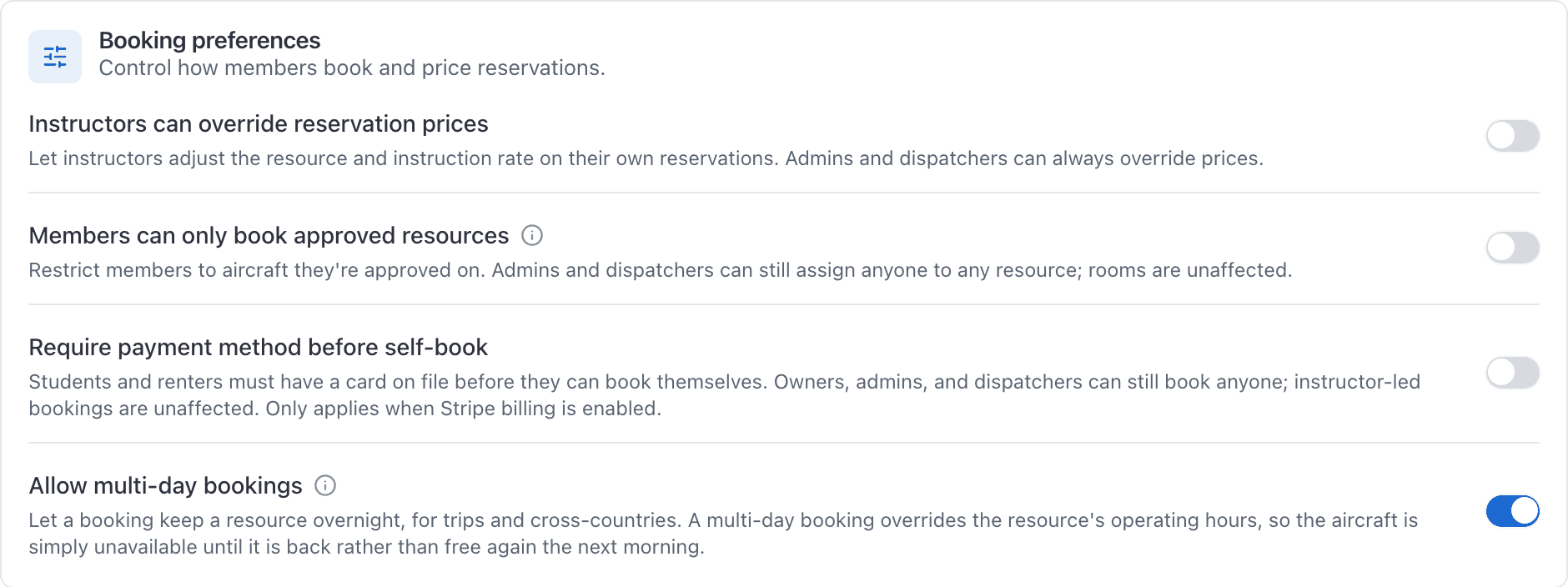
Payment-method and multi-day toggles are off by default. Flying day defaults to 6:00 AM to 10:00 PM until you change it.
Flying day#
The local hours when aircraft can be booked on a normal day (default 6:00 AM to 10:00 PM). Same-day bookings must start and finish inside this window. The calendar board uses the same frame. AerScheduler AI idle offers only look inside it too.
An individual aircraft can override the school hours on its edit screen (for example a night-capable tail that stays open later). Choose 24 hours when the school truly books around the clock.
Allow multi-day bookings#
Off, a booking has to start and end on the same local day, and anything that crosses local midnight is refused.
On, the booking form's date field becomes Out on and gains Back on and Back at, so a booking can keep the aircraft for a night or a week. A multi-day booking overrides the flying day hours: the aircraft is simply gone until it is back, rather than free again the next morning.
A flight that ends exactly at midnight is not a multi-day booking. 10pm to midnight is an ordinary evening flight. 10pm to 12:15am is a night away.
See Book a trip that keeps the aircraft overnight.
Require payment method before self-book#
On, a student or renter booking themselves must have a card saved before the booking is accepted. The refusal reads "Add a payment method before booking. Open Payment methods in your profile, then try again."
What it does not touch:
- owners, admins and dispatchers booking on somebody's behalf
- a booking where the person doing the booking is not sitting in the student or renter seat, for example an instructor booking a dual
Members can only book approved resources#
A check-out is an explicit approval linking one member to one tail, granted from Approve members on the aircraft or from Approved aircraft on the person's record. Students and renters both appear. People groups are not involved.
On, students and renters can book only the aircraft they are approved on. A renter with no approvals is told they are not checked out on any aircraft and asked to talk to the school.
Four groups are not checked, on purpose:
- Owners, admins and dispatchers. They can still assign anyone to any aircraft from the dispatch board, which is what you want when somebody is being checked out in the first place.
- Instructors. A CFI is not held to the approved list, so turning this on cannot ground your dual bookings.
- Guest flights, which have no member to check.
- Rooms. Nobody is checked out on a classroom.
A simulator is checked, the same as an aircraft. A device your school treats as a checkout item behaves like one.
The rule is enforced when the booking is saved, not by hiding tails in a picker. A student or renter is refused any aircraft or simulator they are not checked out on, whichever surface they book from and whatever kind of booking it is, and the refusal names the person and the tail: "Ana Ruiz is not approved to use N12345." Editing an existing booking is checked the same way, so a booking made on an approved tail cannot be edited onto an unapproved one afterwards.
With the setting off, nothing is blocked and every member sees the whole fleet. The approvals are still recorded, they simply do not gate anything.
Instructors can override reservation prices#
On, an instructor can adjust the resource rate and the instruction rate on a booking, using Override payment on the reservation panel in the console or Override Payment on the reservation screen in the app. The setting gates both identically.
Admins, owners and dispatchers can always override, whatever this is set to.
Booking windows on membership plans#
If your school runs membership plans, each plan can carry a Booking window: how many days ahead members on that tier may book. It is the classic club rule, where full members book the season and associates book inside the week.
Set it on the plan under WebSettings → Memberships. Two things to know before you do:
- It applies to every reservation type, so a club that sets "associates book seven days out" meaning aircraft has also limited their ground school and their simulator time.
- It applies even when staff book on that member's behalf, because the rule is about whose membership it is, not who typed it in.
The refusal names the plan and the numbers: "The Associate tier can book up to 7 days ahead. That booking is 12 days out."
A window only applies while the membership is active. A pending or lapsed membership has no window at all, so the restriction disappears rather than tightening.
The overnight minimum#
A floor on billable hours per night the aircraft is kept away. Set the school's figure under WebSettings → Billing, and override it for one aircraft on that aircraft's rates.
Without one, a member can keep an aeroplane all weekend, fly 1.5 hours, and owe you 1.5 hours. AerScheduler discloses the minimum on the booking form and again in the ramp in modal, before any invoice exists, in the form "This will bill 4.0 hours rather than the 1.5 flown."
A booking that comes back the same day is never affected.
Booking and cancellation rules#
All of these live under WebSettings → Booking preferences, in the Booking and cancellation rules section. Every one is off by default. Turn on only what your school needs.
They are shared calendar rules. The server checks them on every internal schedule booking: a member booking themselves and a front-desk booking on the dispatch board. There is no staff bypass. They are not waiting for a public embed; they already apply to the school schedule.
Cancel and edit lock#
When set (for example 24 hours), members cannot cancel or edit a booking once it starts inside that window. Front desk, instructors, and technicians can still change or cancel it.
Members who try see a clear message naming the hours and asking them to contact the front desk.
Late-cancel fee#
Optional, and only available when the cancel and edit lock is on and Stripe is connected. Inside the lock window, a member can still cancel if they agree to the fee. The fee is invoiced through Stripe before the booking comes off the board. Staff cancels never charge.
If Stripe cannot bill the member, the cancel is refused and the booking stays, so you never lose the slot without collecting the fee.
Max upcoming bookings#
Caps how many future (not yet ended, not cancelled) bookings a student or renter may hold at once. Maintenance is not counted. The refusal names the member and the limit.
A repeating series counts every date it would create. If the school limit is 20 and the member already holds 5 upcoming bookings, a repeat of 16 or more is refused before anything is booked. The booking form caps “After N bookings” at the school limit and blocks an end date that would clearly go over.
Max reservation length#
Caps how long a single booking may run. The refusal names both the school limit and the length they tried to book.
Minimum notice#
How far ahead a booking has to start. Times inside that window stop being offered in the picker, and the server refuses a start that is too soon. The refusal names the notice required.
Owners, admins, and dispatchers can still create a walk-up inside the notice window. Instructors and technicians can too when booking on somebody else's behalf. Members booking themselves in a student or renter seat cannot. Editing notes or crew on an existing booking does not re-apply notice unless the start time actually moves. Claiming a cancelled slot you were offered also skips notice, horizon, start interval, and fixed duration: the original booking already passed those rules.
Booking horizon#
How far into the future anyone may book. Off leaves the standard one-year picker limit in place. The count is calendar days in the school's time zone, not a rolling 24-hour multiple, so a 1-day horizon set at 3pm still allows all of tomorrow. Horizon and start interval both need that time zone: if it is missing, the booking is refused until you set one under Settings → Organization. The refusal names how many days ahead the school allows.
Owners, admins, and dispatchers can book past the horizon. Instructors and technicians can too when booking on behalf of someone else. Members booking themselves in a student or renter seat cannot. An edit that does not move the start does not re-check it.
This is separate from a membership plan's Booking window, which is per tier under Settings → Memberships.
Start time interval#
Start times must land on a 15, 30, or 60 minute grid in the school's time zone, measured from midnight. The Start picker offers only those marks, so the board does not fill with ragged times. Off, the form still offers 15 minute marks.
Fixed reservation duration#
Every booking is exactly this long, and the End time is filled in for you. Leave it off to let people choose their own end time up to the max length.
It cannot be longer than max reservation length when that ceiling is also on. The settings save will refuse the pair, and so will a booking that does not match the fixed length.
Buffer before a booking and buffer after a booking#
Idle time the resource needs around a booking: before for preflight or a turnaround, after for tie-down and paperwork. Each is its own rule. Setting one does not turn the other on.
When both are on, they stack between adjacent bookings. A 15 minute buffer after one flight and a 15 minute buffer before the next means 30 minutes idle on that resource between them, not 15. The conflict check uses that combined gap, so a booking that would land inside the stacked idle time is refused the same way as an overlap.
Buffers apply to bookings at this school. If an instructor also flies at another school, those other bookings still block the overlapping time, but they do not grow by this school's turnaround.
A member's weekly available hours (People, then the person's availability) now gate the booking the same way the picker does. No hours configured means unrestricted. A week of empty days means they cannot be booked. Hours are read in the school's time zone. Maintenance bookings skip this gate, same as they skip flying-day hours: overnight shop time is allowed even if the technician's flying week is 9 to 5.
Repeating bookings use the same seating, seat-role, and overnight opt-in rules as a single booking. A series cannot seat someone the caller is not allowed to seat, and it cannot stay overnight unless multi-day bookings are on.
Currency checks at book (medical, flight review, checkouts under Compliance) are separate from these rules and stay always on, as they always have been. Duals can still go when the currency allows flying with a current instructor who is current.
Account ledger booking gates#
These two fields only appear when the school is on Account ledger. Invoice-each-booking schools never see them, and saved values do nothing if you switch back to invoices.
Both apply only to self-book: a member booking themselves. If they put another member on a shared flight, that person's balance is checked too (close-out will charge them). Owners, admins, and dispatchers booking on someone's behalf skip them, and so does an instructor booking a dual. Same bypass as Require payment method.
The rule is simply whoever the close-out is going to bill gets checked. That includes an instructor renting an aircraft with nobody else aboard, because on that booking the instructor is the customer rather than the person being paid. It never includes guests, who are billed by invoice and have no account balance.
Minimum credit to self-book#
Leave blank to turn it off. A dollar amount means their account must already hold at least that much credit before they can book. $0 is a real rule: they cannot book while owing.
The refusal names the floor and the current balance, and tells them to add funds under Billing or ask the front desk.
Maximum owing to self-book#
Leave blank to turn it off. A dollar amount is the most they may already owe and still book themselves. $0 means any negative balance is refused.
If both a minimum credit and a maximum owing would refuse the same booking, they see the minimum-credit message (the tighter prepaid rule).
Account ledger dispatch gates#
Same two fields, checked at ramp-out instead of at book. Leave both blank and dispatch does not re-check the self-book floors (a member who booked when they were current can still go). Set them when you want a second look the morning of the flight.
Owners and admins ramping out skip these. Dispatchers do not. That is deliberate, and it is the difference between the two sets of fields. The front desk booking somebody in next week is a scheduling decision, so dispatchers skip the self-book floors. Handing over the keys this morning is the moment the money question actually matters, so the desk gets stopped too. If you would rather your desk could launch anyone, leave these two fields blank and use the self-book floors alone.
Maintenance reservations are not checked. On a dual, the billed student or renter is checked even if the instructor is the one ramping out.
The refusal says "start this flight" instead of "book", and still tells them to add funds or ask the desk.
How far ahead anyone can book#
The date picker stops 365 days ahead, whatever their role and whatever their membership plan says. Booking horizon can tighten that further for the whole school.
The Start picker still offers 15 minute marks unless you set a start time interval of 30 or 60 minutes. There is no way to express an 09:07 departure.
Settings a dispatcher cannot reach#
Dispatchers run the board. They can create any reservation type, assign anyone, edit, reschedule, drag, cancel, ramp out, ramp in and fill in who pays what. What they cannot do:
- open Settings at all, so booking preferences, the school's time zone, the overnight minimum and the cost-splitting rules are out of reach
- raise an invoice for a booking by hand
- see financial reports
- override prices, unless they are also an admin
That last one is worth planning around. The cost-splitting rules decide which fields in the Who pays what panel matter, and the dispatcher filling that panel in cannot read them. Tell them once.
Related#
Scheduling permissions by role.
Setting the school's zone, which multi-day bookings depend on.
What your members see when one of these rules catches them.
When selected roles must submit a request and staff approve from the desk queue.
The overnight minimum from the billing side.
Auto-refill, late fees, statements, and desk credit.
Still stuck on this?
Email support@aerscheduler.com and tell us what you were trying to do. We answer.