
Split a flight between two or more people
The Who pays what panel divides one flight into a stake per person, and the booking mints one invoice per payer. Fill it in after the flight is back and before it is invoiced.
For owners, admins, dispatchers, instructors, students and renters
On a booking with more than one payer, the Who pays what panel on the reservation records each person's stake. Fill it in after the aircraft is back and before the booking is invoiced, because the booking mints one invoice per payer and the shares freeze the moment the first one exists.
When the panel appears#
Open the booking from WebCalendar, press Open the full booking at the foot of the panel, and look in the close-out section. The Who pays what panel is drawn only when all three of these are true:
- the booking has two or more payers on it, for example two renters on a shared cross-country or four students in a ground class
- it has not been invoiced yet
- there is something on it that costs money to divide
A one-payer booking has no panel, because there is nothing to split. If you expected one and it is not there, count the payers again: an instructor with a student aboard is not one of them, and neither is a guest.
Fill in each person's stake#
Each row is one payer. Depending on the booking you can record:
| Field | What it is |
|---|---|
| Hobbs out, Hobbs in | That person's own leg of the flight |
| Instruction (hrs) | Ground or flight instruction time attributed to them |
| Share % | Their percentage of the cost |
| Role | Pilot in command, Safety pilot, Second in command, or Passenger |
| Not billed | Takes them out of the split, with a reason |
Fill in what you know. Your school's cost-splitting rules decide which of these figures the invoice actually uses, and the rest is kept as a record of what happened on the flight. The rules themselves live under WebSettings → Cost splitting, which is admin-only, so a dispatcher filling this in cannot see them. If you are not sure which fields matter at your school, ask an admin once and then it is the same every time.
A ground lesson shows a shorter panel: Instruction and Share % only, with no Hobbs fields and no pilot role.
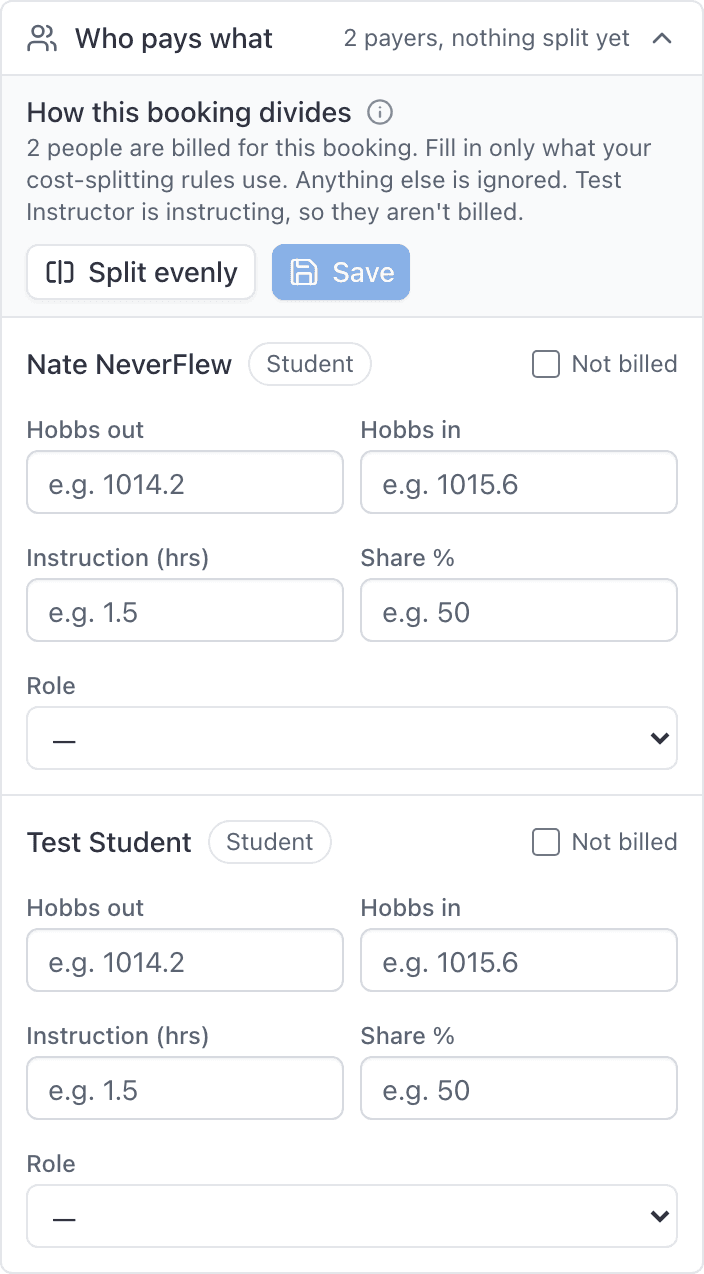
Split evenly#
Split evenly fills the whole panel in one press, which is what a shared ride usually wants:
- The legs run consecutively from the recorded Hobbs out, so the first person flies from 1014.2 to 1014.9 and the second from 1014.9 to 1015.6. That is both what happened and what adds up: the legs come to exactly what the aircraft flew, which is what the server checks.
- Instruction divides the same way, against the lesson's recorded time.
- Shares come to 100%.
Odd tenths go to the earlier payers rather than being rounded away, so 2.5 hours between two pilots is 1.3 and 1.2 rather than 1.25 twice.
It fills the fields; it does not save them. Change anything that was not even, then press Save. It appears once the booking has been ramped in, since before that there are no hours to divide.
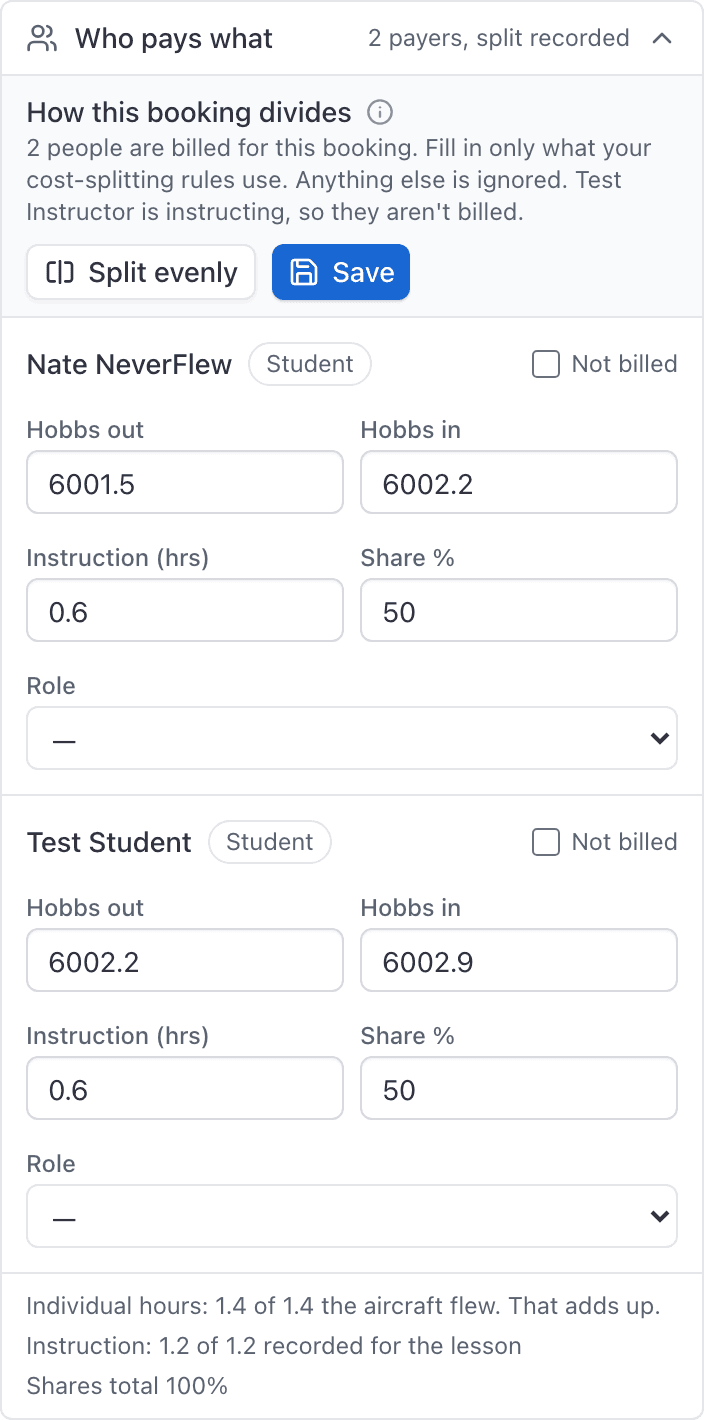
Press Save when the rows are right.
The first person listed is the leading payer#
The order people were added to the booking is not cosmetic. The first person on a side is the leading payer: they are the one billed when your school's rule for a charge is "one person pays", and they take the odd cent when a division does not come out even.
If the wrong person is first, fix it on the booking rather than in this panel. An edit replaces the whole crew, so staff or the instructor on the booking can set the people again in the order you want. A student or renter can only add or remove themselves.
Why the instructor is not in the table#
An instructor with a student aboard is being paid, not billed, so they are left out of the payer table. The header of the panel says so and names them.
An instructor flying alone does appear, because at that point they are renting the aircraft like anybody else.
Mark somebody as not billed#
Tick Not billed on their row and give a reason. Use this for the person whose seat was comped, or the safety pilot who is not paying for the aeroplane. They stay on the flight record and they still sign off the close-out. They simply do not get an invoice.
The totals have to match#
The panel adds your rows up live and says when they do not work:
- "Individual hours: 1.2 of 1.4 the aircraft flew, off by 0.2. These have to match, or we can't bill it." The legs you entered have to account for the whole time the aircraft was running.
- "Shares total 90%. That has to be 100%." Percentages have to close.
Fix the numbers until both warnings clear, then save.
Save before the invoice is raised#
The invoice is generated the moment the last pilot signs off the close-out with their PIN. So the order of the day is: ramp in, fill in Who pays what, save, then everybody signs off.
After it has been invoiced#
A split booking produces one invoice per payer, not one invoice with everybody's share inside it. Each person sees their own, labelled as one of N shares for the booking.
That is also why the board's Billing filter can look wrong. A booking counts as Unpaid while anybody's share is outstanding, so a ground class where three of the four students have paid still shows as unpaid until the fourth does. See Find a booking on the schedule.
Related#
The rules that decide how each charge divides.
The same panel from the billing side.
The step that turns the shares into invoices.
Which types can carry more than one payer.
Still stuck on this?
Email support@aerscheduler.com and tell us what you were trying to do. We answer.