
Fill in Who pays what on a shared booking
The panel between ramp-in and invoicing where you record each person's hours or share. Only the fields your school's rule uses actually matter.
For dispatchers, instructors, admins, students and renters
On a booking with two or more payers, a Who pays what panel sits in the Close-out section until the booking is invoiced. Fill in only the fields your school's splitting rule actually uses, click Save, then finish the sign-offs as normal.
When the panel appears#
It shows up in the Close-out section on the booking's own page whenever the booking has two or more payers, from the first close-out step right through until the invoice is raised. In the console, open the booking from the board and use Open the full booking at the foot of the panel: the panel itself is a summary and does not carry the shares. A booking with one payer never shows it. Once the invoice exists the panel is gone, and the shares cannot be changed.
Anyone who can ramp the booking can fill it in: staff, or a pilot assigned to that flight. That is deliberate, so the person standing at the aircraft can record the numbers while they are fresh.
Who counts as a payer, and where the instructor went#
| On the booking | Who pays |
|---|---|
| Students or renters | Them |
| An instructor and a student | The student. The instructor is being paid |
| Instructors only | The instructors. Flying alone is renting |
| A guest on a discovery flight | The guest |
An instructor who is not being billed is named in the panel's header instead of listed as a row, with a note that they are instructing so they are not billed.
Which fields to fill in#
The panel offers every field the booking could possibly need. Only the ones your school's rule uses are billed.
| If your rule is | Fill in |
|---|---|
| Each pays their own time | Hobbs out and Hobbs in for each person |
| Set shares | Share % for each person |
| Split evenly | Nothing |
| Each pays in full | Nothing |
| One person pays | Nothing |
Anything else you type is recorded but not billed.
Mark somebody as not billed#
Each row has a Not billed checkbox and a short reason, for a safety pilot, an observer, or anyone you are comping. They stay on the booking, so they still count for currency and still block a double booking, but they are charged nothing.
Making the totals add up#
Running totals sit underneath the rows. They reconcile the individual hours against what the aircraft actually flew, and the shares against 100%. If the totals read correctly while you type, the save will go through.
The errors you can hit#
| What you see | Why | Fix |
|---|---|---|
| The individual times do not match what the booking recorded | Your rule charges each person their own time and the legs do not add up to the aircraft's hours | Correct the individual Hobbs readings until the running total matches |
| A person has no time recorded | Same rule, somebody left blank | Every payer needs an out and an in reading |
| The shares do not total 100% | Set shares, and the percentages are short or over | Adjust until they total exactly 100. A blank share means "nobody has said", not zero |
| An instructor was included in your arithmetic | They are not a payer when a student is aboard | Split 100% between the people the panel lists |
What each person receives#
Each payer gets their own invoice, at their own rate, with a memo naming the others on the flight. The line text quotes that person's own hours, not the booking's.
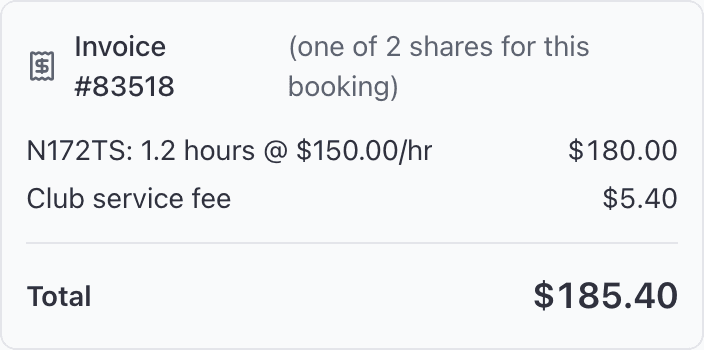
Two more things worth knowing:
- The service fee is charged once per invoice, so a three-way split collects it three times.
- A share worth less than 50 cents is skipped, because Stripe will not accept an invoice that small. That person receives nothing and the booking is still treated as billed.
Related#
The rules behind this panel, and the five ways a charge can divide.
The steps either side: ramp in, then the PIN sign-offs that raise the invoice.
Still stuck on this?
Email support@aerscheduler.com and tell us what you were trying to do. We answer.