
Turn on invoicing and card payments
Connect Stripe so the school can take card payments, switch billing on, pick invoice or account ledger, and set the rates and fees every bill is built from.
For owners
Go to WebSettings → Billing. Connect payouts with Stripe in the Payouts card, then turn on Billing enabled at the top (it saves immediately). Set a default instructor rate in Rates and fees and click Save changes. Only the organization owner can do any of it.
Before you start#
- You must be the organization owner, not merely an admin. An admin can open the page and type in it, but the save will be refused.
- Stripe will ask for your business details and the bank account you want payouts to land in. It is your own Stripe account, so payouts and the payout schedule stay yours.
- Set your aircraft rates too, or their bookings price at zero. See Set your aircraft and instruction rates.
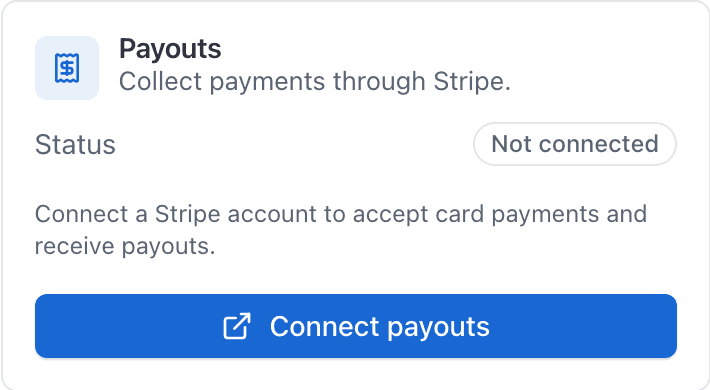
Connect payouts with Stripe#
There are two ways in, side by side on the Payouts card:
- Connect payouts creates a new Stripe account for your organization. Use it if you don't have one yet.
- Use an existing Stripe account connects one you already take payments with. You sign in to Stripe and pick the account, and it keeps its own history and payout settings. Stripe checks new accounts closely, so an account with a track record is less likely to be paused when your first larger payments come in.
The steps below are for a new account. For an existing one, click Use an existing Stripe account, sign in on Stripe's page, choose the account and click Connect. You land back on Settings with a message saying payouts are connected.
Open Settings and choose Billing
The Billing tab starts with Payouts and Billing enabled on the same card, then How members pay and Rates and fees.
Click Connect payouts
In the Payouts card. The badge next to it reads Not connected until this is done.
Complete Stripe's hosted onboarding
This happens on Stripe's own pages. Finish every step, including the bank details.
Wait for the confirmation page
You come back to a "Confirming your payout setup" page, which then drops you on Settings with a message saying payouts are connected.
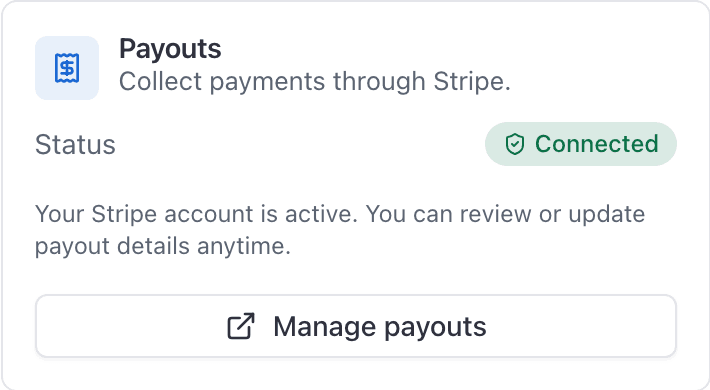
The Payouts badge should now read Connected, and the button becomes Manage payouts.
Turn billing on and set your default instructor rate#
Switch on Billing enabled
On the Payouts card, after the badge reads Connected. It stays off and disabled until payouts are connected. It saves as soon as you flip it.
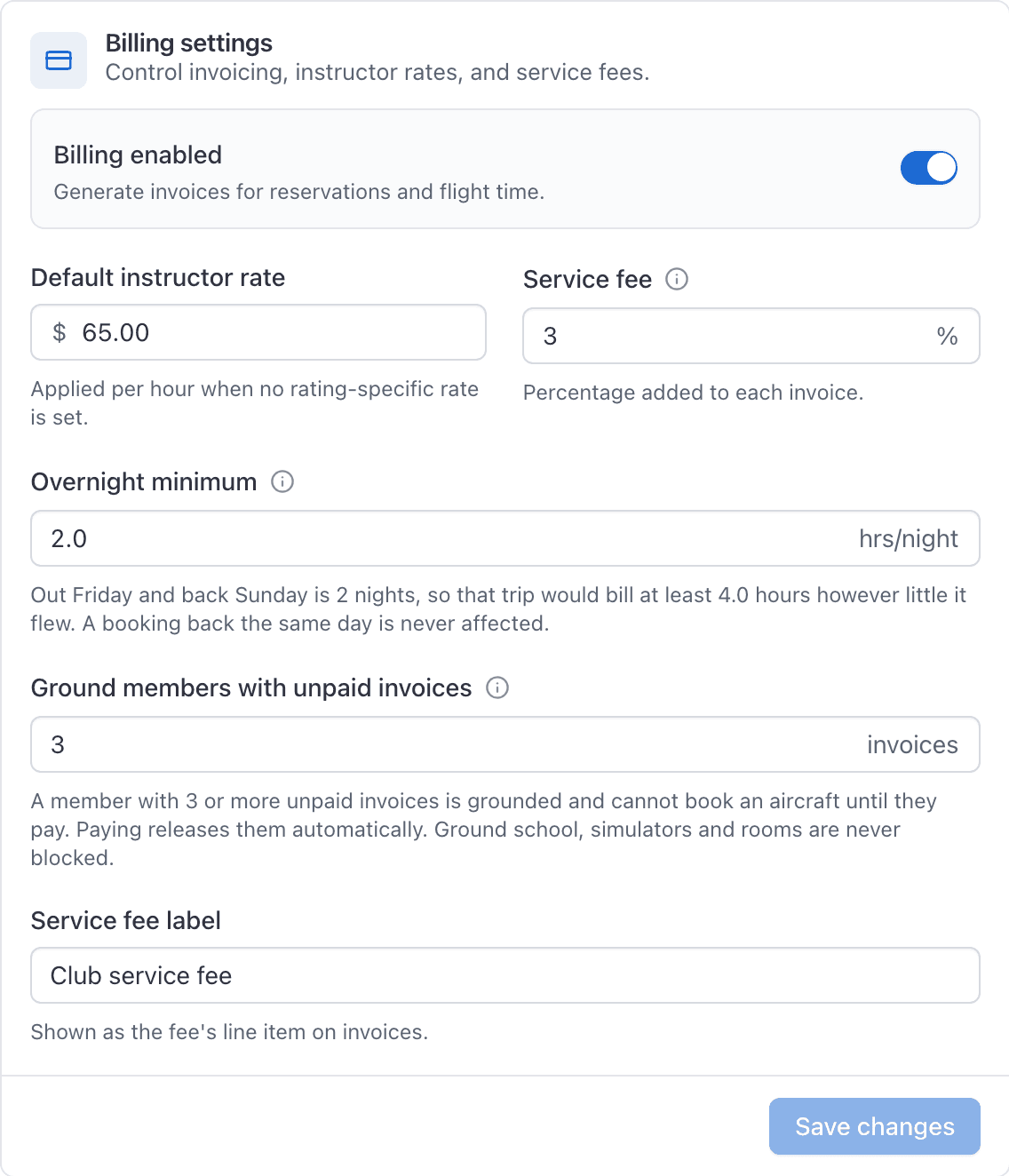
Set the Default instructor rate
In Rates and fees. The hourly figure charged for instruction when the booking has no rating at all. A booking that carries a rating is priced from that rating's own rate instead. It starts at $0.00.
Click Save changes
On the Rates and fees card. Rates, service fees, overnight rules, and grounding wait on this button. Billing enabled and How members pay do not: those save on their own.
Add a service fee#
The Service fee (%) field adds a percentage of the invoice as an extra line, using whatever wording you put in Service fee label (the default is "Service Fee").
It is your own surcharge. It is not AerScheduler's fee and not Stripe's. It goes on every invoice you raise, including membership dues.
What Stripe charges you#
Payments run through your own Stripe account, so Stripe's processing fees apply: at the time of writing that is 2.9% plus 30 cents for a card and 0.8% for ACH Direct Debit, in US dollars. Anything deducted comes out of your payout rather than being added to what your member is charged.
Payouts reach a US bank in about two business days once you are up and running. The very first payout takes longer, usually 7 to 10 days, because Stripe verifies the account.
Your Stripe dashboard is the authority on what was deducted and what landed. AerScheduler does not show the fee breakdown.
If Stripe onboarding does not finish#
If you close Stripe's pages half way, the confirmation page tells you the payout setup is not finished, and the badge stays Not connected. Nothing bills in that state.
To pick it back up, open WebSettings → Billing and click Connect payouts again. You resume where you left off.
If Stripe has rejected your account, Connect payouts says so instead of opening Stripe. Only Stripe can change that decision. Sign in at dashboard.stripe.com with the login you used for the account to see why and what Stripe asks for. Turning billing off and on, or switching how members pay, does not affect it. To use a different Stripe account instead, see Switch to a different Stripe account.
Switch to a different Stripe account#
To move your payouts to another Stripe account, for example because Stripe rejected the first one, disconnect it and connect again. Your organization, members, aircraft and balances stay as they are. You do not need a new AerScheduler account.
Settle any open invoices
An invoice still unpaid on the current Stripe account has to be collected, marked paid or voided first. Until then Disconnect Stripe is greyed out, and pointing at it lists the invoices, each one a link.
Click Disconnect Stripe
In the Payouts card, beside Connect payouts or Manage payouts. Type your organization's name to confirm.
Connect the other account
Use an existing Stripe account to connect one you already have, history and all. Or Connect payouts to create a new one.
What changes when you disconnect:
- Nobody can pay by card or bank until the new account is connected and Stripe has verified it. Billing enabled stays on, so charging resumes by itself once it is.
- If you invoice each booking, flights closed out in the meantime are not invoiced. They wait under Unbilled reservations in Billing, to bill once the new account is ready. On the account ledger, flight charges keep posting as usual.
- Members' saved cards and autopay are cleared, because cards are kept in the Stripe account. Each member adds a card again after you reconnect. If your booking rules require a card on file, members are asked for one at their next booking.
- Rates, fees, billing settings, member balances and past invoices stay.
- Money already on the old account still reaches AerScheduler: a bank payment that settles later, a refund you issue from the old Stripe dashboard, a dispute. A card top-up taken on the old account can still be refunded from the member's account.
Doing this from the iOS app#
An owner who opens AppBilling Settings before any of this is sent to the Invoicing with Card and ACH Payments screen instead. It explains what invoicing will do, then Setup creates the Stripe account and opens the same hosted onboarding. If an account already exists but was never finished, the app carries on from where it stopped.
Two more settings sit below, in the Manual invoices card: Dispatchers can manually generate invoices and Instructors can manually generate invoices. They are on both surfaces, both owner-only, and they say who may bill outside a reservation rather than where. See Letting dispatchers or instructors create invoices.
Pick How members pay#
Still on WebSettings → Billing, under How members pay:
- Invoice each booking (default): each member visit raises a Stripe invoice.
- Account ledger: member flights post to a running balance; members Add funds by card or the desk credits cash/check. Guests still get a visit invoice.
Only the owner can switch it. Full walkthrough: Choose invoice or account ledger.
Check it worked#
- The Payouts badge reads Connected.
- Billing enabled is on.
- Every aircraft has a rate.
- Close out a real flight. When the last pilot confirms with their PIN, the booking shows its line items and total. Invoice mode: the payer gets an invoice email. Account ledger: the Close-out section says Charged to account ledger.
If a flight closes out and no bill appears, work through Why a flight was not invoiced.
Related#
Bill each booking, or use a member account balance.
The rate, the wet or dry basis, and whether the invoice measures Hobbs or tach.
The other figure on this same settings card, and how nights are counted.
Common questions
- Can I switch to a different Stripe account?
- Yes. Settle any open invoices, click Disconnect Stripe in Settings, Billing, then connect the other account. Your members, aircraft and balances stay. Members add their cards again once the new account is connected.
- Can I use a Stripe account I already have?
- Yes. Click Use an existing Stripe account in Settings, Billing, sign in to Stripe and choose the account. It keeps its own history and payout settings.
Still stuck on this?
Email support@aerscheduler.com and tell us what you were trying to do. We answer.