
Add a member to a plan and bill their dues
Put somebody on a plan, bill or waive the join fee, and bill each dues period as it comes due. Dues are ordinary invoices, so they pay the same way.
For owners and admins
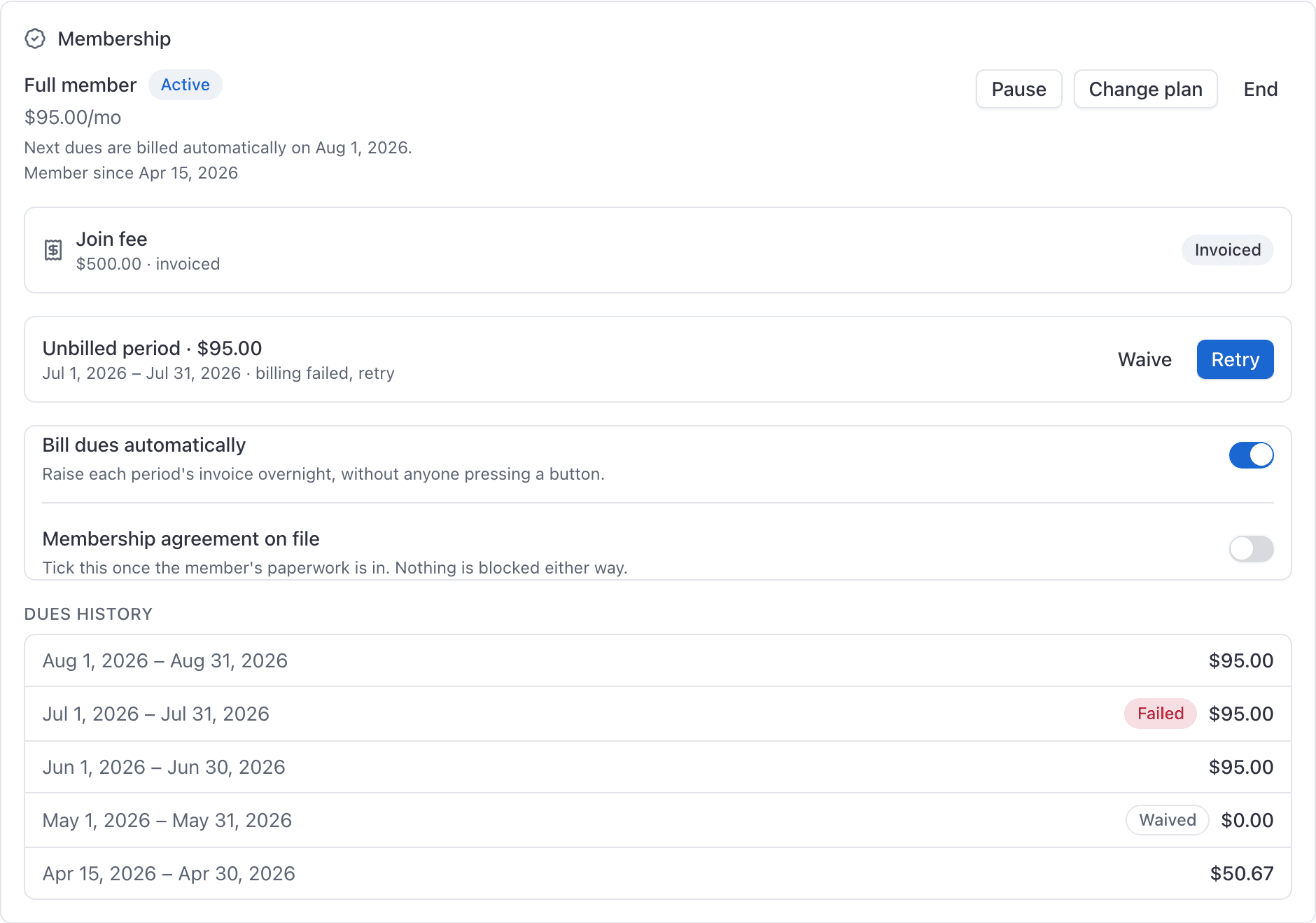
WebPeople → the person → Billing. Click Add to a plan in the Membership card, then Bill on the join fee row and Bill now on each dues period as it comes due. A dues invoice is an ordinary invoice, so it shows up on Billing and pays through the same link as a flight.
You need at least one plan to exist first. See Set up membership plans and dues.
Add somebody to a plan#
Open the person's Billing tab
People, then the person, then Billing. The Membership card sits above their Invoices card.
Click Add to a plan
Choose the plan and decide Start it now
Leave Start it now off and you get a Not started membership: it is on their record, and it accrues nothing until you start it.
Waive the join fee if you are comping it
There is a Waive the join fee option in the same dialog.
Click Add to plan
The plan's prices are snapshotted onto the membership at that moment. Raising the plan's price later never re-prices them.
A person can hold one live membership at a time. To move somebody between tiers, use Change plan rather than adding a second one.
Bill the join fee#
If a join fee is owed and was not waived, the Join fee row shows a Bill button carrying the amount. Click it and the join fee is raised as an invoice.
Bill a dues period#
When a period comes due, the Next period row shows Bill now. Click it and that period is invoiced.
Each period lands in the dues history ledger underneath:
| What the row shows | Meaning |
|---|---|
| An Owed chip | Due, not yet invoiced |
| No chip, just the period and the amount | Billed. This is the normal finished state |
| A Waived chip | Comped, and recorded as comped |
| A Failed chip | The attempt did not go through, with the reason |
To have periods raised for you overnight, switch on Bill dues automatically. Remember it is opt in twice: on the plan, and on this membership.
Waive a period#
Waive comps that period. It stays in the ledger marked Waived, so the history still shows what happened and why the member was not charged.
Pause, resume, change plan or end#
| Action | What it does |
|---|---|
| Pause | Suspends the membership. Nothing accrues. |
| Resume | Puts it back to active. |
| Change plan | Moves them to another plan at today's price, from the next period. |
| End | Cancels the membership. |
Ending a membership and later putting the same person back on a plan creates a new membership. It does not revive the old one, and the old dues history stays where it is.
When a period fails#
A failed period is kept, not deleted. It shows in the ledger as Failed with the reason, and carries a Retry button.
The membership's cursor still moves on past a failed period, so the automatic sweep does not sit there retrying the same one forever. Fix the cause, then press Retry by hand.
What the member can see#
On their own profile a member sees a read-only membership card: plan name, status, the dues line, next dues, member since, recent dues periods, a note if a join fee is owed but not yet invoiced, and a note if the agreement is not recorded as on file.
Membership agreement on file#
The Membership agreement on file toggle is a record for your files. AerScheduler does not collect signatures, and nothing about the member is blocked while it is unticked.
Nobody can join or cancel themselves#
Every membership change is an admin action. There is no way for a member to join a plan, move tier, or cancel from their side. If somebody wants to leave, they email you and you press End.
Finding a dues or join fee invoice#
Dues and join fee invoices are ordinary invoices. Open WebBilling, set the date range around the period, and find it by the member's name. They pay through the same link as any other invoice, and they count in the Revenue and Payments received reports.
Related#
Building the plan this member is joining.
Dues invoices are chased like any other.
Still stuck on this?
Email support@aerscheduler.com and tell us what you were trying to do. We answer.