
Choose invoice or account ledger
Bill members with a new invoice for each booking, or with a prepaid account balance (auto-refill, late fees, book/dispatch gates). Guests always get a pay-this-visit invoice.
For owners
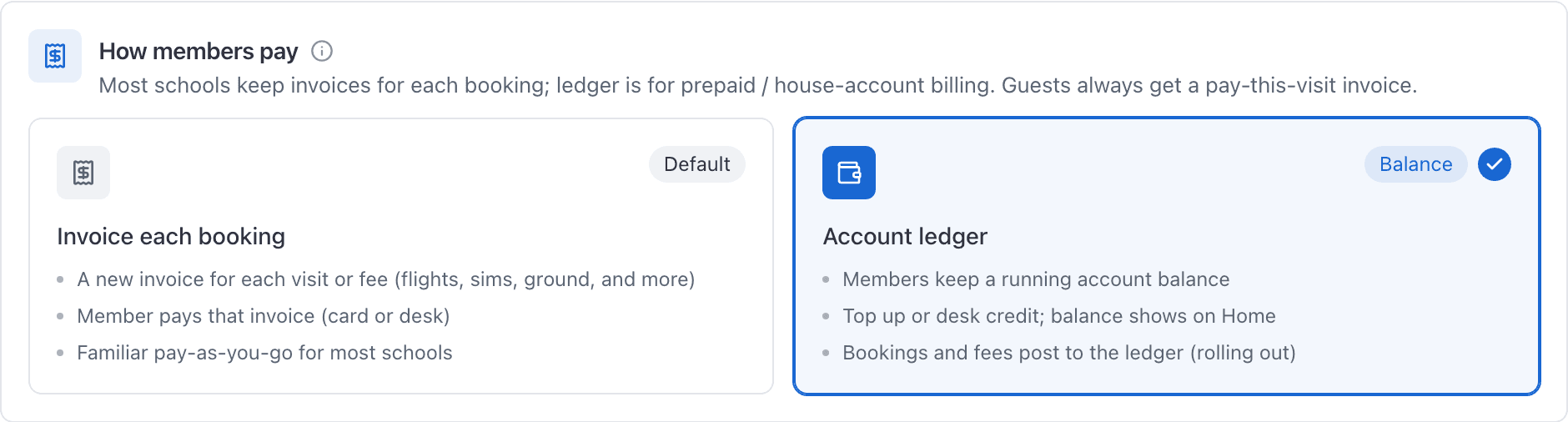
On WebSettings → Billing, under How members pay, choose Invoice each booking (the default) or Account ledger. Only the organization owner can change it. Guests always get a pay-this-visit invoice either way.
What the choice means#
AerScheduler can bill members in two ways. Pick one for the school; you can switch later.
| Mode | What members see |
|---|---|
| Invoice each booking | A new invoice for each billable visit or fee: flights, sims, ground lessons, manual invoices, and similar. They pay that invoice by card or at the desk. |
| Account ledger | A running account balance. Members add funds (or the desk credits cash/check). Member flights, fees, and similar charges draw the balance down. |
Guests are never on the ledger. A discovery or guest visit still gets a normal pay-this-visit invoice.
Choose a mode#
Open Settings and choose Billing
Turn on Billing enabled
On the Payouts card, after Stripe is connected. The toggle stays off until payouts are connected. It saves as soon as you flip it.
Under How members pay, pick Invoice each booking or Account ledger
The cards explain the difference. Switching after setup asks you to confirm once.
Billing enabled is what actually starts charging. Stripe still has to be connected for card charges. See Turn on invoicing and card payments.
Switching later#
- To ledger: existing unpaid invoices stay as they are. New member flights and fees post to the account balance. See Charge a flight to the account ledger.
- Back to invoices: existing ledger balances stay on the account until you refund or adjust them. They are not deleted. New member billing raises Stripe invoices again.
Only the organization owner can change this. Other roles can read the setting.
Day to day on the ledger#
The school-wide call list is Review account balances and who owes on Operations Billing (Accounts tab). Work one person from Manage a member's account ledger: Add funds, desk credit, receipts, refunds, reassigning a flight charge, auto-refill, and statements.
Owners can also set:
- A card fee on top-ups
- Late fees (percent and/or flat, plus grace)
- Book and dispatch balance gates under Booking preferences
Card fees on top-ups#
If you use the ledger, you can optionally recover card processing cost when members add funds. That is separate from this choice. See Set a card fee on account top-ups.
Related#
The full path from booking to bill in both modes.
What close-out looks like when Account ledger is on.
Auto-refill, late fees, statements, receipts, and desk tools.
Still stuck on this?
Email support@aerscheduler.com and tell us what you were trying to do. We answer.