
Review account balances and who owes
On Account ledger, Operations Billing lists every member's balance. Filter who owes, open a ledger, and use Reports for aging.
For owners and admins
On WebOperations → Billing, with Account ledger on, the Accounts tab is every member's balance. Filter who owes, click a row to open their ledger, and leave guest invoices on the Invoices tab. Aging buckets and export live under WebReports → Accounts receivable.
This page is only for schools on Account ledger. Invoice-each-booking schools still use Operations Billing as the invoice desk; their receivables report ages unpaid invoices instead.
What you see#
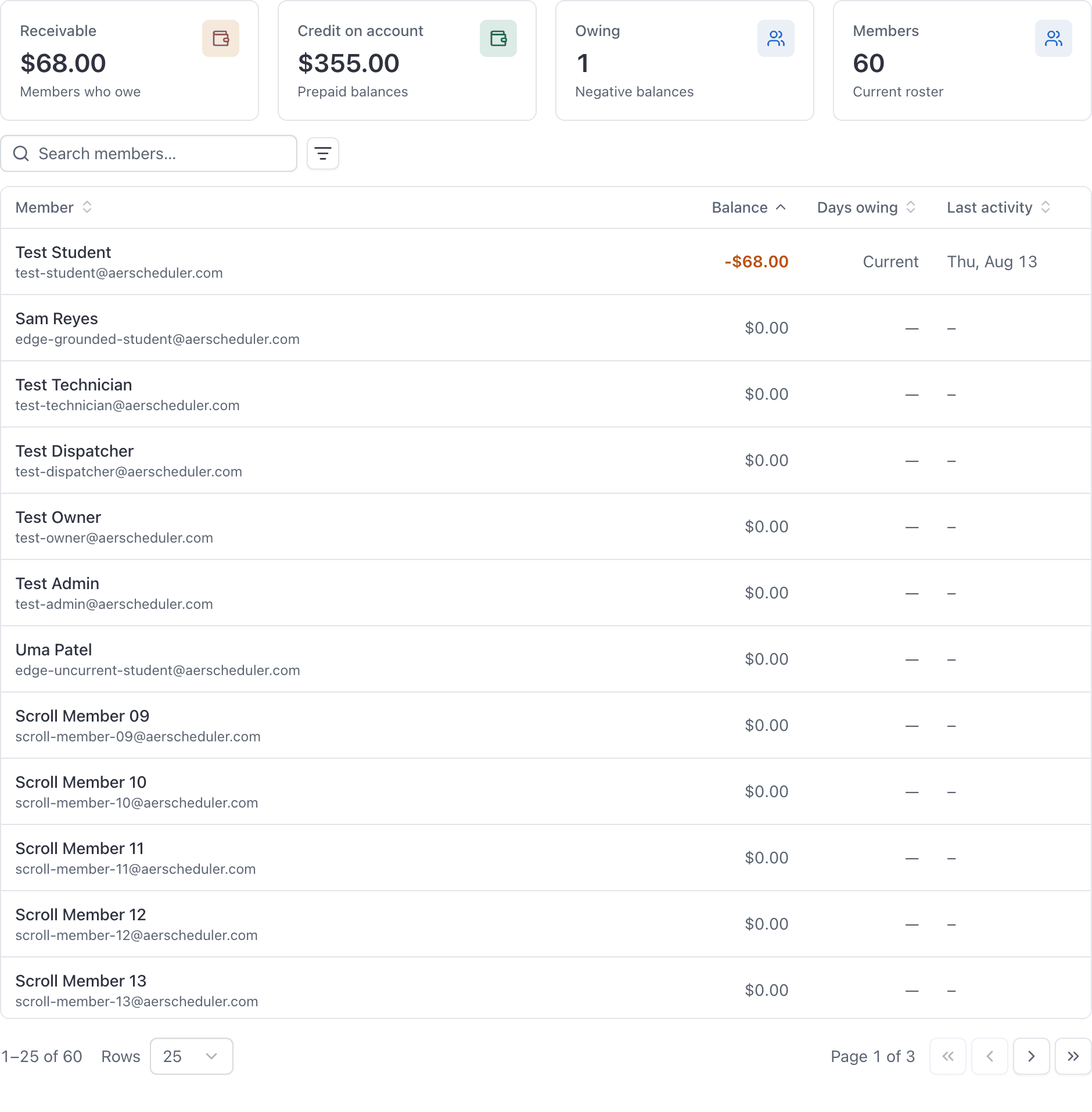
Two tabs:
| Tab | What it is for |
|---|---|
| Accounts | Current members and their running balance. Green is credit on account. Amber is amount owed. Days owing is how long they have been in the hole. |
| Invoices | Guest pay-this-visit invoices, leftover invoices from before you switched, and unbilled reservations. |
Accounts is the day-to-day call list: who owes, who has prepaid. Click a row to open that person on People → Ledger, where you add credit, refund, or read the entries. See Manage a member's account ledger.
The four numbers above the table are school-wide. They do not shrink when you search or filter the list.
Filter who owes#
Use Balance to show Owes, Credit, or Zero. Search matches name or email. The table opens with the most owing at the top.
Days owing starts the day the running balance last went negative and stayed there. A later credit that brings them back to zero or above clears it. It is not "days since their last flight."
Invoices still exist#
Guests never join the ledger, so a discovery flight still raises an invoice. Unpaid invoices from before you switched also stay here until they are paid or voided. That is why the Invoices tab does not disappear.
Aging and export#
For 30 / 60 / 90 day buckets, CSV, or a saved view, open WebReports and run Accounts receivable.
- Ledger mode: one row per member who owes, aged the same way as Days owing on Billing.
- Invoice mode: unpaid invoices rolled up by customer, aged from the due date (or the date raised, if there is no due date).
The start of the report's date range is unused. It is a snapshot as of the end of the range, who owes right now. Overview also flags receivables older than 90 days.
Common questions
- Why do I still see an Invoices tab in ledger mode?
- Guests always get pay-this-visit invoices, and leftover invoices from before you switched still need a home. Member flights post to the Accounts tab.
- Where is aging, like 30 60 90 days?
- Operations Billing shows days owing on each row. The Accounts receivable report under Reports groups those balances (or unpaid invoices, in invoice mode) into age buckets and exports.
Related
- Manage a member's account ledgerRead the balance, add funds or desk credit, set auto-refill, late fees, statements, print a receipt, refund prepaid money, and reassign a flight charge.
- Choose invoice or account ledgerBill members with a new invoice for each booking, or with a prepaid account balance (auto-refill, late fees, book/dispatch gates). Guests always get a pay-this-visit invoice.
- Run a report and filter the resultsPick a report from the left rail, set the date range, then use Filters to narrow it. Read the small caption under the toolbar first: it tells you which date the range applies to.
Still stuck on this?
Email support@aerscheduler.com and tell us what you were trying to do. We answer.