
How billing works in AerScheduler
Invoice each booking or Account ledger: the path from booking to bill, what you set up first, where money shows up, and ledger-only tools like auto-refill and late fees.
For owners, admins, dispatchers, instructors, students and renters
A flight is priced when its close-out finishes. AerScheduler takes the hours off the aircraft's meter, adds the instruction time, splits the total between the people on the booking, then either raises one Stripe invoice per payer or posts one charge per payer to their account ledger. That choice is school-wide under How members pay. Guests always get a pay-this-visit invoice.
Two ways members pay#
On WebSettings → Billing, under How members pay, the owner picks one mode for the whole school:
| Mode | After a member flight | How members settle |
|---|---|---|
| Invoice each booking (default) | One Stripe invoice per payer | Pay that invoice by card, autopay, or mark paid for cash/check |
| Account ledger | One balance charge per paying member | Add funds (card or desk cash/check). The balance may go negative |
Guests and discovery flights are never on the ledger. They always get a pay-this-visit invoice, even when members use an account balance. See Choose invoice or account ledger.
From booking to paid#
Every billable flight follows the same path. Only step 4 and 5 change with the mode.
The flight is booked
By default nothing is priced yet. The booking decides which aircraft and which people are involved, and both feed the bill at close-out. Staff can instead charge a package price when booked: Stripe invoices that amount when the reservation is created. On Account ledger, self-book can also be refused for low credit or too much owing. See Booking rules and settings.
Ramp out, then ramp in
The pilot records Hobbs and tach at the start and at the end, plus instruction time if a CFI was teaching. On Account ledger, optional dispatch gates can refuse ramp-out the same way booking gates refuse a book. See Close out a flight so it invoices.
Every pilot confirms with their PIN
Nothing is billed until the last assigned pilot has signed off. This is the most common answer to "where is my invoice?" or "why is there no ledger charge?".
The bill is posted
Invoice mode: one Stripe invoice per payer. Account ledger: one balance charge per paying member (guests still get an invoice). See Charge a flight to the account ledger. A student or renter on a split booking only sees their own invoice, not someone else's amount or a special rate on another share. Desk staff see every share.
The member settles
Invoices: pay by card in the app, autopay, or mark paid after cash or a check. Ledger: members add funds ahead of time (or run a negative balance until they top up). Auto-refill can charge the default card on a schedule.
The Billing page in the web console updates live when an invoice is created, paid, voided, or refunded, and when a ledger balance changes, so you do not need to refresh.
What AerScheduler prices, and what it does not#
It prices four things (the same numbers in both modes):
| Charge | Where the number comes from |
|---|---|
| Aircraft or simulator time | Hobbs in minus Hobbs out, or tach in minus tach out, times the aircraft's hourly rate |
| Instruction | The instruction time entered at ramp-in, times the rating's rate or the school's default instructor rate |
| Overnight minimum | A floor under the aircraft time when the booking is away overnight |
| Service fee | An optional percentage of the bill that your school adds, with a label you choose |
It does not price anything else. There is no fuel line item, even on a dry rate, so a school on dry rates bills fuel separately on a manual invoice. Rooms have no rate and are never charged for time, and maintenance bookings are never billed at all.
One bill per payer#
A booking with one payer produces one invoice or one ledger charge. A booking with several produces one each, priced at that person's own rate, with a memo naming the others on the flight and line text quoting that person's own hours. How the cost divides is set once per booking type in Cost splitting.
Where the money shows up#
Invoice each booking#
| Screen | Who sees it |
|---|---|
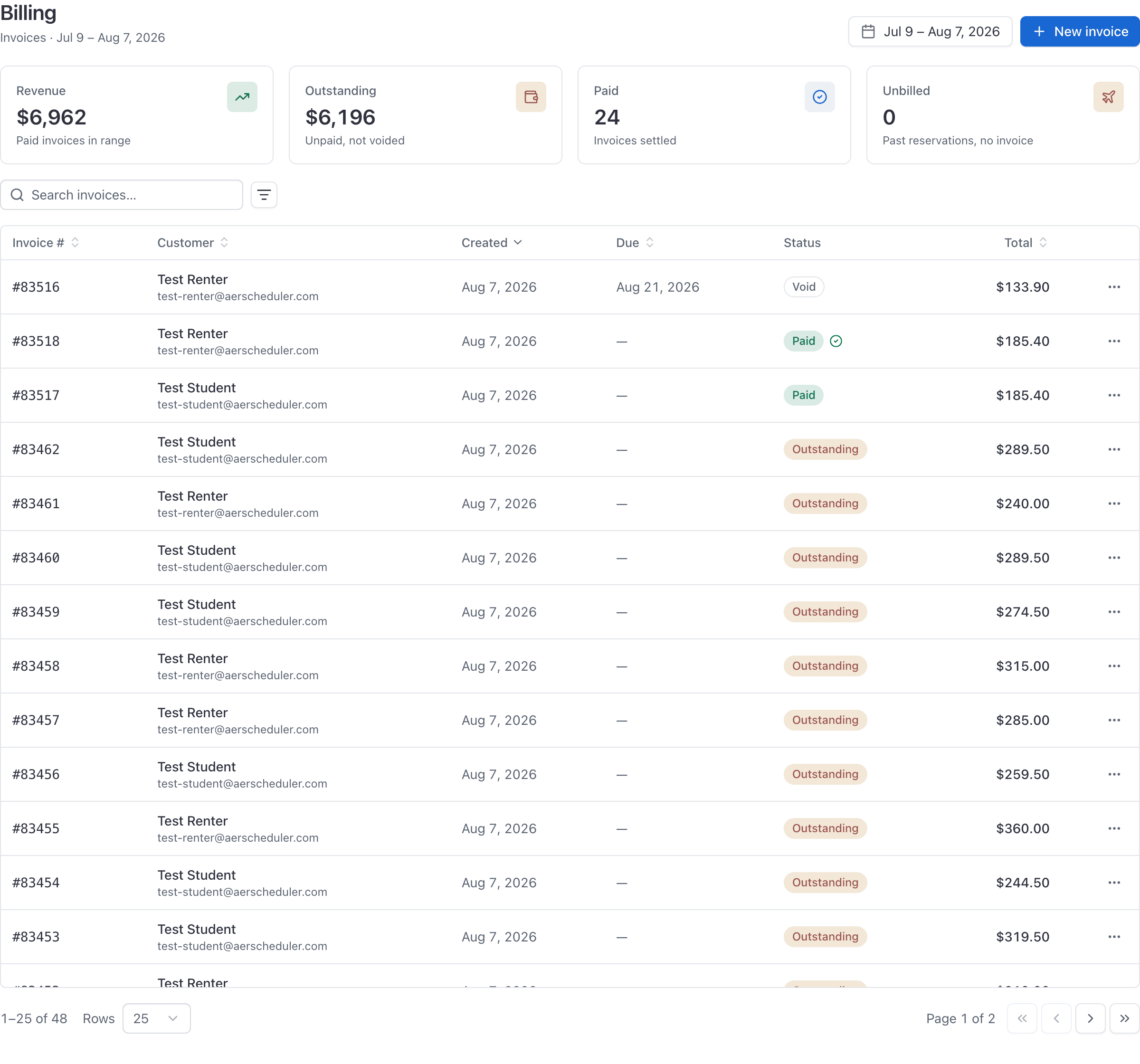
| WebBilling | Owners and admins. Every invoice, plus revenue, outstanding and unbilled totals. |
| WebBilling under You | Every member, for their own invoices only. |
| The close-out section on the booking | Staff, and anyone rostered on that flight. |
| WebDashboard | Staff see recent invoices, admins also see the outstanding total. |
| WebReports → Financial | Admins. Revenue, payments received, items sold, memberships and dues. Accounts receivable ages unpaid invoices. |
Account ledger#
| Screen | Who sees it |
|---|---|
| WebBilling → Accounts | Owners and admins. Every member's balance, who owes, who has credit. |
| WebBilling → Invoices (ops) | Guests and leftover Stripe invoices from before you switched. |
| WebPeople → person → Ledger | Admins managing that member (desk credit, refund, reassign). |
| WebBilling under You | The member: balance, history, Add funds, Statement, receipts. |
| WebProfile → Payment methods | Saved cards plus Auto-refill when ledger mode is on. |
| WebReports → Accounts receivable | Admins. Ages negative balances by school calendar days. |
See Review account balances and who owes and Manage a member's account ledger.
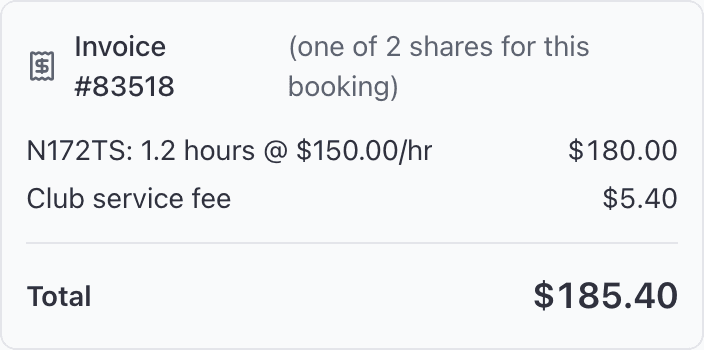
On a split booking, the summary on the booking itself shows one person's share, labelled "(one of N shares for this booking)". It is not the flight's whole bill.
What you have to set up first#
Four things, and nothing bills until all four are done. How members pay is a fifth choice you make once Stripe is live.
| Setting | Where | Who |
|---|---|---|
| Stripe payouts connected | WebSettings → Billing, Payouts card | Organization owner only |
| Billing enabled | Same card, under Payouts. Stays off until payouts are connected. | Organization owner only |
| How members pay | Same page: Invoice each booking or Account ledger | Organization owner only |
| A rate on each aircraft | WebAircraft → edit the aircraft | Owner or admin |
| An instruction rate | WebSettings → Billing or WebSettings → Instruction rates | Owner for the default, admin for a rating |
Start with Turn on invoicing and card payments, then Set your aircraft and instruction rates, then pick invoice or account ledger.
On Account ledger, these also matter#
Once How members pay is Account ledger:
- Card fee on top-ups: an optional percent, flat amount or both, added when members Add funds by card. Desk cash and check stay dollar-for-dollar. See Set a card fee on account top-ups.
- Auto-refill: member (or admin) turns on charging the default card on a schedule: under a balance floor, pay what they owe, or a fixed amount. Runs in the school's time zone after about 4am local. See Manage a member's account ledger.
- Late fees: owner sets percent and/or flat plus grace days. Posts once per member per calendar month (school time zone) after they stay owing past grace. Reminder and receipt emails go with it. See Late fees.
- Book and dispatch balance gates: minimum credit and/or maximum owing at self-book and optionally again at ramp-out. Staff still override. See Booking rules.
- Statements: opening, period activity, closing for a school-local date range; print or email. Not a Stripe invoice and not QuickBooks.
Invoice-mode schools ignore those ledger-only settings.
What billing cannot do#
Worth knowing before you plan around it.
- Stripe invoice refunds are done in your Stripe dashboard. AerScheduler does not void a paid invoice to undo a card payment.
- A paid invoice cannot be voided. Voiding is for an invoice that should never have been raised, not for undoing a payment.
- An invoice cannot be edited once raised. You can mark it paid or void it, nothing else.
- On Account ledger, prepaid refunds, desk credits, and adjustments live on the member's ledger (see Manage a member's account ledger). There are still no Stripe credit notes for invoice-mode flights. Ledger rows are never edited in place: reverse or reassign instead.
- No per-instructor rates. Every CFI teaching a given rating bills the same hourly figure.
- Manual New invoice still raises a Stripe invoice (member or guest recipient). Member flight close-out in ledger mode uses the account ledger instead. If a close-out bill never appeared, Create invoice / Post to ledger on the booking is the admin fix. See Why a flight was not invoiced.
- QuickBooks syncs paid Stripe invoices as Sales Receipts. Ledger top-ups and balance charges are not Sales Receipts today.
Where to go next#
Connect Stripe, switch billing on, and set the fees every bill is built from.
Bill each booking, or use a member account balance. Guests always get a visit invoice.
Add funds, auto-refill, late fees, statements, receipts, refunds, and reassign.
Invoice a fixed amount when the reservation is created, including public discovery offerings.
Ramp out, ramp in, confirm with a PIN, and the bill is posted.
Every billing action by role, including the owner-only ones.
Common questions
- Do we have to use invoices?
- No. Under Settings → Billing → How members pay, the owner can switch the school to Account ledger. Member flights then post to a balance instead of a Stripe invoice. Guests still get a pay-this-visit invoice.
- Can some members use invoices and others use a ledger?
- No. How members pay is school-wide. Guests are the exception: they always get a visit invoice even when members are on the ledger.
- Where do members add money on Account ledger?
- Billing under You (Add funds), or Profile → Payment methods. Admins can also desk-credit cash or check from People → the member → Ledger.
Still stuck on this?
Email support@aerscheduler.com and tell us what you were trying to do. We answer.