
Manage a member's account ledger
Read the balance, add funds or desk credit, set auto-refill, late fees, statements, print a receipt, refund prepaid money, and reassign a flight charge.
For owners, admins, students and renters
Open the member on WebPeople, then Ledger under Billing. That table shows balance, credits, charges, receipts, and (for admins) reassign. Invoices is leftover Stripe invoices and guest bills. Members see the same split on their own WebBilling page.
Account ledger only appears when the school has chosen Account ledger under How members pay. Otherwise you see invoices as usual.
What you see#
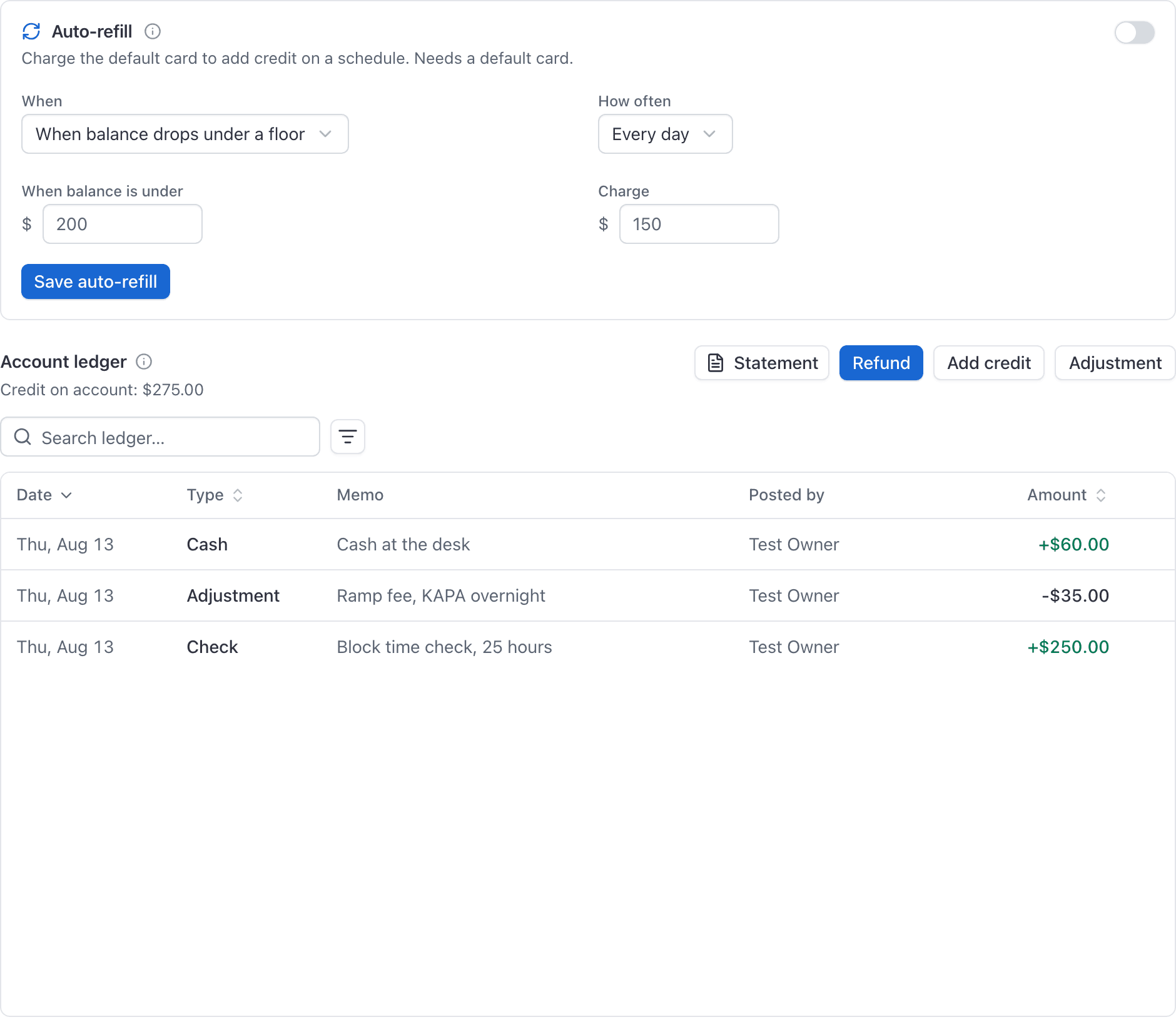
The ledger (on WebPeople → Ledger and on your own WebBilling → Ledger page) shows credit on account (positive) or amount owed (negative), then entries. Search and filter by type or date, the same way Operations Billing, Accounts tab, is the school-wide roster; click a row to land here. The table itself filters like any other list. Credits render in green. Posted by is who put the row on the ledger (an admin for desk credit, refund, and adjustment; the member for a card top-up; System when Stripe or a job posted it). Click a row to open the same right-hand panel reservations use. Those posts also appear under Audit logs → Ledger. Common types:
| Label | Meaning |
|---|---|
| Top-up | Member paid by card to add funds |
| Cash / Check / Other credit | Desk credit posted by an admin |
| Adjustment | Admin plus or minus with a memo |
| Flight | Close-out charge for a booking |
| Fee | Join fee, dues, enrollment fee, or a monthly late fee |
| Charge | Desk custom charge (when posted as a ledger item) |
| Refund | Money returned from a prepaid balance |
| Reversal | Undoes an earlier entry (never an edit of the original) |
Nothing on the ledger is edited in place. Corrections are new rows that reverse or replace what went wrong.
Add funds (member)#
On their own Billing page, or when looking at themselves on People, the member clicks Add funds, picks an amount, and pays by card. The balance rises by the credit they asked for. Home and Billing show the live balance as soon as the charge lands. If the school set a card fee on top-ups, the card is charged a little more than that credit.
Add credit, adjustment, refund (admin)#
On someone else's ledger, admins get:
- Add credit for cash, check, or other money received at the desk (memo required).
- Adjustment for a signed plus or minus that is not a flight and not a top-up.
- Refund when the balance is positive. See Refund.
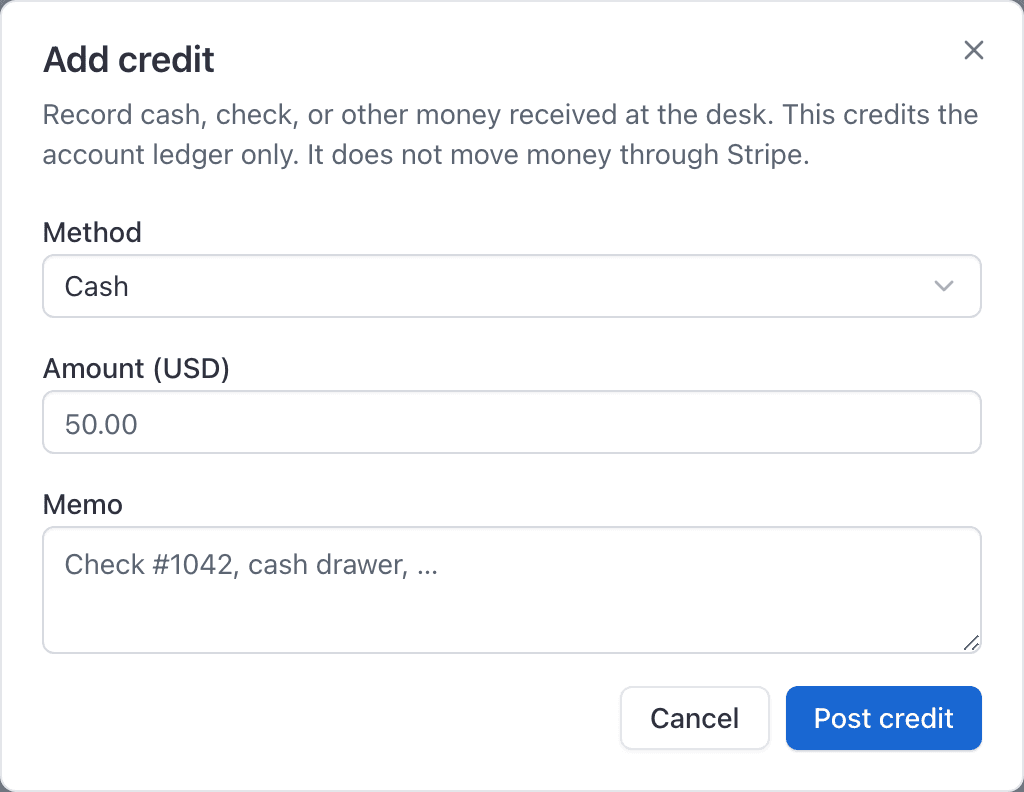
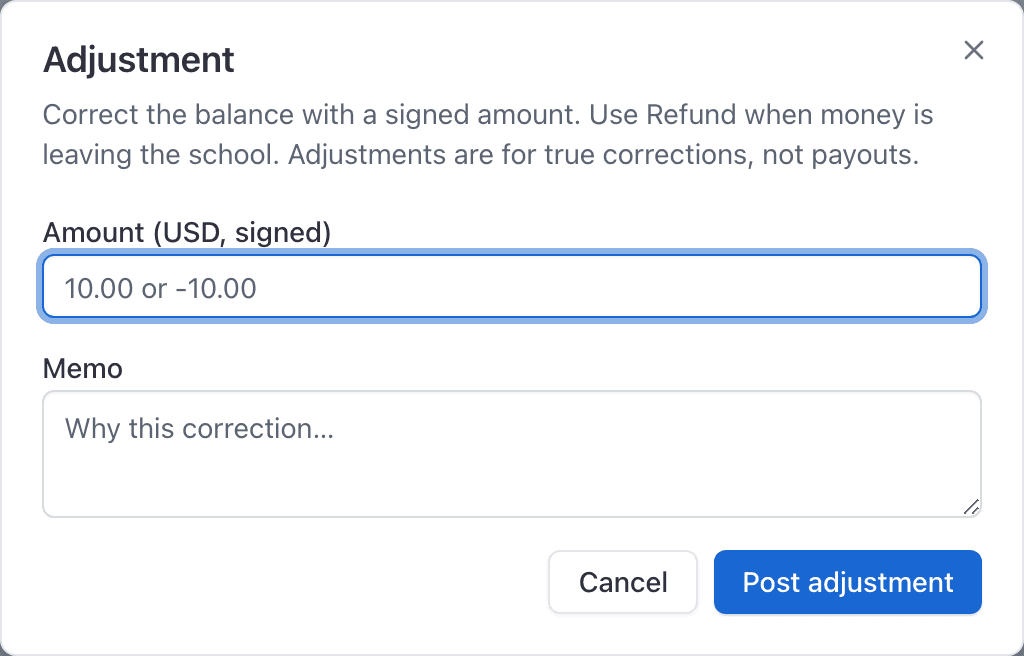
Owners and admins only. Members cannot credit or adjust themselves.
Refund#
Refund pays the member back from a positive balance, down to $0.00, not below.
Pick a method, then an amount. You are not unwinding a whole top-up row.
- Check / cash: you write the check or hand them cash. AerScheduler only debits the ledger.
- Original card: pick which past card charge the money should ride back on. Stripe already knows that card. You can only return what is still unused on that charge, even if the account balance is higher. The amount field refuses anything over that remainder. To return more, pick another charge and refund again, or use check/cash for the full balance.
If they added funds twice (for example $25 then $50), those are two charges. Refunding the $25 charge cannot send the other $50 home.
Card fees on a refund#
A top-up memo like "includes $6.00 card fee on charge" means the member paid $56 to receive $50 of credit. The $6 never sat on the ledger. A refund can return at most the $50 credit. The $6 surcharge stays on the original charge.
Stripe also keeps its own processing fee on that payment. Neither the member nor the school gets that back from this dialog.
See Card fee on account top-ups.
Auto-refill#
On WebBilling → Payment methods (and on People → Ledger for admins), a member can turn on auto-refill. It charges the default saved card and credits the ledger, the same path as Add funds.
Three modes:
- When balance drops under a floor. If the balance is below $X, charge $Y.
- Pay whatever I owe. Charge the amount owing, if it is at least $1.
- Charge a fixed amount. Charge $Y on the cadence even at zero.
Cadence is every day, or once a month on day 1–28. The job runs in the school's time zone, after 4am local, so a downtime catch-up still fires that day. It tries once, then retries two days later, twice. After three failures it pauses and emails the member. A successful charge also emails the new balance, and the amount charged to the card, which is larger than the credit when the school adds a card fee on top-ups. Both success and pause land as an in-app notification. The ledger row memo is Auto-refill (not a generic card top-up). The card is not deleted. Turn it back on after updating the card.
On a monthly cadence the first charge waits for the date you picked. Set it up on the 20th and choose the 1st, and nothing happens until the 1st. After that, if the job misses the date it catches up as soon as it can.
Auto-refill needs ledger mode, a school that has connected card payments, and a default card. If any of those is missing, the switch refuses to turn on and says which one, rather than saving and failing quietly later. It is not ACH; that is a later slice.
If auto-refill pauses, the reason says whose problem it is. "The saved card was declined" means the card. "This school has not finished setting up card payments" and "card payments were unavailable" are not about the member's card at all and need nothing from them.
Late fees#
Owners set these under WebSettings → Billing when the school is
on an account ledger. A whole percent of the amount owing, plus an optional flat
amount, posts once per member per calendar month (school time zone) after they have
stayed owing past the grace period, counted in school calendar days (default 30 days;
0 means the first eligible morning). The memo is
Late fee YYYY-MM, so a second sweep in the same month is a no-op.
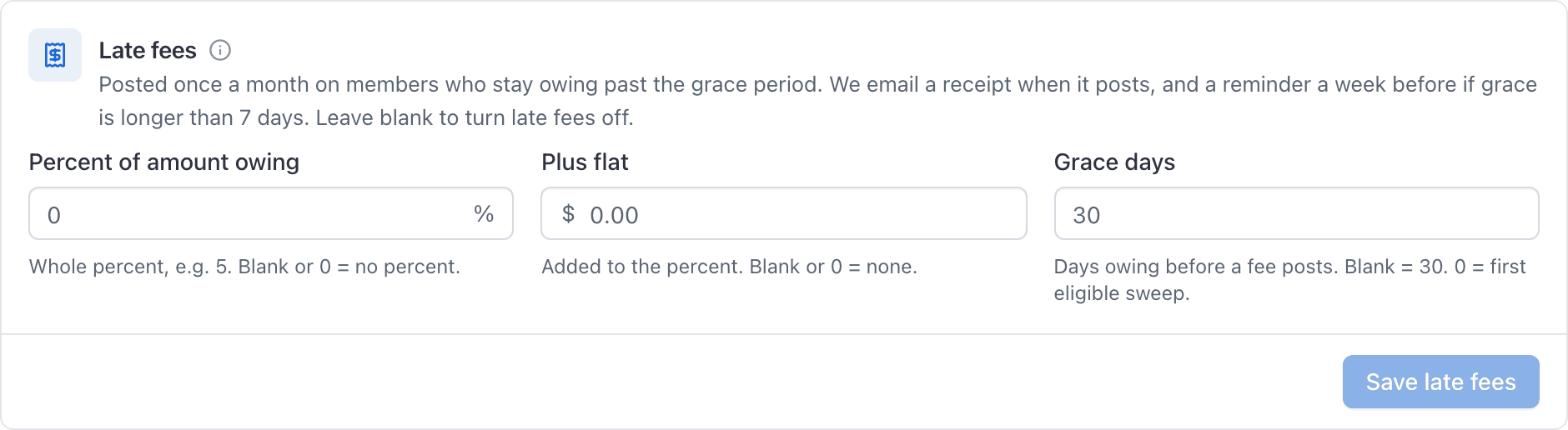
Invoice-mode schools ignore these fields. The fee is a ledger Fee row, not a Stripe
invoice. Open Receipt on that row for the line item.
When grace is longer than 7 days, the member gets a reminder email and in-app notice
about a week before the fee would post (Late fee reminder YYYY-MM, once). When the
fee posts they get another email with the amount and new balance, plus an in-app
"Late fee posted" notice. Add funds from Billing to avoid the next month.
Statements#
Statement on the ledger (your Billing page, or an admin looking at People → Ledger) opens a date range in the school's time zone (not your laptop's): opening balance (everything before the start), each entry in the period with a running total, and closing.
Print uses the same isolated print view as a receipt. Email statement sends it to the member's email with a link back to Billing. This is not a Stripe invoice and does not sync to QuickBooks.
The period cannot be longer than two years, and a range with more than 5,000 entries asks you to narrow the dates.
Receipts#
Live Flight, Fee, and Charge rows offer Receipt. That opens the same right-hand panel as an invoice or ledger entry: line items, the member, the school, and the booking when there is one, with Print on the panel.
You cannot open a receipt for a top-up, a reversal row, or a charge that has already been reversed. Use the live charge (or the new charge after a reassign) instead.
Reassign a flight charge#
Admins only. On a live Flight row that has not been reversed, click Reassign, pick another active member, and confirm.
AerScheduler reverses the original charge and posts the same amount on the new member. Both rows keep a memo. The booking's payer stake moves with the money, so close-out does not try to bill the first person again.
Reassign refuses:
- Yourself as the target
- A member who already has a live charge on that same booking
- Archived or deleted members
- Rows that are not flight charges (fees and desk charges stay where they are)
Where members look#
| Screen | Who |
|---|---|
| WebPeople → person → Ledger | Admins managing that member (same searchable table, plus desk credit / refund / reassign). Invoices is leftover Stripe bills. |
| WebBilling → Ledger under the personal section | The member themselves (balance, searchable history, Add funds, receipts; no Reassign) |
| WebBilling → Payment methods | Auto-refill and saved cards |
| iOS app Account / ledger | Balance, history, Add funds, receipts |
Guests#
Walk-ins are not on this ledger. Guest visits stay on pay-this-visit invoices. Promote someone to a member under People if they should hold a balance going forward.
Common questions
- Can I edit a ledger charge that was posted wrong?
- No. Reverse it (or reassign a flight charge) so both the mistake and the fix stay on the account. There is no edit-in-place.
- Who can reassign a flight charge?
- Owners and admins only, from People → the member → Billing, on a live Flight row that has not already been reversed.
- What does auto-refill do?
- It charges the member's default card on a schedule to add credit: when the balance drops under a floor, to pay what they owe, or a fixed amount. Three failed charges pause it and email the member; a successful charge emails the new balance. The card is not deleted.
- Do members get a late-fee email?
- Yes. A reminder about a week before grace (when grace is longer than 7 days), then a receipt email and in-app notice when the monthly fee posts. Open Receipt on the Fee row.
Still stuck on this?
Email support@aerscheduler.com and tell us what you were trying to do. We answer.