
Bill a discovery or guest flight
A guest has no account and no PIN, so a guest booking closes out in one step and Stripe emails them the invoice directly.
For admins and instructors
A guest has no account, so there is no PIN and nobody signs off. Ramp out and ramp in as usual, then click Close out & bill guest in the booking's Close-out section. Stripe creates a customer for the guest and emails them the invoice with a pay link.
Before the flight#
The booking has to be a Guest reservation, and the guest record on it needs a name and an email address. That is what the invoice is addressed to. Nothing checks it for you, so make sure both are filled in before you close out.
A guest booking holds one guest, and the guest is the payer. Both the aircraft time and the instruction land on their invoice: instruction is charged whenever there is an instructor plus somebody to instruct, and a guest counts.
Close out and bill the guest#
Ramp out
Open the booking on WebSchedule and click Ramp out in the Close-out section. Enter Hobbs out and Tach out.
Ramp in
When the aircraft is back, click Ramp in and enter Hobbs in and Tach in, plus Instruction time (hrs) if you are charging for the lesson.
Click Close out & bill guest
On a member booking this is where the pilots would confirm with a PIN. On a guest booking the Close-out section offers Close out & bill guest instead.
Check the guest's details
The dialog shows the guest's name, email and phone. Correct anything that is wrong before you send, because this is where the invoice is going.
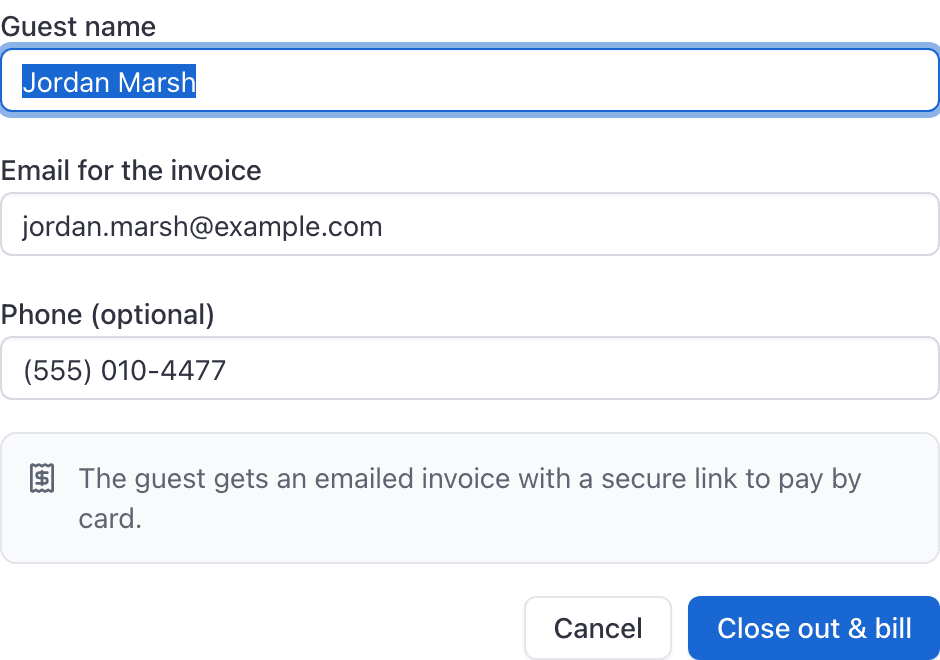
Confirm
Click Close out & bill. The review is finalized and the invoice goes out.
What the guest receives#
Stripe creates a customer record for the guest and emails them the invoice with a payment link. Guest invoices are given 7 days to pay by default.
The guest does not get an AerScheduler account. They cannot sign in, and they see nothing about your school beyond their own invoice.
Guest invoices in the Billing list#
The invoice appears on WebBilling alongside everything else, and the instructor who flew it can open it from the reservation.
Reminders do not apply to guests#
Send payment reminder is refused on a guest invoice: "Guest invoices are emailed by Stripe". Chasing a guest happens in your own Stripe dashboard, where the invoice was sent from.
If the guest record is incomplete#
You cannot run the close-out a second time. It answers "This reservation has already been reviewed", and the guest's details can no longer be corrected on the booking. Bill the guest by hand instead, from Billing → New invoice with Guest recipient on (or the iOS Generate Invoice screen), where you can type their name and email in directly.
Billing a guest for something that is not a flight#
The web console's New invoice dialog can only pick a member. To invoice a guest for a headset, a photo package or anything else, use Billing → New invoice with Guest recipient on, which has a guest recipient field. See Create a manual invoice.
Related#
The scheduling side of the same booking.
What to do when the guest pays you in cash on the ramp.
Still stuck on this?
Email support@aerscheduler.com and tell us what you were trying to do. We answer.