
Close out and bill a discovery or guest flight
A guest has no account and no PIN, so an admin or the instructor on the flight closes it out for them. The guest is emailed a secure link and pays by card.
For owners, admins and instructors
A guest has no account, so there is no PIN to collect. Ramp the flight in, then press Close out & bill guest, check the email address, and confirm. The guest is emailed a secure link and pays by card.
Ramp the flight in first#
A guest flight closes out like any other flight up to the point of sign-off. Ramp out with the departure Hobbs and tach, fly, then ramp in with the return readings. See Ramp out and ramp in a flight if that part is new.
Only once the aircraft is back does the booking offer the guest close-out. Until then the panel is still asking for readings.
Press Close out and bill guest#
Open the booking
From WebCalendar, click the block. The close-out section says the flight is flown and needs to be closed out and billed to the guest, and names them.
Press Close out & bill guest
This is where Confirm review sits on a normal flight.
Check the guest's details
The modal carries the Guest name, the email the invoice goes to, and the phone number from the booking. Correct anything that is wrong before you go on.
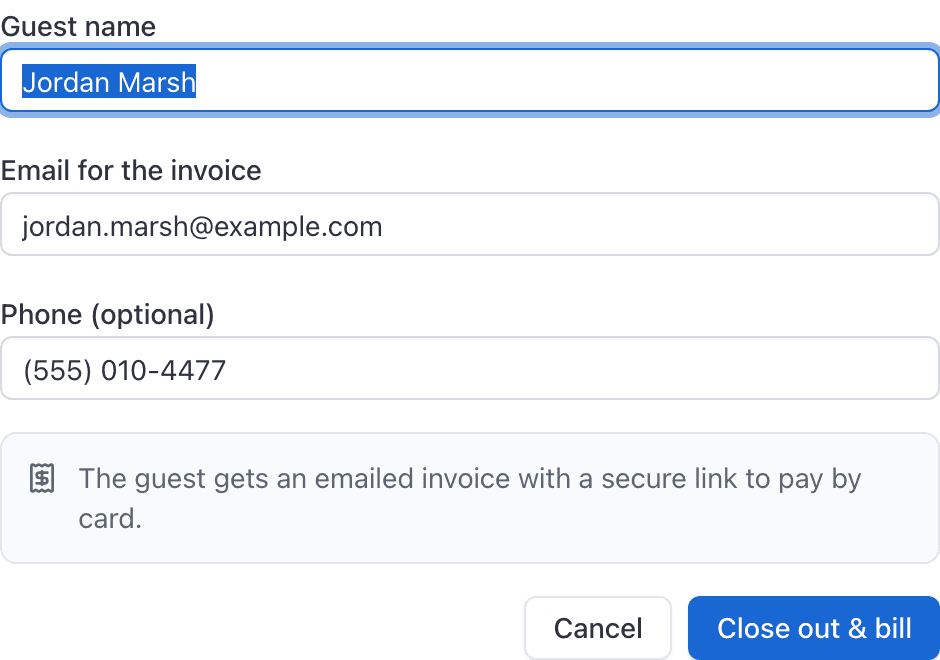
Press Close out & bill, then confirm
There is a confirmation step, because this raises a real invoice against a real person outside your school.
Check the email the invoice goes to#
How the guest pays#
The guest is emailed a secure link and pays by card from it. They do not need an AerScheduler account, they never set a PIN, and they are never asked to sign in. Closing out here replaces the pilot sign-off entirely for that person.
If an instructor is also on the guest booking, the flight is still billed to the guest. The instructor is being paid, not charged.
Who is allowed to do this#
An owner or admin can close out any guest flight. The instructor assigned to the flight can close out theirs. Anyone else opening the booking sees "An admin or the assigned instructor can close this out." instead of a button.
That is narrower than the rest of the close-out, where anybody rostered on a booking can ramp it out and in. Billing an outside customer is the part reserved for staff and the instructor of record.
Related#
The billing side: what lands on the invoice and how the payment settles.
What a Guest booking allows, and why it always needs an aircraft.
Still stuck on this?
Email support@aerscheduler.com and tell us what you were trying to do. We answer.