
Sign off a flight with your PIN
Every pilot on a booking confirms the close-out with their own four character PIN. The invoice is raised automatically when the last person signs off, so a flight nobody signs off is a flight nobody is billed for.
For instructors, students and renters
Once a flight has ramped in, every pilot on it presses Confirm review and types their own four character PIN. When the last person signs off, the invoice is raised automatically. A flight nobody signs off is a flight nobody is billed for.
Set your PIN first#
WebYou → Profile → Security, under Confirmation PIN. Type a PIN and press Set PIN. It has to be exactly four characters.

On the iOS app it is AppSettings → Security → Personal PIN.
Without a PIN you cannot close out a flight you were on, and the booking sits at Awaiting review and never turns into an invoice.
Confirm the review#
Open the booking
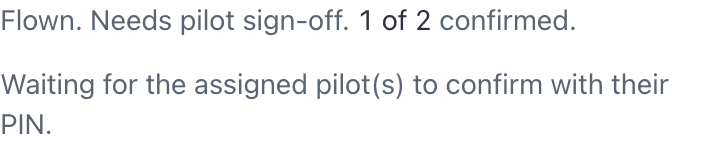
The close-out section reads that the flight is flown and needs pilot sign-off, with a count such as 1 of 2 confirmed.
Check the recorded times
The Hobbs and tach readings, and the instruction time, are what you are signing for.
Press Confirm review and type your PIN
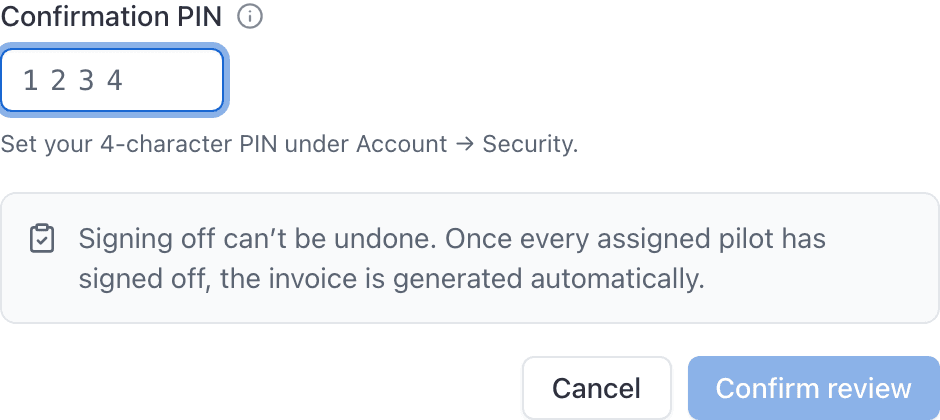
Press Confirm review
Your sign-off is recorded against your name.
If something was wrong#
A sign-off can be taken back, up until the flight is billed, by the school's staff (an admin or the front desk) or by the instructor on that booking. They use Reopen to make a correction on the reservation panel in the console, or Reopen close-out in the app's actions menu. If you are the student or the renter, ask one of them. Everybody's PIN on that booking is cleared and they all confirm again once the correction is made, which is the point: nobody's signature carries over onto numbers they have not seen.
Correcting a reading or a rate does the same thing on its own, so you do not need to reopen first to fix a Hobbs entry.
Who can clear whose signature. Fixing your own flight is yours to do: if the only PIN on the booking is your own, correct the reading and enter your PIN again. Clearing somebody else's signature is a different act, and it is limited to the school's staff (an admin or the front desk) and to the instructor on that booking. So a student on a dual cannot clear their instructor's confirmation. Ask the front desk or your instructor to reopen it.
A booking nobody signs off, a maintenance block or a discovery flight with no instructor, has no signature to clear, so anybody who can close it out can correct it.
Once the flight has been invoiced, or charged to a member's ledger, the sign-offs and the readings are fixed while that bill stands. Undo the bill first: void the invoice from Billing, or open the member's Ledger tab, find the flight charge and choose Reverse. Either one puts the flight back within reach, and the money is countered rather than erased, so the statement still shows what happened.
Everyone on the flight has to confirm#
The close-out waits on every person on the booking. A two person dual waits on both the instructor and the student. Neither one can sign for the other, and neither can an admin: the PIN is personal, and only people on the booking are offered the button at all.
Anybody looking at the booking who is not on it sees a line saying it is waiting for the assigned pilots to confirm, and no button.
A maintenance booking carries nobody, so it needs no sign-off and completes on its own.
What happens when the last person signs#
The close-out completes and the invoice (or ledger charge, when How members pay is Account ledger) is generated automatically. On a booking split between several people, that is one bill each, not one bill with shares inside it.
Billed ticks only once that charge exists. If the meters did not move, the total is under 50 cents and nothing is posted: Review is ticked and Billed stays grey until you correct the times and post the charge.
The badge then walks on to Paid once an invoice is settled. A ledger charge is already the money, so there is no separate paid badge.
You can only sign off once#
Afterwards the button is replaced with a line telling you that you have signed off and are waiting on the other pilot's PIN. If a flight is stuck there, the other person on it has not confirmed yet. Ask them.
If the recorded times were wrong#
Say so before you sign. Once the readings are corrected, every sign-off on that booking is wiped and everybody has to confirm again.
Corrections are made with Correct times on the booking in the console, or Update Details in the app. Once the last person has signed off, or an invoice exists, they are refused entirely and the invoice has to be voided first. See Ramp out and ramp in a flight.
Guests never sign off#
A guest has no account and no PIN. A guest flight is finished by an admin or by the instructor on it, with Close out and bill guest, and the guest is emailed a link to pay by card. See Close out and bill a discovery or guest flight.
Still stuck on this?
Email support@aerscheduler.com and tell us what you were trying to do. We answer.