
Check your currencies and fix one that blocks booking
Your Currencies page shows medicals, flight reviews, and checkouts. Anything not current can stop you booking an aircraft, including one that has simply never been signed off.
For students, renters and instructors
Open WebYou → Currencies. Anything that is not current can stop you being booked on an aircraft, including a currency that has never expired because it has never been signed off.
Open your currencies#
WebYou → Currencies, or Currencies in the iOS app. The page is headed with medicals, flight reviews and checkouts, and it shows four counts across the top:
- Current
- Expiring soon
- Expired
- Not signed off
Below the counts is one card per currency, worst first, each with the currency name, a status badge, and either an expiry date or "Awaiting sign-off".
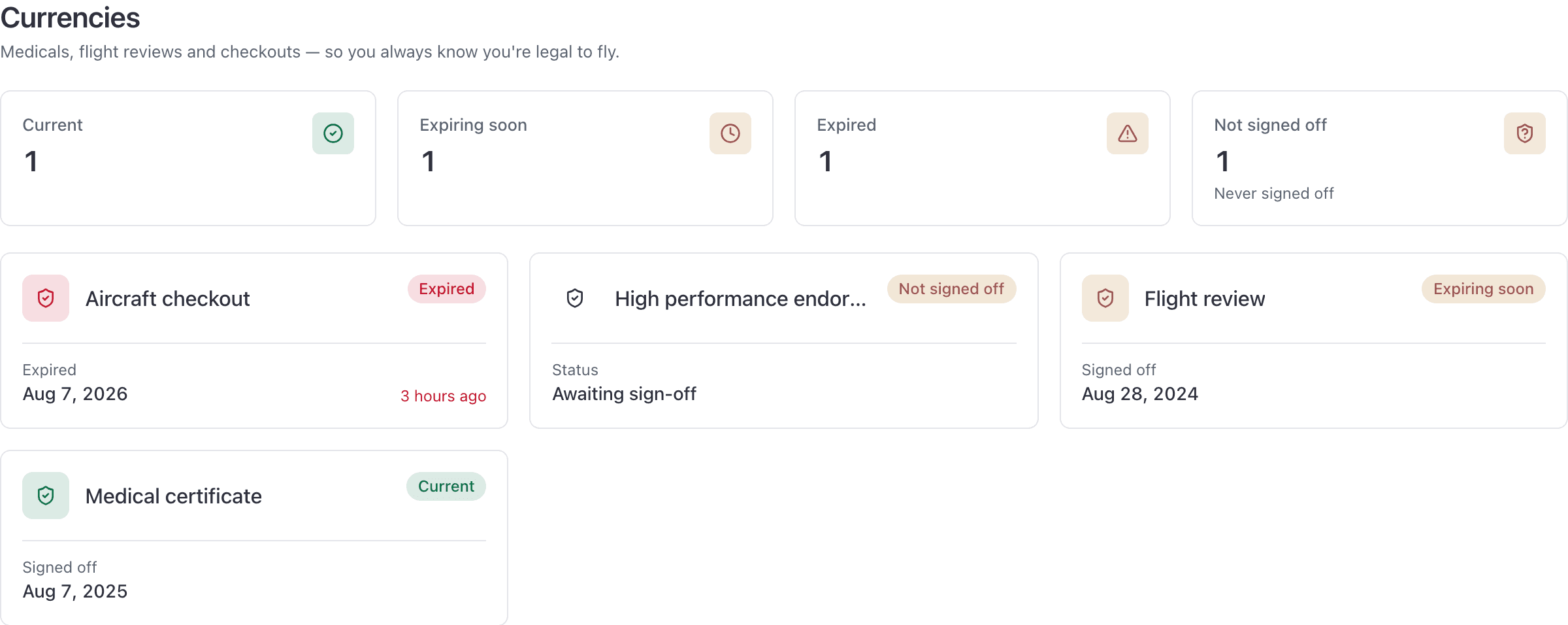
The page is read-only for you. Your school records and signs off what is on it.
What each status means#
| Status | What it means | Can you be booked on an aircraft? |
|---|---|---|
| Current | Signed off, in date | Yes |
| Expiring soon | Still valid, but the date is close | Yes, for now |
| Expired | The date has passed | No |
| Not signed off | Nothing has expired. Nobody has signed it off yet | No |
A currency counts as current only when all three are true: it is in date, it has not been archived, and somebody at the school has signed it off.
Not signed off is not the same as expired#
This is the one that generates the phone call. A currency sitting at "Not signed off" has no expiry problem at all. It has simply never been countersigned by the school, and until it is, it counts as not current and blocks aircraft bookings exactly like an expired one does.
It is common on a brand new member: the school set the currency type up, the paperwork is in, and nobody has ticked it off yet.
How a currency blocks a booking#
Currencies are checked when the booking is created. This is always on whenever your school has currency rules for that aircraft. A booking that names somebody who is not current for that aircraft is refused, and the refusal names the person: "Jamie Smith does not meet currency requirements."
The check is per resource, because a school can require different things for different tails, for example a checkout on the complex single that the trainer does not need.
A currency rule is scoped to a group of resources, and a group can hold rooms and simulators as well as aircraft. So a rule scoped to a group that includes the simulator or the classroom blocks a sim session or a ground lesson the same way it blocks a flight.
Flying with a current instructor#
Some currency rules allow the flight to go ahead when a current instructor is on the booking. If yours is one of those, adding an instructor to the booking makes the refusal disappear.
The screen does not explain that this is what happened, so it can look as though the block was imaginary. It was not: the rule allowed the flight because an instructor is aboard, and it assumes that instructor is pilot in command. Booking the same aircraft solo again will be refused again.
How to get one renewed or signed off#
You cannot clear a currency yourself, and there is no button on this page to try. Send your school the new medical, the endorsement, or the checkout paperwork, and ask them to record it and sign it off. Once they do, the count drops and booking works again straight away.
Related#
Every refusal message on the booking form, including this one.
The booking form these checks run against.
Still stuck on this?
Email support@aerscheduler.com and tell us what you were trying to do. We answer.