
Why can't I edit, move or cancel this booking?
Bookings lock as they move through the day, and a few actions are narrower than they look. This page says which rule caught you and what to do instead.
For owners, admins, dispatchers, instructors, students, renters and technicians
A booking locks in stages as the day goes on: once it has ramped out, once it has ramped in, once it is invoiced, once its window has passed. A few actions are also narrower than the buttons suggest. Find the symptom below.
The Edit button has disappeared#
Edit reservation is only offered while all three of these hold:
- the booking is not cancelled
- it has not ramped out
- its end time is still in the future
Miss any one and it is gone rather than greyed out, from the panel's … menu, from the block's menu on the board, and from the booking's own page.
| Situation | What to do instead |
|---|---|
| It has ramped out | Only the return time can still change. Drag the trailing edge of the block. See below. |
| Its window has passed and it never flew | Cancel it, with a reason. The record is what makes the cancellation report honest. |
| It is cancelled | Book a new one. A cancelled booking is kept as a record and never reopened. |
The block will not drag#
Dragging is blocked by the same rules plus one more, and the board tells you why before you try: hover the block and the reason is in the tooltip.
| Tooltip | Why |
|---|---|
| "This flight is invoiced" | Its times are part of the bill. |
| "The aircraft is back" | Its times are part of its close-out now. |
| "This booking's window has already passed, and it never ramped out." | It is history. |
| "Only dispatch or someone rostered on this flight can move it." | You are not on it and you are not staff. |
Two other things stop a drop rather than a drag:
- Dropping on the Unassigned or Other row at the foot of the day board is refused. Dragging cannot take a booking off its aircraft.
- Dropping on the wrong kind of resource is refused and says so, for example a ground booking needing a room rather than an aircraft.
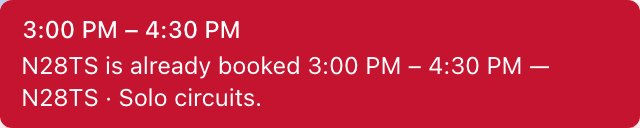
Everything snaps to 15 minute marks, and a booking cannot be dragged shorter than 15 minutes. Dragging one occurrence of a repeating booking moves only that occurrence, and the toast says so.
The aircraft is out and only the return time can change#
Once a flight has ramped out, its start time, its aircraft and its crew are frozen. The one thing still open is when it is due back.
On the web the Edit button is gone at this point, so the way to push the return time is on the board: the block grows a single handle on its trailing edge, and dragging that changes the end time. The tooltip says as much, but only on hover, which is why people miss it.
The iOS app will still let you edit the end time from the reservation screen.
Cancel or edit is refused inside the school's lock window#
"This booking starts in less than 24 hours, so you can't cancel it yourself…" (hours match whatever the school set).
Your school turned on a cancel and edit lock under Booking preferences. Members cannot cancel or edit once the start is inside that window. Front desk, instructors, and technicians can still do it. If the school also set a late-cancel fee, members can cancel by agreeing to the fee in the cancel dialog (web and iOS).
See Booking rules and settings.
Cancel says you are unauthorized#
"You are unauthorized to make this request."
Cancelling turns on who created the booking, not who is flying it. The permitted set is the creator, plus owners, admins, dispatchers and technicians.
Same rule, seen from the other side: a student can cancel a lesson they booked themselves but not the identical lesson the front desk booked for them.
There is no Cancel button at all#
On the web console, students and renters are never shown one, even on a booking they created themselves, because the board cannot see who created a booking and errs on the side of hiding the button.
Two ways round it: cancel from the AerScheduler iOS app, which can see it and does offer the button, or ask the front desk.
You can only take yourself off this booking#
"You can only take yourself off this booking. Ask an instructor or the front desk to remove someone else."
Editing a booking replaces the whole crew, so the server checks what actually changed. A student or renter may add or remove themselves and nobody else. Staff, and the instructor on the booking, can change anyone's seat.
This bites hardest on a group lesson, where a student trying to tidy the roster looks like they are removing a classmate. It also surprises people because editing your own booking opens the full dispatch form, with every picker on it, which looks like permission to reseat the flight.
The shares are frozen because it is invoiced#
"This booking has already been invoiced, so the shares can't be changed. Void the invoices first if they're wrong."
The Who pays what panel locks the moment the first invoice for the booking exists, and on a split booking there is one invoice per payer. Fill the panel in after the aircraft is back and before the last pilot signs off, because that sign-off is what raises the invoices. See Split a flight between two or more people.
The repeat cannot be changed#
The Repeat control is offered when you create a booking and never when you edit one. Editing an occurrence of a series is an ordinary edit of that one booking, and there is no way to change the rule itself afterwards.
To change a cadence, cancel the series and book it again. Cancelling offers three scopes: this booking only, this and all later bookings, or the whole series. Bookings that have already started are never cancelled by any of them.
A Hobbs reading needs correcting#
Use Correct times on the reservation panel in the console, or Correct times on the reservation screen in the app. Only the figures the booking already carries can be corrected, and only once the aircraft is back.
The flight is already signed off#
Use Reopen to make a correction on the reservation panel in the console, or Reopen close-out in the app's actions menu. It clears the sign-offs so everybody confirms the corrected numbers, and changes nothing else: the readings, the crew and the booked times all stay as they are.
It is the same act Correct times performs on its own, offered separately for the case where the numbers are right and the sign-off is not: the wrong person confirmed, or somebody confirmed without looking.
Reopening is narrower than correcting, because a PIN is a signature. The school's staff, an admin or the front desk, or the instructor on that booking, can reopen it. A pilot cannot clear another pilot's confirmation. You are asked why, and the reason goes on the flight's activity record with your name against it.
Correcting is limited the same way, but only when it would clear a signature that is not yours. Your own is yours to redo: fix the reading on your own solo, then enter your PIN again. A booking nobody signs off, a maintenance block or a discovery flight with no instructor, has no signature to clear, so anybody who can close it out can correct it. What needs staff or the booking's instructor is clearing somebody else's confirmation, so a student cannot clear their instructor's.
Things only the iOS app can do#
Two of them, both small. The app can edit the end time of a flight that has ramped out, where the console will not edit a ramped-out booking at all. And it shows cancelled bookings in its reservations list, which the web board never draws.
Related#
The other half: refusals when you are creating a booking.
The three ways a booking moves, when it can move at all.
The permission rules behind every message on this page.
Still stuck on this?
Email support@aerscheduler.com and tell us what you were trying to do. We answer.