
Set up membership plans and dues
A plan is what belonging costs: a join fee, recurring dues, when they are billed, and what the tier gets in return.
For owners and admins
WebSettings → Memberships → Add plan. A plan is one tier: a name, an optional one-time join fee, optional recurring dues, when those dues are billed, and what the tier gets in return. Full, associate and student rate are three plans, not three settings on one.
What a plan is#
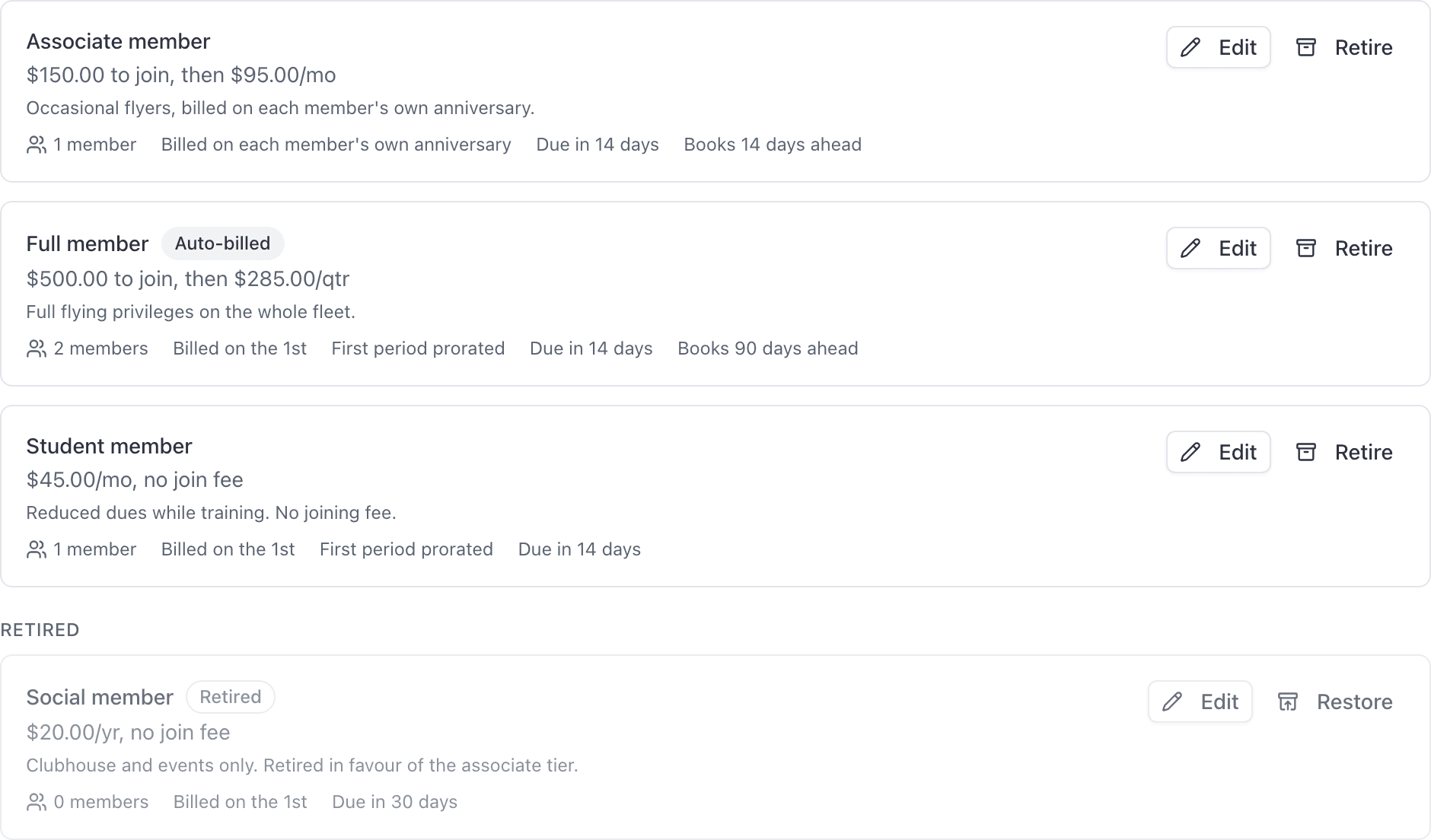
A plan is what your organization sells: the cost of belonging, and what belonging buys. Every tier you offer is its own plan.
Each plan carries some or all of:
| Part of a plan | What it is |
|---|---|
| Join fee | A one-time charge when somebody joins |
| Dues | A recurring charge, monthly, quarterly or annual |
| Billing day | A fixed day of the month, or each member's own anniversary |
| Prorate the first period | Whether the stub before the first full period is charged |
| Days to pay | What gives a dues invoice a due date |
| Booking window | How far ahead this tier may book |
| Aircraft rates | A per-tail hourly rate for this tier |
| Membership agreement | Which document type members on this tier should have on file |
Create a plan#
Open Settings → Memberships and click Add plan
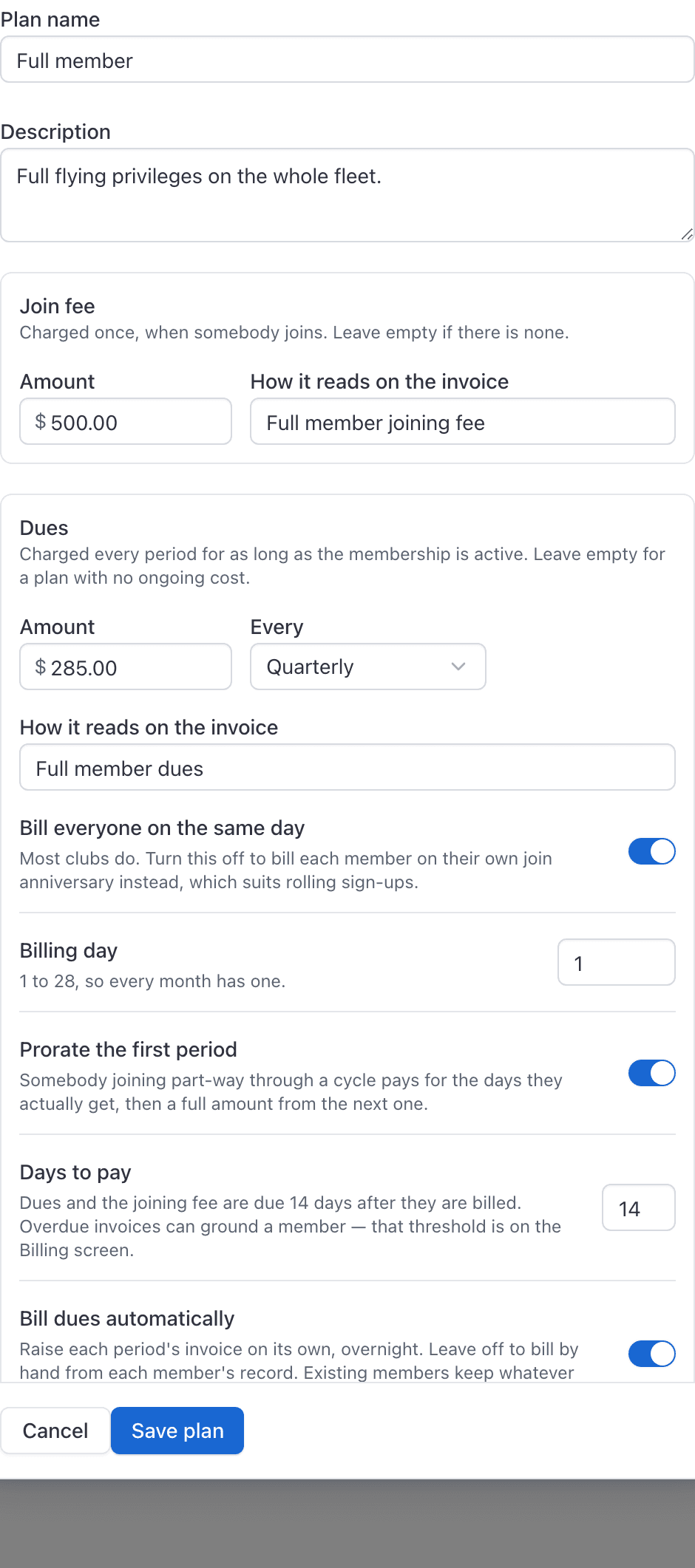
Name and describe the plan
Use the name your members already use: Full member, Associate, Student rate.
Enter the join fee, if there is one
You set the amount and how it reads on the invoice.
Enter the dues
An amount, an interval under Every (Monthly, Quarterly or Annually), and the wording that appears on the invoice.
Decide when dues are billed
Either Bill everyone on the same day with a Billing day, or turn that off so each member is billed on their own anniversary.
Set Prorate the first period and Days to pay
Optionally set a Booking window and a Membership agreement
Click Create plan
Reopen the saved plan to set per-aircraft rates for the tier, which are only offered once the plan exists.
New plans appear in the plan pickers on the invite and join-request screens, so you can put somebody on a tier as you bring them in.
Join fee and dues#
The join fee is charged once, when the member joins. Dues repeat on the interval you chose. Both carry their own wording, which is what the member reads on the invoice, so write them the way your club already talks: "2026 annual dues" beats "Dues".
Your school's service fee percentage, if you have set one, is added to dues invoices in the same way it is added to flight invoices.
Bill everyone on the same day, or on their own anniversary#
Turn Bill everyone on the same day on and pick a Billing day, and the whole tier is billed together. The day is capped at 28 so that every month has one.
Turn it off and each member is billed on the anniversary of their own start date. That is smoother for you and less predictable for the treasurer.
Prorate the first period#
This only matters when the plan bills everyone on the same day, because that is the only case that produces a stub.
With prorating on, the gap between joining and the first full period is charged by whole days against the length of the period it comes before. A 10-day stub on a quarterly plan is 10/92 of a quarter.
The stub is billed before the first full period, at its own smaller price. That is why the amount shown under Next period on a new member's record can be less than the plan's dues.
Days to pay#
This is what gives a dues invoice a due date at all. Fill it in and the invoice carries a deadline, which is what the automatic reminder sweep chases against. Leave it blank and the dues invoice has no due date, and reminders fall back to chasing it once it is a week old.
Booking window and per aircraft tier rates#
These are the two entitlements a plan can carry.
Booking window refuses a booking further ahead than the tier allows, for every reservation type. It is read live at the moment of booking.
Aircraft rates set a per-tier hourly rate for a given tail, inside a saved plan. It is sparse on purpose: leave an aircraft blank and members on the tier are billed that tail's published rate.
The membership agreement#
This names the document type a member on this plan is meant to have on file. It is a reminder for your own records: AerScheduler does not collect signatures, and nothing about a member is blocked when the agreement is missing.
Changing a plan later#
| What you change | Who it affects |
|---|---|
| Join fee, dues amount, interval | Only people who join after you save. Existing members keep the price they joined at, because their prices were snapshotted when their membership started. |
| Booking window | Everybody on the tier, as soon as you save, including members who joined years ago. |
| Aircraft rates | Everybody on the tier, as soon as you save. |
To move an existing member onto today's price, use Change plan on their record, which takes effect from their next period. See Add a member to a plan.
Plans are retired, never deleted. Retire hides a plan from the pickers and lists it separately without touching anybody who is on it; Restore brings it back.
Automatic dues billing#
Bill dues automatically raises each period overnight as it comes due, instead of you pressing Bill now.
Related#
Putting somebody on a plan and billing their dues.
The published rates a tier rate overrides.
Still stuck on this?
Email support@aerscheduler.com and tell us what you were trying to do. We answer.