
Training: why it did that
The behaviour people email about most: hours that will not count, buttons that are disabled, sections that never appear, and numbers that went down.
For owners, admins, dispatchers, instructors and students
Most training questions come down to five rules: publishing is permanent, lessons only credit hours they were told to credit, requirements apply their limits when you read them, signing freezes a record, and a dispatcher is not a grader. Everything below is one of those five.
I published by mistake and cannot edit the syllabus#
There is no unpublish. Publishing freezes a version forever: its stages, lessons, tasks, requirements and grading scale are read-only from that moment, and the editor is replaced by a plain read-only page rather than a greyed-out one. Nothing failed to load.
The route forward is a new version. Click New version in the course header, name it, click Create draft, and you get an editable deep copy of everything. Fix it, publish it, then Retire the old version so nobody new is enrolled on it.
Anybody already enrolled on the old version stays on it and finishes on it. That is the point of versions, and there is no supported way to move a student across. See Publish a syllabus version.
Hours are not counting toward anything#
The lesson credits nothing. In the syllabus editor, every lesson has a Credits toward box listing the version's requirements, and you tick which clock feeds which: flight time, ground time, or per lesson for a count.
A lesson with nothing ticked is perfectly flyable, gradeable and signable, and adds zero hours to every requirement, silently.
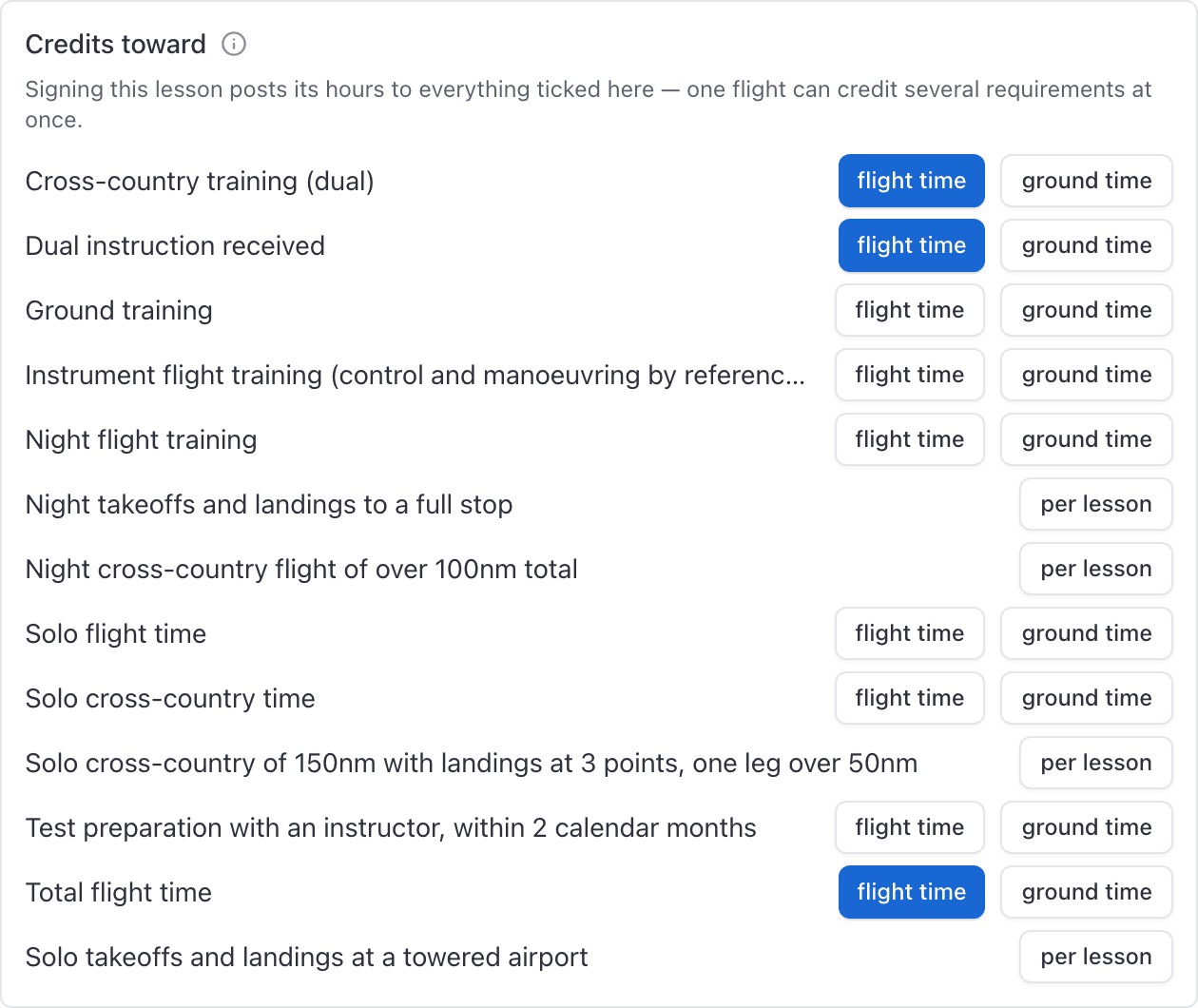
Expand the lesson row in the syllabus. A lesson that credits nothing says so in amber. If the version is already published you cannot fix it there: make a new version, tick the boxes, and post the missing hours on affected students as a credit by hand.
A requirement shows fewer hours than the student flew#
Working as intended, and the row says which rule bit.
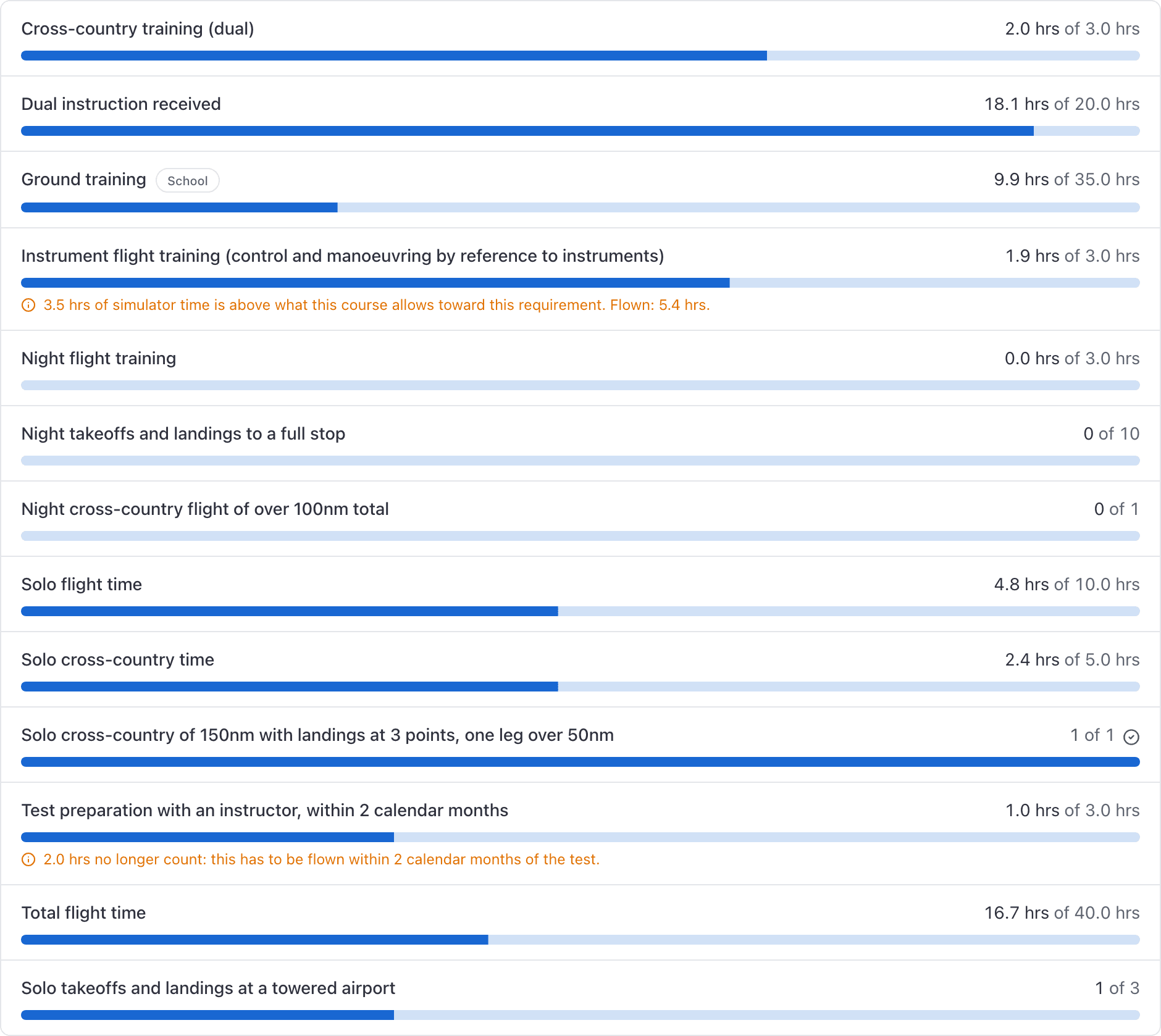
Three possible reasons: device time above the course's simulator limit for that requirement, transferred credit above the limit for previous training, or training that has fallen outside the requirement's recency window.
Limits are applied when the record is read, not when the credit is written, so every hour is still on the ledger. The requirement is only refusing to count more than its share.
If a recency window looks off by a few days, note that it is counted in whole calendar months from the 1st, which is the FAA's wording. On 5 August with a two month window, training from 1 June counts.
The Training record section is missing from a close-out#
It appears only when all four of these are true:
- The booking type is dual, ground, sim or solo.
- At least one student is on the booking.
- That student is enrolled on a course that has a lesson of the matching type. Dual and solo look for flight lessons, ground for ground lessons, sim for sim lessons.
- You are staff, or one of the instructors assigned to that booking.
A rental, a guest flight or a maintenance booking never shows it, and neither does a booking whose student is on no course. See Grade a lesson when you close out the flight.
The grade dropdown will not accept our marks#
The close-out, the training record, and the phone all offer this course's own marks. If a
save is refused with "S" is not one of this course's grades (1, 2, 3, 4)., something
posted a mark the version does not use, usually an integration or an old queued grade from
before the scale changed.
Read Set the grading scale for a course for which marks complete a lesson.
The numbers dropped after I amended a record#
Expected, and temporary. The correction is created unsigned, and only a signed record counts, so the moment you click Amend the lesson stops counting as complete and every hour the original credited is reversed out of the ledger.
Finish the correction and sign it, and the numbers come back. If somebody amended a record and walked away, look for a row badged Correction that is not signed. See Correct a signed lesson record.
Graduate is disabled and I cannot see why#
The reason lives on the Overview tab of the training record, in an amber card naming what is outstanding. From the Requirements or Lessons tab you see only a dead button.
On a Part 141 course, graduation is blocked while the record has not been certified, or while any requirement sourced from Part 61 or Part 141 is unmet. Requirements you set yourself, with Comes from set to "Our own", never block.
On a Part 61 course the button is never disabled. See Graduate a student, or end an enrollment.
Training is empty when a dispatcher opens it#
Dispatchers can open the Training page, and then see one section saying nobody is in training. The page is not broken. The course library is not served to a dispatcher, so that section is hidden, and the student list is scoped to the dispatcher's own enrollments, which is normally none.
Dispatchers do get the three training reports, which is the right place for them to work. See Who can see and do what in Training.
The Training card is missing on a person's page#
The Training card on a member's page only appears when you are allowed to read their courses, and when they have at least one. A dispatcher, or anyone else who cannot grade or list the school's training, sees no card.
That is not a missing record. The page will not show you someone else's syllabus, and it will not show yours under their name either. Read other people's records from Reports, or open the record as an instructor or an admin.
I cannot find our graduated students#
WebTraining → Students only ever lists enrollments that are still In training, and there is no status filter on it. Nothing has been deleted.
Graduated, terminated and transferred students are in three places: the course's own Students tab, the person's page under Training, and the Student progress report. Widen that report's range past year to date or you will still miss anybody who enrolled last year.
Simulator hours and task grades are always blank#
Both are entered wherever you grade, the console included, but each only appears when the lesson calls for it.
Simulator hours appear on a lesson your syllabus marks as a sim. On a flight lesson there is no field, because there is nothing to declare: everything flown was in the aircraft. If a device session was recorded against a flight lesson, the hours went in as aircraft time and your course's simulator allowance never saw them. Fix that by grading it against the sim lesson.
Task grades appear when the lesson has tasks. A lesson with none shows no task list, so if the grid is missing on every lesson, the tasks were never added to the syllabus. See Build a syllabus.
Nothing is marked for you, and unmarked tasks are saved as unmarked rather than as a pass.
A grade I entered offline did not sync#
Check the banner at the top of Training on the phone. If it is red, the server refused the grade and its own message is on the entry: usually that the record was already signed, or that you no longer have permission to grade that student. The entry is kept, not thrown away.
Two other things worth knowing:
- Only one pending grade is held per lesson. Grading the same lesson twice offline replaces the first attempt.
- If the record saved but the signature was refused, the next sync can leave a second draft on that lesson. Open the student's record in the console, sign the one you want, and grade over the other.
One screen says the lesson is done and another does not#
The close-out lesson picker and the Next up strip on the booking form treat a lesson as done once any signed record exists against it, including a failing grade. The student's training record only counts a lesson complete when it is signed and graded with a mark the course's scale says completes it.
So a student can read as "Flight 5 done, next up Flight 6" at the close-out while their record still shows Flight 5 incomplete. The training record is the one that counts, and the one an inspector reads.
I cannot undo a credit I posted by hand#
There is no reverse button in the console. Check the requirement, the amount and the date before clicking Post credit.
The only undo the console offers is amending the lesson record that created a credit, which reverses that lesson's credits. It does nothing for a transfer, simulator or manual credit posted by hand.
An endorsement went out with blanks still in it#
The sign dialog counts the unfilled braces and warns you, but the Sign button stays enabled, and the text is stored exactly as you signed it and never regenerated. So an endorsement signed with blanks keeps them.
You cannot edit it. Sign a fresh, correct one. If the endorsement carries an expiry date, use Renew on the row, which signs a replacement and removes the old one from the card, the expirations report and the digest. See Sign an endorsement.
I cannot add a lesson to a student who has graduated#
Once an enrollment is graduated, terminated or transferred, the console refuses to add or edit any lesson record on it, and there is no un-graduate.
Record everything before you graduate a student, including the ground lessons somebody has been meaning to write up. A lesson that turns up afterwards has nowhere to go in AerScheduler, so it stays in your own paperwork.
Still stuck on this?
Email support@aerscheduler.com and tell us what you were trying to do. We answer.