
Who can see and do what in Training
What each role can do on its own, what the four training grants add, and the two places the screen offers a button the server will refuse.
For owners, admins, dispatchers and instructors
Owners and admins can do everything. Instructors can read and grade every training record and sign endorsements, but cannot touch the course library or enroll anybody until they are given a grant. Students see only their own record. Dispatchers see almost nothing, despite Training appearing in their navigation.
What each role can do#
| Owner / Admin | Instructor | Dispatcher | Student | Renter | Technician | |
|---|---|---|---|---|---|---|
| Open the Training page | Yes | Yes | Yes, but it is empty | No | No | No |
| See and edit the course library | Yes | Only with Configure training | No | No | No | No |
| Enroll, graduate, terminate, certify | Yes | Only with Enroll and graduate | No | No | No | No |
| Read any student's training record | Yes | Yes | No | Own only | Own only | No |
| Grade, sign and amend lesson records | Yes | Yes | No | No | No | No |
| Countersign a lesson | No | Own only | No | Yes | Yes | No |
| Sign and renew endorsements | Yes | Yes | No | No | No | No |
| Post transfer or simulator credit | Yes | Only with Enroll and graduate | No | No | No | No |
| Run the three training reports | Yes | No | Yes | No | No | No |
| Hand out training grants | Yes | No | No | No | No | No |
Two rows in that table catch people out.
Instructors cannot open Reports at all. The Student progress, Training records and Endorsement expirations reports are owner, admin and dispatcher only. An instructor works from the student's record and from the endorsement digest instead.
Nobody can countersign on a student's behalf, including the owner. The student's signature is the student's.
The four training grants#
WebTraining → Permissions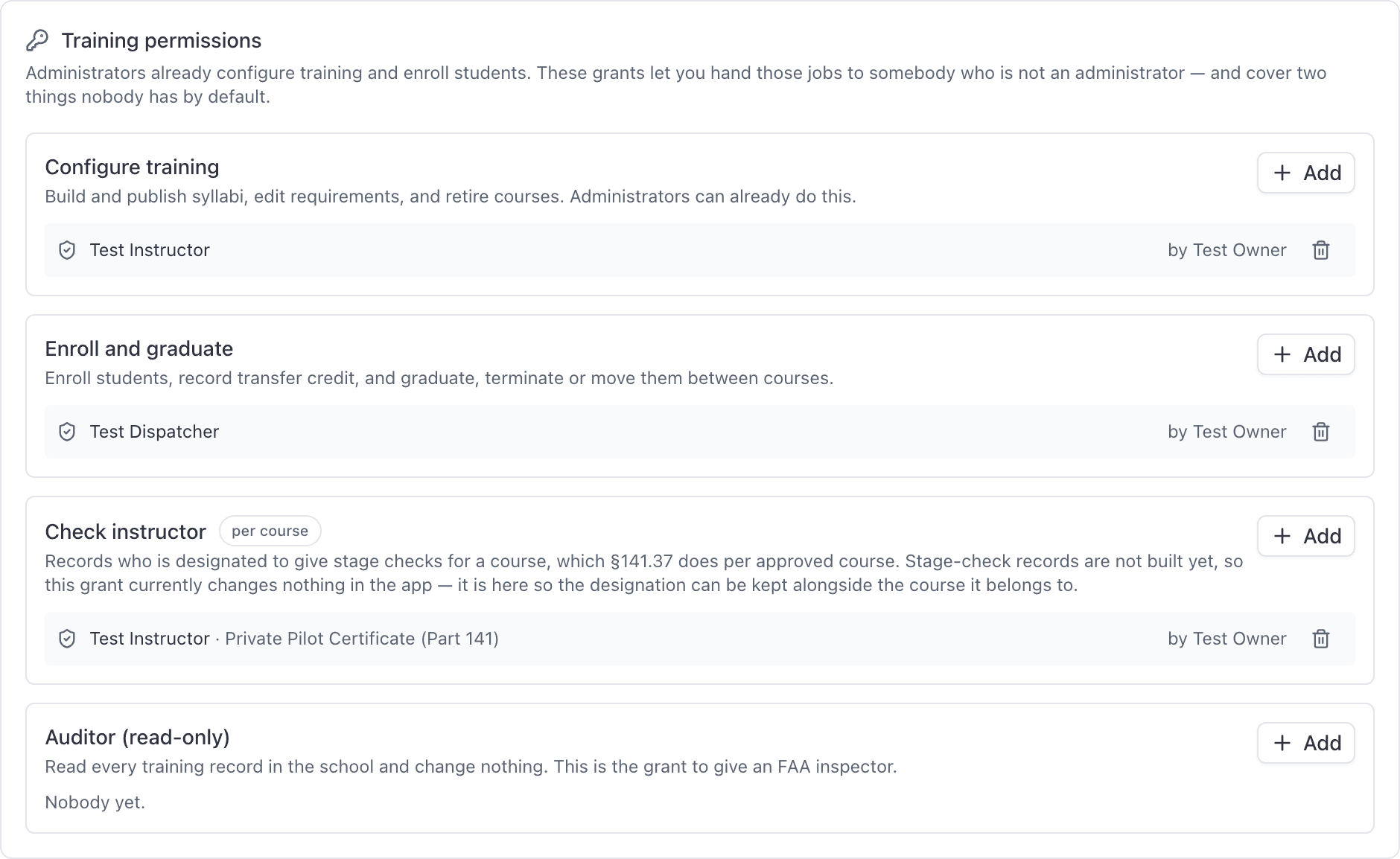
| Grant | What it adds |
|---|---|
| Configure training | Build and publish syllabi, edit stages, lessons, tasks and requirements, set the grading scale, retire and un-retire versions. |
| Enroll and graduate | Enroll students, post transfer credit, certify a Part 141 record, graduate, terminate or transfer, and bill the enrollment fee. |
| Check instructor | Records that this instructor is your designated check instructor, either for one named course or for every course. |
| Auditor (read-only) | Read every training record in the school and change nothing. |
Only Check instructor can be scoped to a single course. The other three always apply school-wide.
Hand out or take back a grant#
Open Training → Permissions
The section only renders for owners and admins. A grant holder cannot hand their own grant to somebody else.
Click Add on the grant you want to give
Each grant carries a description of exactly what it adds.
Pick a person
For Configure training, Enroll and graduate, and Check instructor: only owners, admins, instructors and dispatchers are offered. Auditor can go to any member, including an FAA inspector who is not staff.
Choose which course, for Check instructor only
Or Every course.
Click Grant
It takes effect immediately. To take one back, click the trash icon on the person's row.
Grants only ever add#
Nothing on this screen can take a capability away from anybody.
Owners and admins already configure training and enroll students, so granting or revoking on their rows changes nothing about what they can do. A school that never opens this page behaves exactly as it always did: the grants exist so that a chief instructor or a training administrator who is not an org admin can do the job without being made one.
Read-only access for an FAA inspector#
The Auditor grant reads every training record in the school and changes nothing. It can be given to any member of the roster, including someone with no staff role, so an FAA inspector does not have to be made a dispatcher first. The other three grants (configure training, enroll and graduate, check instructor) are still offered only to owners, admins, instructors, and dispatchers.
In practice the cleaner route is to export the record yourself. See Pull training records for an FAA inspection.
Where the button and the permission disagree#
Dispatchers can reach a training record by link or search, but the server only serves a record to the student on it, to somebody who can grade, or to an Auditor. A dispatcher gets a refusal on everybody but themselves. Read other people's records from Reports instead.
Still stuck on this?
Email support@aerscheduler.com and tell us what you were trying to do. We answer.