
Read a training record: lessons, hours and the ledger
What each tab of a student's record means, why lessons complete and hours can disagree, and why a requirement can show fewer hours than the student actually flew.
For owners, admins, instructors and students
A student's record has four tabs. Overview is progress and blockers, Lessons is the syllabus with each record underneath it, Requirements is the hours, and Ledger is every credit that built those hours. Lessons and hours are two different measures and are meant to disagree.
Open one from WebTraining → Students → the student, or from the person's page under Training. A student opens their own from My training.
The header#
Student name, the course and version (for example "Private Pilot · Rev A"), a Part 61 or Part 141 badge, and a status badge: In training, Graduated, Terminated or Transferred. A Part 141 record that has been certified also carries a Record certified badge. A record that is still In training may carry a pace badge as well; a finished one never does.
Overview: progress, blockers and fees#
- Timeline: each stage of the syllabus as a bar across the months, filled as far as the signed lessons go, with the stage check as a diamond (filled once it is passed) and a line for today. Everything after today is a forecast, drawn striped: the lessons left, in syllabus order, at the student's own pace so far. A student with no lessons yet has no pace, so the forecast assumes a lesson a week and says so. Time that went by with nothing flown is left empty, which is how a stalled student shows up at a glance.
- Next up and Still needed: the next lesson in the syllabus, and the requirements not met yet, including why hours that fell outside a recency window stopped counting.
- Checkride readiness, on a course that names a certificate (private, commercial, instrument, flight instructor). See below.
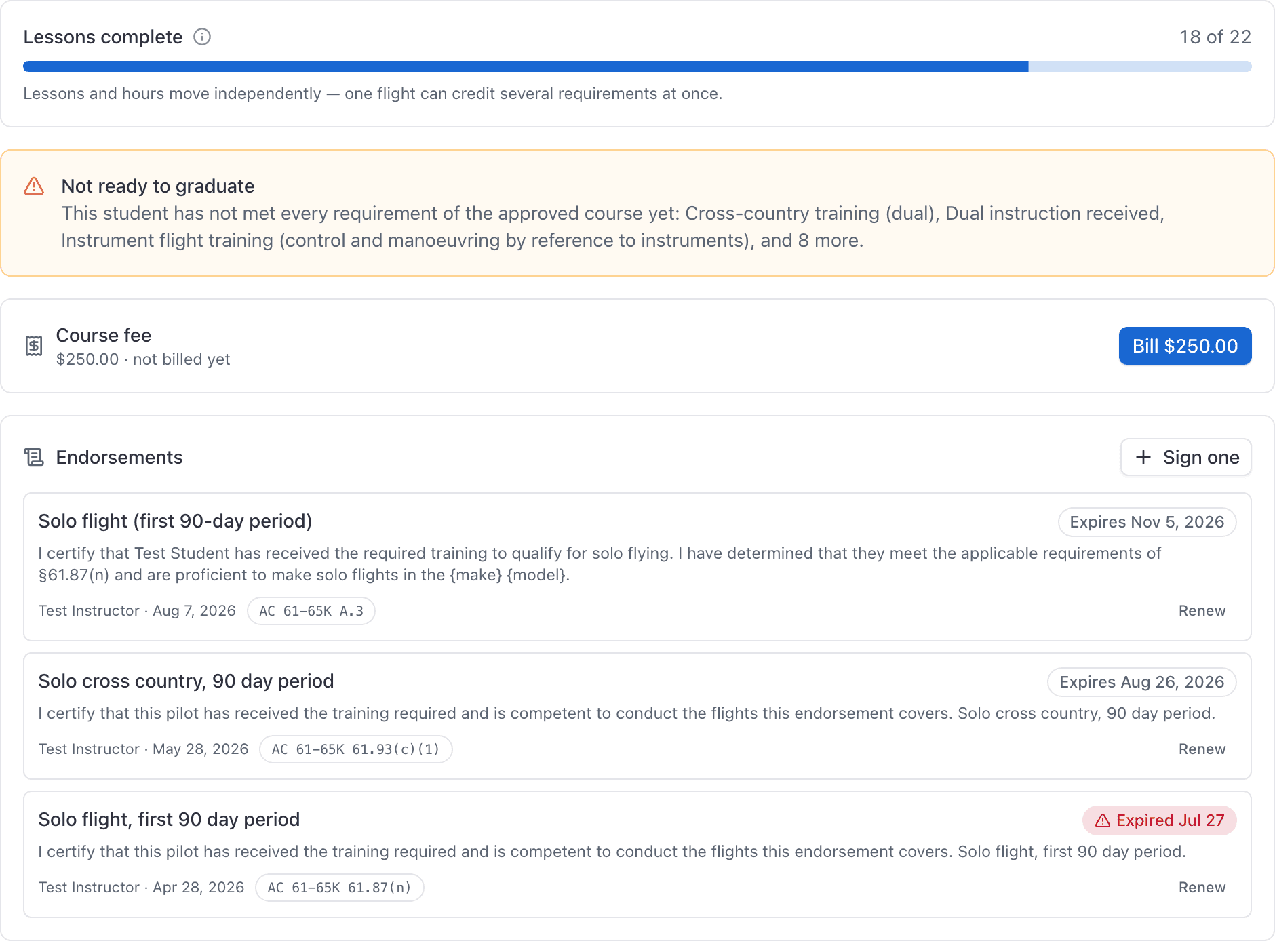
- Not ready to graduate, a card on Part 141 courses naming the requirements still unmet. This is the only place the reason for a disabled Graduate button is written down.
- Course fee, if the course had one when they enrolled, with the button to bill it.
- Endorsements, the same card that appears on the person's page.
Checkride readiness#
The list an examiner works through before a practical test, filled in from the record:
| Item | Done when |
|---|---|
| Syllabus complete | Every lesson in the course is complete |
| Hour requirements met | Every FAA minimum is met, counting only hours inside their recency window. A school's own extra requirements do not count here |
| Knowledge test endorsement | The certificate's AC 61-65K endorsement is on file: A.36 private, A.38 commercial, A.42 instrument, A.46 flight instructor |
| Practical test endorsement | A.37, A.39, A.43 or A.47 is on file |
| Practical test prerequisites (A.1) | Signed within the two calendar months before this month (§61.39(a)(6)). An A.1 signed in August is good for a test through the end of October |
| Knowledge test deficiencies reviewed (A.2) | A reminder only: it is needed when the knowledge test report lists missed areas, which AerScheduler does not know |
Expired endorsements do not count. The list never blocks anything; it tells you what is still missing. A student sees the same list on My training. Calendar months are counted in your organization's time zone.
Lessons: what each badge means#
Every stage and lesson from the version they are enrolled on, with the records made against each one underneath.
| On a lesson | Means |
|---|---|
| Complete | The lesson has a signed record graded with a mark the course's scale says completes it. |
| Next up | The first lesson that is not yet complete. It is a suggestion, not a gate. |
| On a record | Means |
|---|---|
| Grading | A draft. Editable, and crediting nothing yet. |
| Awaiting student | The instructor has signed it. Hours are already credited. The student has not countersigned. Lessons marked sign-off optional skip this. |
| Signed | Both signatures are on it, or the lesson does not require a student signature. |
| Superseded | It has been amended. Struck through, kept on the record. |
| Correction | The replacement for a superseded record. It credits nothing until it is signed. |
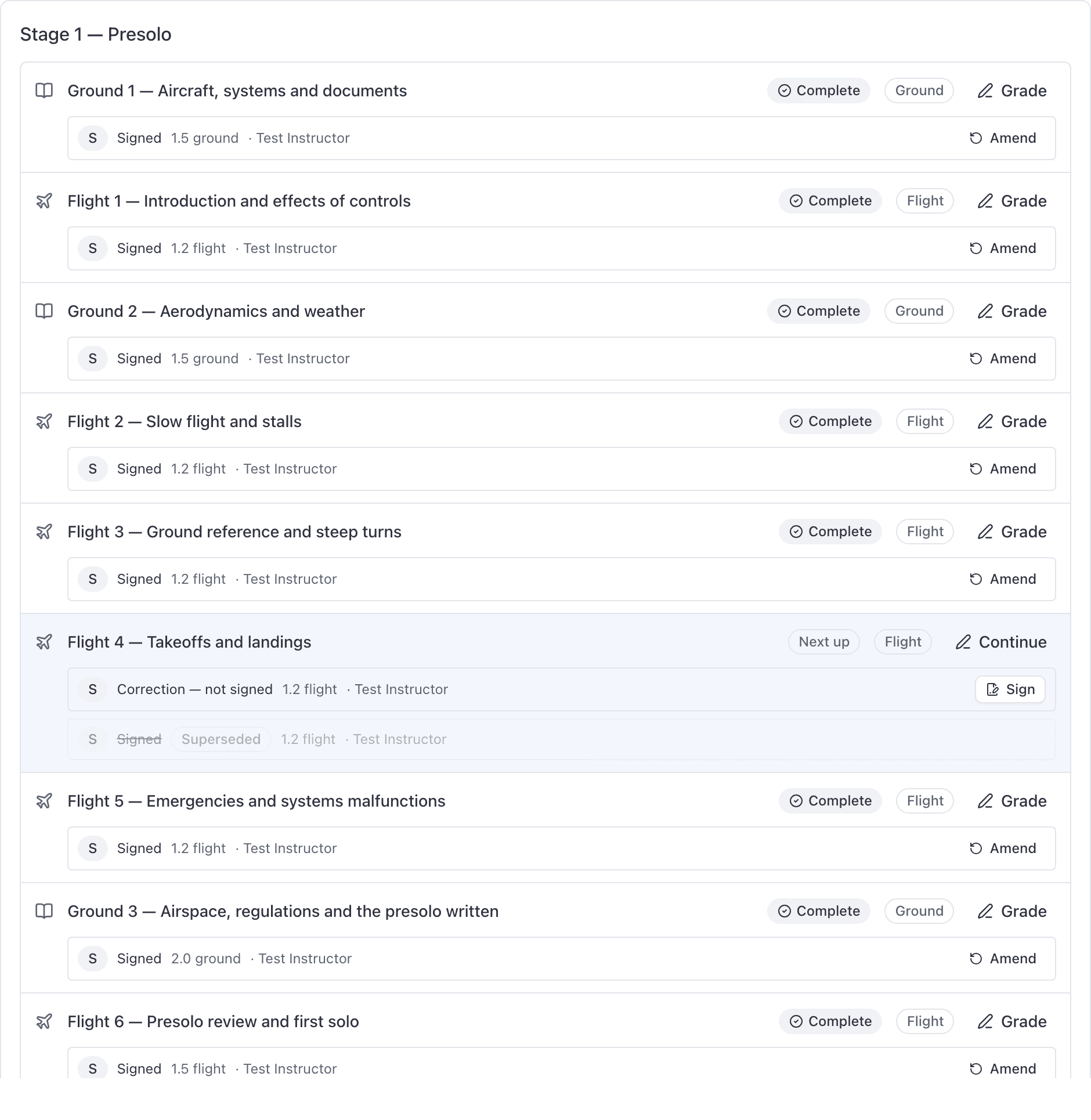
Two things surprise people here, and both are correct:
- A lesson graded with a failing mark is signed, is on the record, and does not move the progress bar. The student flies it again.
- A student who flew the same lesson three times before passing counts as one lesson done. Lessons are counted, not records.
Requirements: credited, flown and discounted#
One row per requirement, showing credited hours against required hours, with a bar. A row sourced from your own school rather than from the regulation carries a School badge.
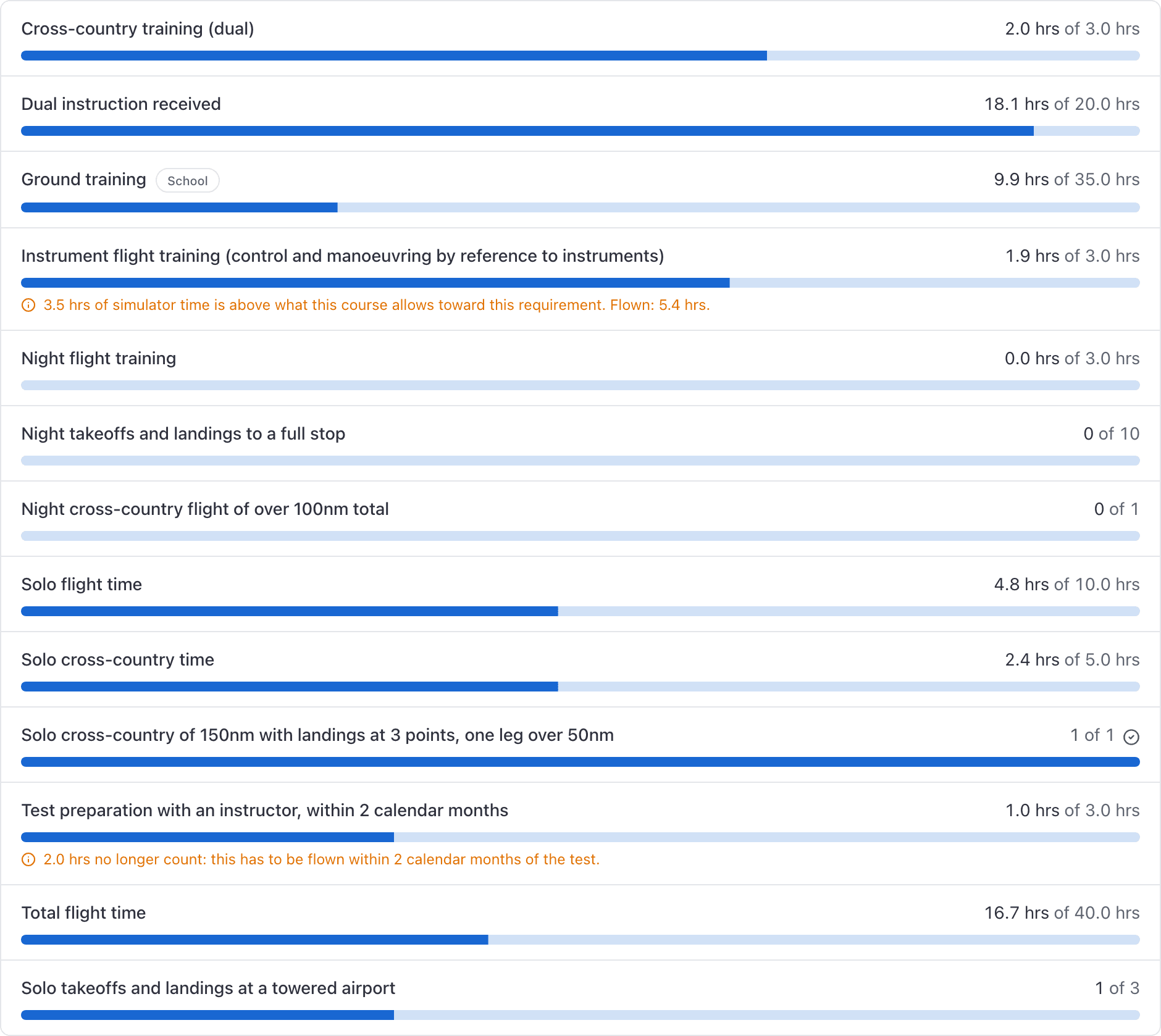
When the number credited is lower than the hours the student actually flew, an amber line underneath says why. There are three reasons:
- Device time above the course's simulator limit for that requirement.
- Transferred credit above the limit for previous training.
- Training that has fallen outside the requirement's recency window.
A recency window is counted in whole calendar months from the 1st, which is the FAA's wording. On 5 August with a two month window, training from 1 June still counts.
Ledger: every credit and reversal#
Append-only. One row per credit, with the amount, the requirement it fed, a chip saying where it came from, and the date the training happened (not the day somebody typed it in). Transferred hours use the calendar day from the logbook, shown the same way wherever you open the ledger. Corrections appear as negative rows labelled as reversals, carrying the reason somebody typed when they amended the record.
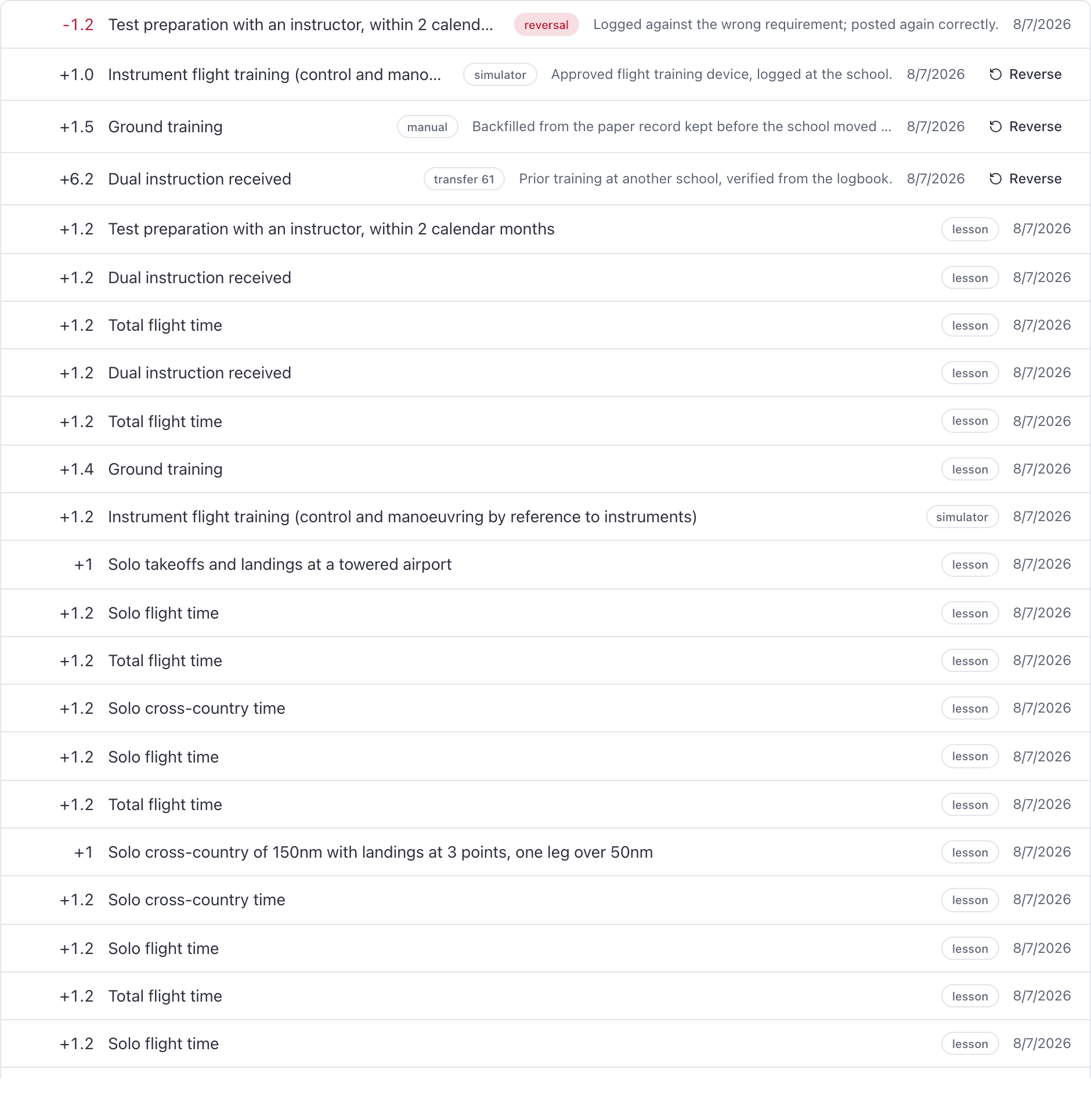
Sources are: a signed lesson, simulator time, transferred training under Part 61, transferred training under Part 141, a manual credit, and a reversal. Nothing here is ever edited or deleted. Once an enrollment is graduated, ended or transferred, its ledger is closed and the Reverse button goes away.
The pace badge#
An advisory badge in the header, based on how long it has been since the student's last signed lesson. At risk is 30 days. Stalled is 60 days. Hover it for the reason.
A student with no signed lesson yet gets no badge until they have been enrolled 60 days, because new is not the same as behind.
It never gates anything. It exists to prompt a phone call. For the same information across the whole school, use the Student progress report.
Where graduated students go#
WebTraining → Students only ever lists people whose enrollment is In training. Graduated, terminated and transferred students are not on that page and there is no status filter to bring them back.
You will find them in three other places: the course's own Students tab, the person's page under Training, and the Student progress report.
Who is allowed to open a record#
| Who | What they get |
|---|---|
| The student on the record | Their own record in full, the same numbers the school sees. |
| Instructors and admins | Any training record in the school, in full, with grading controls. |
| A holder of the Auditor grant | Every record, read only. |
| Everyone else, including dispatchers | Refused. |
Grading buttons only appear for people who can actually grade. The lifecycle buttons (Certify record, Graduate, End enrollment) only appear for admins and holders of the Enroll and graduate grant.
Still stuck on this?
Email support@aerscheduler.com and tell us what you were trying to do. We answer.