
Book an aircraft in for maintenance
Start a booking, choose the Maintenance type, pick the aircraft and the window, and save. Nobody is assigned to it, it blocks the whole window on the dispatch board, and it is never invoiced.
For technicians, owners, admins and dispatchers
Start a booking, set the type to Maintenance, pick the aircraft and the window, and save. It blocks the whole window on the dispatch board and is never invoiced. Pick the Technicians doing the work so it goes on their calendars. To book a job, pick it under Work order: the work and the bill live on the job, and its technicians fill in the booking's when you have not picked any.
Make the booking#
Start a new booking
From WebSchedule, or from the app. A technician-only account goes straight there: the call to action reads "Schedule maintenance" rather than "Book a flight", and the Type is already fixed to Maintenance.
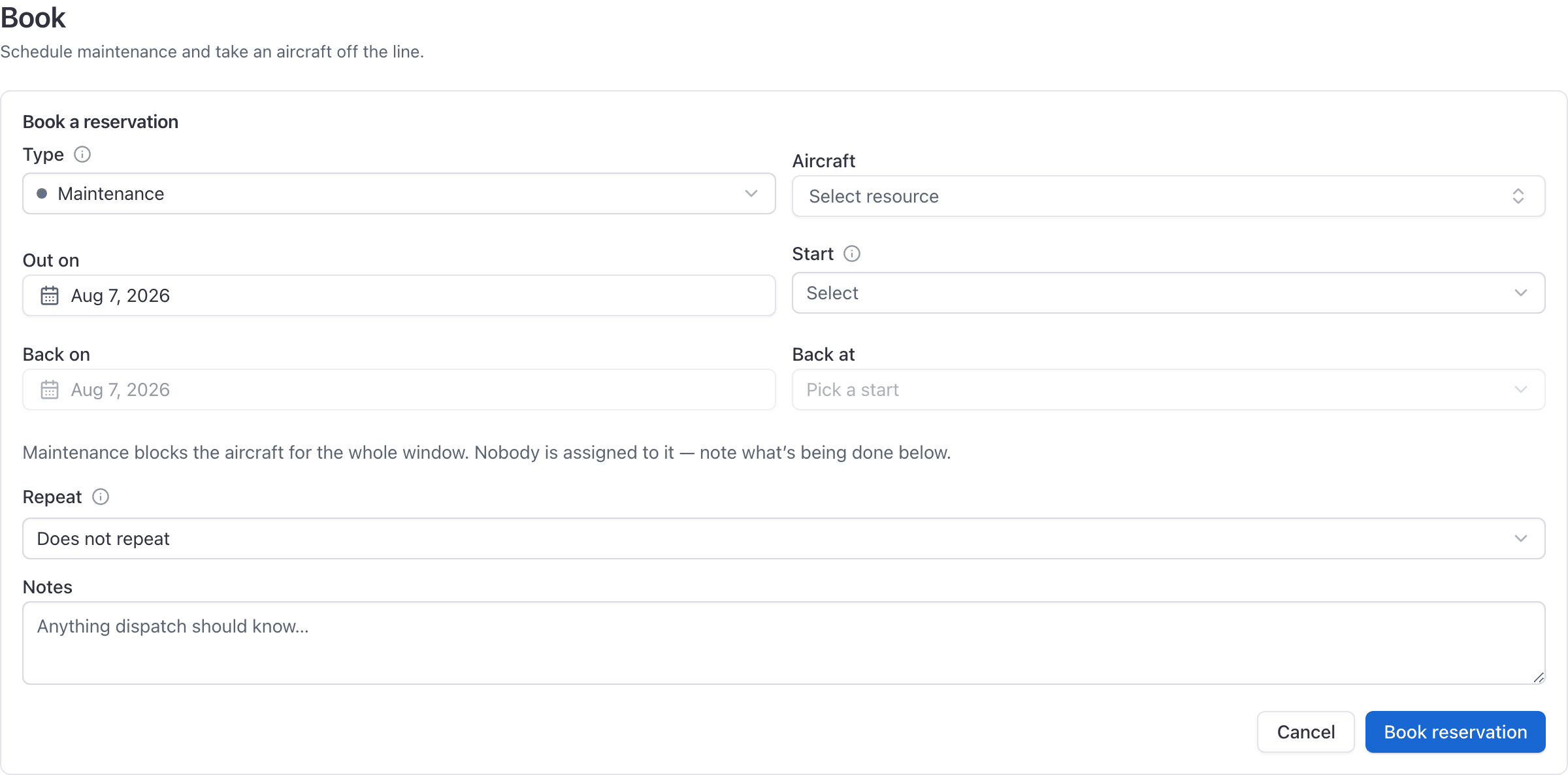
Set the type to Maintenance
If you hold another role as well, pick it from the Type list.
Pick the aircraft and the window
Book the whole time the aircraft will be unavailable, including the ferry out and back if it is going to another field.
Say what it is for and who is doing it
If you open work orders, choose the job under Work order (below). Pick who is doing the work under Technicians. Otherwise put what is being done in the notes: without a job, they are the only place the shift on the other end can read what this block is for.
Save
The aircraft is blocked for the whole window on the dispatch board.
Technicians, not a crew#
A maintenance booking has no instructor, student or renter: it takes the aircraft off the line rather than putting somebody in it, so nobody flies, pays or signs off on it. What it can have is Technicians, the people doing the work.
- Only people with the technician role can be picked. Give someone the role first if they are missing from the list.
- They are told. Each technician newly put on the booking gets a notification with the aircraft and the window, unless they put themselves on it.
- A job fills them in. Pick a work order while Technicians is still empty and the job's technicians are copied over. Linking a job to a booking from the job's page does the same, as long as the booking has no technicians yet. A booking someone staffed by hand is never overwritten, and taking people off the job later leaves the booking alone.
- Changing the type clears them. Turn a maintenance booking into any other type and its technicians come off it.
Book a customer's aircraft in for a job#
A maintenance booking holds the aircraft and the hangar for a work order. The job carries who is doing the work, what is being done and the bill; the booking carries only the time.
- Link the job from the booking. On a Maintenance booking, Work order lists the open jobs on that aircraft. Pick one, or choose Open a new work order: the job opens with the booking and its Technicians, with your notes as its request, at Scheduled (or Aircraft received for a booking that has already started). A new job on a customer's aircraft at either stage emails its owners straight away. A repeating booking cannot hold a job: one job is one visit.
- Or link it from the job. On the job's page, Booked for under Details picks one of the aircraft's maintenance bookings. See Run a work order.
- The block says whose it is. On the schedule, a booking that holds a job shows the customer it is billed to and, for owners, admins and technicians, what they asked for. A grounded aircraft's block carries a small grounded mark. Dispatchers see the customer and the mark but not the request, and pilots never see a customer's aircraft at all.
- Drag the booking to move the dates. The job stays linked to it. Owners, admins and dispatchers can drag it. The aircraft's owner is not emailed about the move, so if the day you promised it back changes, change Promised back on the job: that tells them.
It works on a grounded aircraft#
Maintenance is the one booking type a grounded aircraft accepts. Every other type is refused with "Resource is grounded."

That exemption holds all the way through: creating the booking, editing it, dragging it on the dispatch board, and ramping it out. It exists because these bookings are how a grounded aircraft gets to the shop and back.
It is never invoiced#
Closing out a maintenance booking never produces an invoice, whatever rates the aircraft carries. Shop time is not a rental.
Whose calendar it is on#
A maintenance booking is on the personal calendar of the person who booked it and of every technician on it, and Only mine in the app keeps it for them. Anyone else sees it on the dispatch board, where it blocks the lane in the normal way, or on the aircraft's own schedule. To put a second technician covering the shift on it, add them under Technicians.
Which roles can book maintenance#
| Role | Can book maintenance? |
|---|---|
| Owner, Admin | Yes |
| Dispatcher | Yes |
| Technician | Yes, and it is the only type they can book |
| Instructor, Student, Renter | No |
Aircraft only, not simulators or classrooms#
A maintenance booking is refused on a simulator or a room. To keep a sim or a classroom clear while it is being worked on, block the window with an ordinary booking instead.
Still stuck on this?
Email support@aerscheduler.com and tell us what you were trying to do. We answer.