
Add your own inspection or a one-off reminder
Maintenance, then Add inspections. Choose Recurring for anything that repeats on hours or days, or One-off for a single date. Name it, set the interval and the warning lead, then pick the tails.
For owners, admins and technicians
WebMaintenance → Add inspections. Choose Recurring for anything that repeats on flying hours, or on days, weeks or calendar months, or One-off for a single date. Name it, set the interval and the warning lead, pick the tails, and click Add.
Recurring or one-off#
The dialog opens on Standard set, the AVIATES presets. The other two modes are for everything else your shop tracks.
| Mode | Use it for | Comes back after sign-off? |
|---|---|---|
| Recurring | Oil changes, 50-hour checks, gear inspections, anything on a clock | Yes, immediately |
| One-off | "Prop back from the shop", a single ferry permit expiry | No |
Your own inspections work the same on a customer's aircraft: its tail is in the Applies to list, and its owners are reminded too. See Choose when reminders go out.
Add a recurring inspection#
Maintenance, then Add inspections, then Recurring
The mode buttons sit at the top of the dialog.
Type a name
Up to 60 characters. Name it the way your shop says it out loud: "Oil change", "50-hour", "Gear rig check".
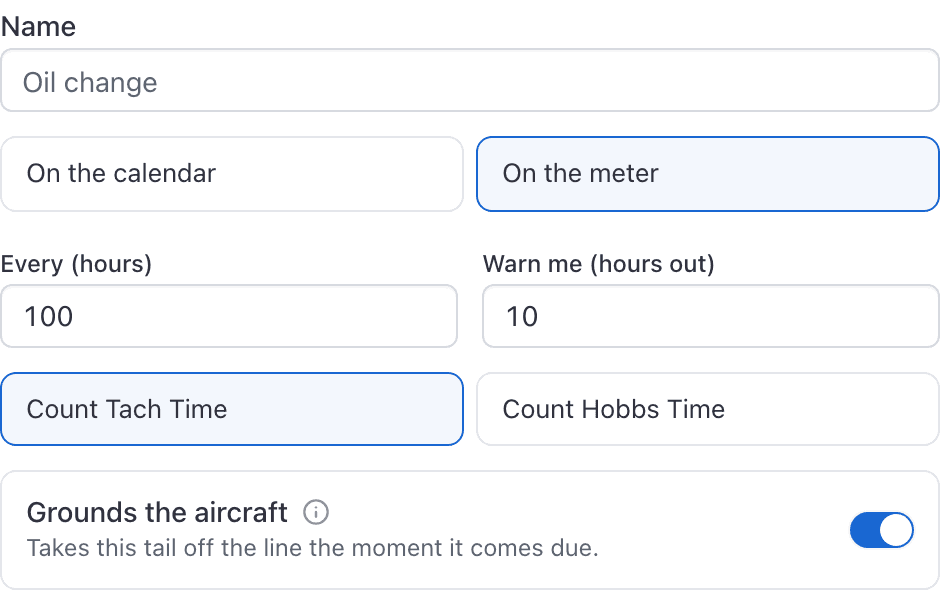
Choose On the calendar or On the meter
On the calendar is preselected. Switch to On the meter for anything counted in flying hours.
Fill in Every, its unit, and Warn me
On the calendar, pick days, weeks or calendar months beside the number. It opens on every 12 months, warn me 30 days before, which is an annual. On the meter it is every 100 hours, warn me 10 hours before.
The warning lead is always in days on the calendar side, whichever unit the interval uses.
On the meter, pick the meter
Counted on, beside Warn me: Tach time or Hobbs time. Tach is the default, and it is what every hour-based standard preset uses.
Decide whether it grounds the aircraft
Switch on Grounds the aircraft only if the tail should come off the line the moment this comes due.
Fill in When was it last done?
The date and meter reading from the last time the work was actually performed. Leave both blank only if it was just done.
Pick the tails and click Add
Applies to is a multi-select. Add stays disabled until at least one tail is picked.
On the calendar or on the meter#
An inspection counted on the calendar recurs from the last sign-off and shows a due date. An inspection counted on the meter counts flying hours and shows a meter figure instead: "Due at 1250.0 tach, now 1237.6."
They never convert into each other, so pick the one your shop actually works to. An oil change measured in hours should be on the meter even though people talk about it in months.
Days, weeks, or calendar months#
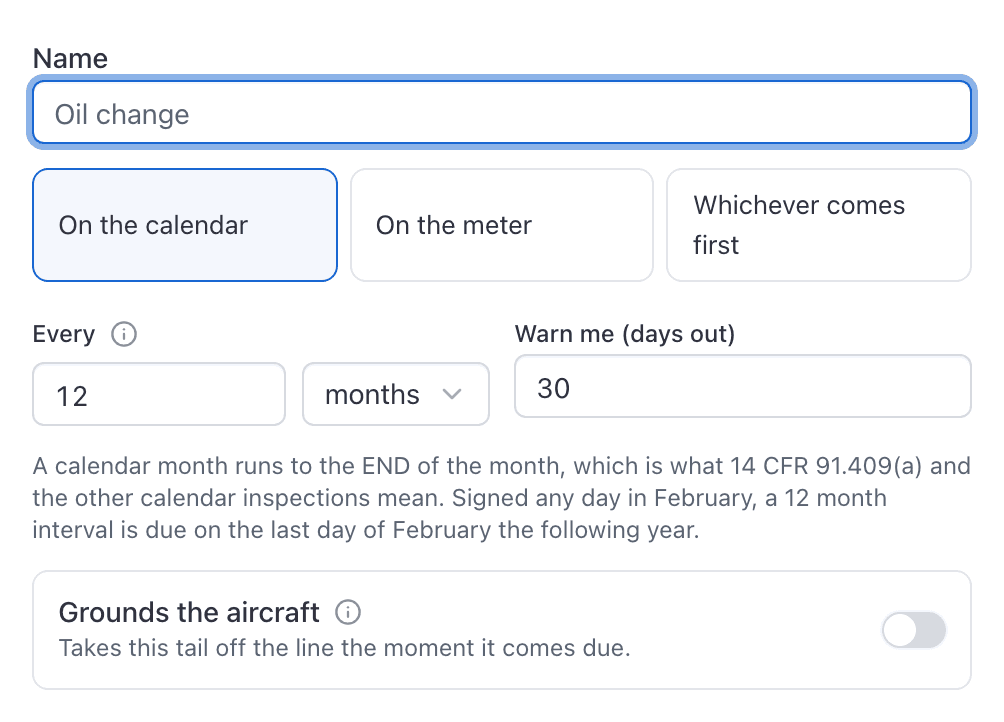
Calendar months are not a number of days, and this is the setting most worth getting right.
A calendar month runs to the END of the month. 14 CFR 91.409(a) requires an annual "within the preceding 12 calendar months", so an annual signed on 15 February 2026 is good through 28 February 2027, not through 15 February 2027. The transponder check (91.413), the static system (91.411) and the ELT (91.207(d)) are all written the same way, and so are a great many recurring Airworthiness Directives.
If you set one of those as "365 days" it will come due up to a month early, depending on which day of which month the work was signed. That will not make you unairworthy, but it will take an aeroplane off your line while it is still perfectly legal to fly, every year, on every tail.
- Calendar months for anything a regulation writes in months. Due date lands on the last day of the month, and it is worked out on your school's time zone.
- Weeks for a shop rhythm. A week is exactly seven days, so this is simply a tidier way to say the same thing, and "every 2 weeks" reads back as weeks.
- Days for anything genuinely counted in days, like the 30-day VOR check.
Set the warning lead#
Warn me is not decoration. It is exactly when the row turns to Due soon and exactly when the shop's warning email and push are sent: to your admins and technicians on your own aircraft, and on a customer's aircraft to the people whose Customer aircraft inspections setting covers it (technicians, by default). That aircraft's owners are reminded on their own steps: unless you change them, 30 and 7 days (or 10 hours) before it is due, and when it is due.
The form never lets the lead reach zero, so you cannot create an inspection through it that comes due with no warning at all. A calendar lead cannot go below 1 day, and a meter lead cannot go below 0.1 hours.
Should it ground the aircraft?#
Grounds the aircraft is the highest-consequence control on the form. With it on, the moment this inspection comes due AerScheduler grounds that tail with the reason "Maintenance", and nobody can book it for anything except maintenance until it is signed off.
Full behavior in When AerScheduler grounds an aircraft by itself.
Add a one-off dated reminder#
Maintenance, then Add inspections, then One-off
A single date that does not come back.
Name it
"Prop back from the shop", "Ferry permit expires".
Pick Due on and Warn me
Due on must be today or later. Warn me (days out) starts at 10 and is clamped to between 1 and 30 days.
Pick the tails and click Add
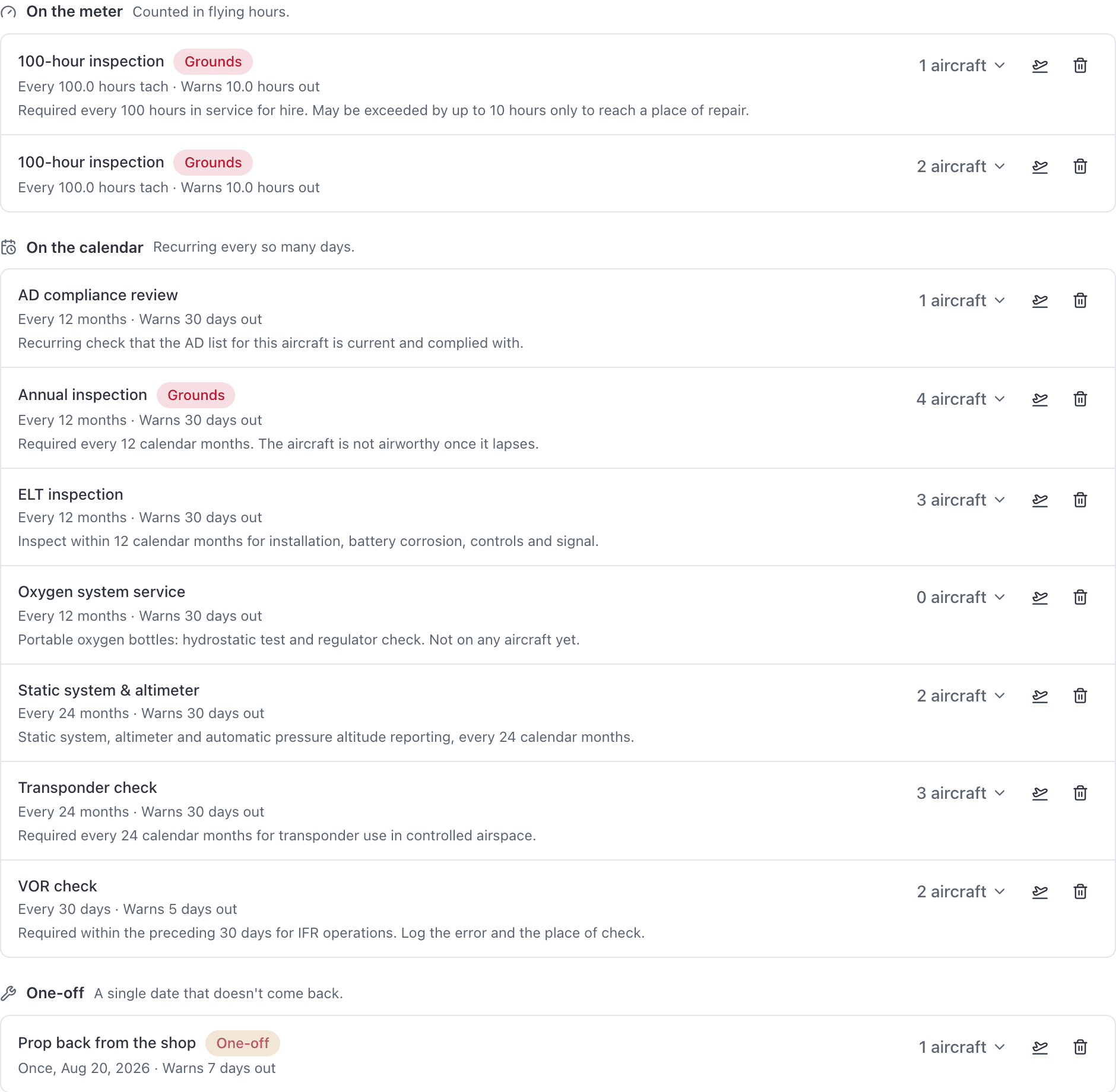
The rule is filed under WebMaintenance → Inspection rules in the One-off group.
What a one-off does not do#
- It never repeats. Signing it off does not create a replacement.
- It has no When was it last done? box, because there is nothing to count from.
- Once it is signed off on every tail it covers, the rule disappears from Inspection rules (Set up on the phone) entirely. That is expected, not a deletion.
Adding one on the phone#
The app's Add inspection button on the Maintenance page creates the rule first and then takes you on to pick the aircraft.
Still stuck on this?
Email support@aerscheduler.com and tell us what you were trying to do. We answer.