
Add a note to a squawk
Open the squawk and use the Notes card: on the console, type in the box and click Add note; in the iOS app, tap Add Note. You can attach photos or a PDF, including a note that is only files. It records progress without closing the squawk, and notes cannot be edited or deleted afterwards.
For owners, admins and technicians
Open the squawk and use the Notes card. On the console, type in the box and click Add note. In the iOS app, tap Add Note. You can attach photos or a PDF, including a note that is only files. It records what is happening without closing the squawk, and a note cannot be edited or deleted once it is written.
Why this is not the same as resolving#
A squawk sits open for days. The part is on order, the hangar is full, the fault would not repeat on the ground. None of that means the defect is fixed, and none of it belongs in the Resolve form, because resolving a squawk says the aircraft is right again.
Notes are where that goes. Each one carries who wrote it and when, and they sit in the order they were written, so the squawk reads as an account of the work rather than a status that jumped from open to closed.
Add one#
Open the squawk's write-up
WebMaintenance → Squawks → Open, then click the row. The panel that slides in shows the thread but does not write to it: press Open the full write-up to reach the page the box for a new note is on. A note is a permanent part of the maintenance account of an aircraft, so it is written in one place.
Write it
Type into the box under the thread. Up to 2000 characters. On the console, Cmd or Ctrl and Enter posts it; plain Enter is a new line, because these run long. Attach photos or a PDF the same way as when you report a squawk. A note can be files only.
Click Add note
It appears at the bottom of the thread under your name and the time. Everyone looking at the squawk sees the same thread.
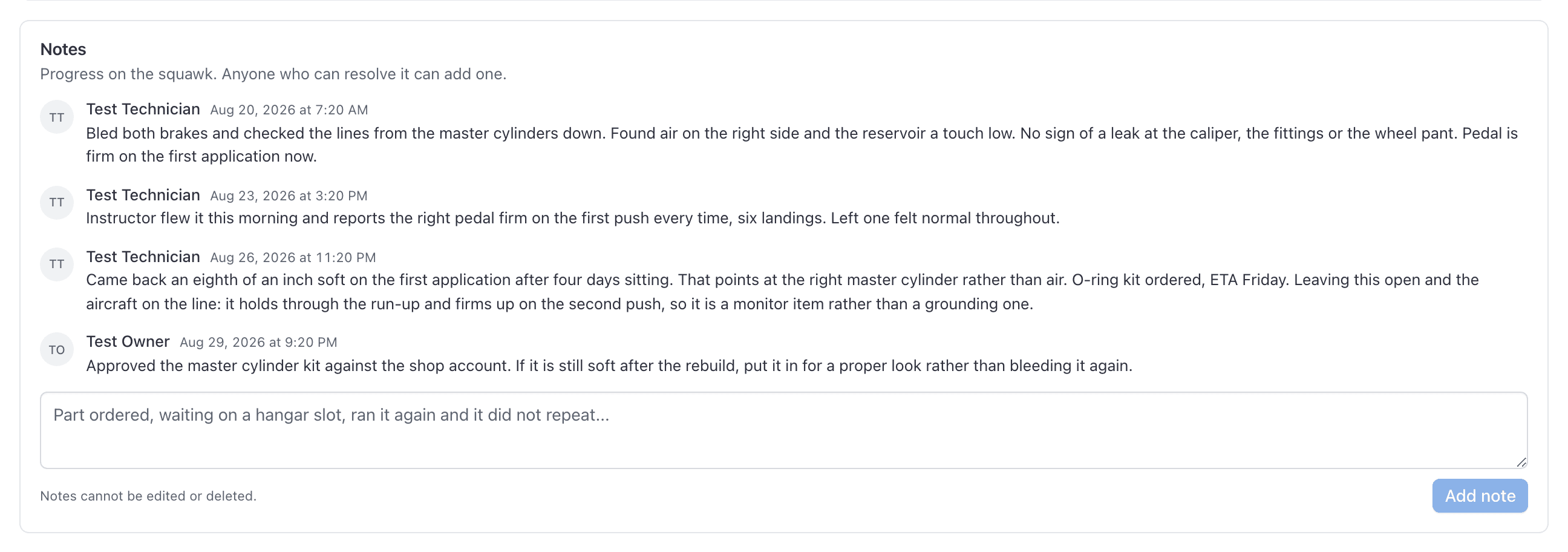
In the app, the squawk's detail page has the same thread, with Add Note under it and in the gear menu at the top.
Notes cannot be edited or deleted#
Who can write, and who can read#
Adding a note takes the same permission as verifying or resolving one: admins, owners and technicians. Everyone else who can open the squawk can read the thread but has no box to type in.
That includes pilots. Somebody who reports a squawk on a tail and can open it again later sees what maintenance has written about it, which is usually the point: "part ordered, ETA Friday" is exactly what the person who reported the flickering light wants to know. Write notes as though the pilot will read them, because they can.
Notes do not notify anybody#
Adding a note sends nothing. It is a record, not a message. If somebody needs to know about it today, tell them, and let the note be the thing they read afterwards.
Sign-off notes are a different box#
The Resolve form has its own notes field, and that one is not part of this thread. It is a single paragraph describing what was done to clear the squawk, there is only ever one of it, and a later sign-off overwrites it. On the squawk's page it appears under Sign-off notes, separately, and it is capped at 500 characters rather than 2000.
Use it for the closing statement. Use notes for everything on the way there. See Resolve a squawk.
Common questions
- Can I add a note to a squawk without resolving it?
- Yes. Open the squawk and use the Notes card. That is what it is for: recording that the part is ordered, that the aircraft is waiting on a hangar slot, or that you ran it again and it did not repeat, none of which mean the defect is fixed.
- Who can add a note to a squawk?
- Admins, owners and technicians, the same people who can verify or resolve one. Dispatchers, instructors, students and renters can read the thread on a squawk they can open, but cannot write to it.
- Can a note be edited or deleted?
- No, by anybody, including us. A note is part of the account of work on an aircraft, and an account that can be quietly changed afterwards is worth less than none. Correct a mistake by adding another note saying so.
- What is the difference between a note and the sign-off notes?
- Sign-off notes are the single paragraph the Resolve form asks for, describing what was done to clear the squawk. There is one of them and the next sign-off overwrites it. Notes are a running thread, each stamped with who wrote it and when, and nothing overwrites them.
- How long can a note be?
- 2000 characters. The console counts down over the last 200 and both surfaces refuse a longer one with a message rather than a silent failure.
- Can a note be only a photo?
- Yes. A note needs a body, or files, or both. An empty note with nothing attached is still refused.
- Does adding a note notify anybody?
- No. Notes are a record, not a message. If somebody needs to know now, tell them; the note is what they read afterwards.
Still stuck on this?
Email support@aerscheduler.com and tell us what you were trying to do. We answer.