
Track Airworthiness Directives and keep the compliance record
Set an inspection's source to Airworthiness Directive and give it the AD number and revision date. Signing it off then keeps a permanent record of what was done, the meter readings and who certified it. The Compliance log is the history and the Airworthiness compliance report prints it. AerScheduler records the ADs you enter; it does not tell you which ADs apply to your aircraft.
For owners, admins and technicians
Set an inspection's Where this comes from to Airworthiness Directive and give it the AD number. From then on, signing it off keeps a permanent compliance record: what was done, the meter readings, and who certified it. WebMaintenance → Compliance log is the history, and the Airworthiness compliance report prints it.
Why an AD is not just another reminder#
An Airworthiness Directive is binding under 14 CFR Part 39. It is federal law, not the manufacturer's advice. 91.403(a) makes the owner or operator responsible for complying with it, and an aircraft out of compliance is not airworthy, so flying it violates 91.7(a). A Service Bulletin, by contrast, is the manufacturer's advice.
That difference has a practical consequence. 91.417(a)(2)(v) asks you to keep the current status of every AD that applies to the aircraft, and for each one: the method of compliance, the AD number and revision date, and, if it recurs, the time and date the next action falls due. A reminder that has simply gone away does not satisfy that.
Tell an inspection it is an AD#
Open Maintenance and click Add inspections
Choose Recurring for a repeating AD, or One-off for one with a single compliance deadline.
Set the interval as usual
For "every 100 hours or 12 months, whichever comes first", pick Whichever comes first and fill in both clocks.
Open Where this comes from and choose Airworthiness Directive
Three more fields appear. They stay hidden for an ordinary shop reminder, so an oil change does not grow boxes it has no answers for.
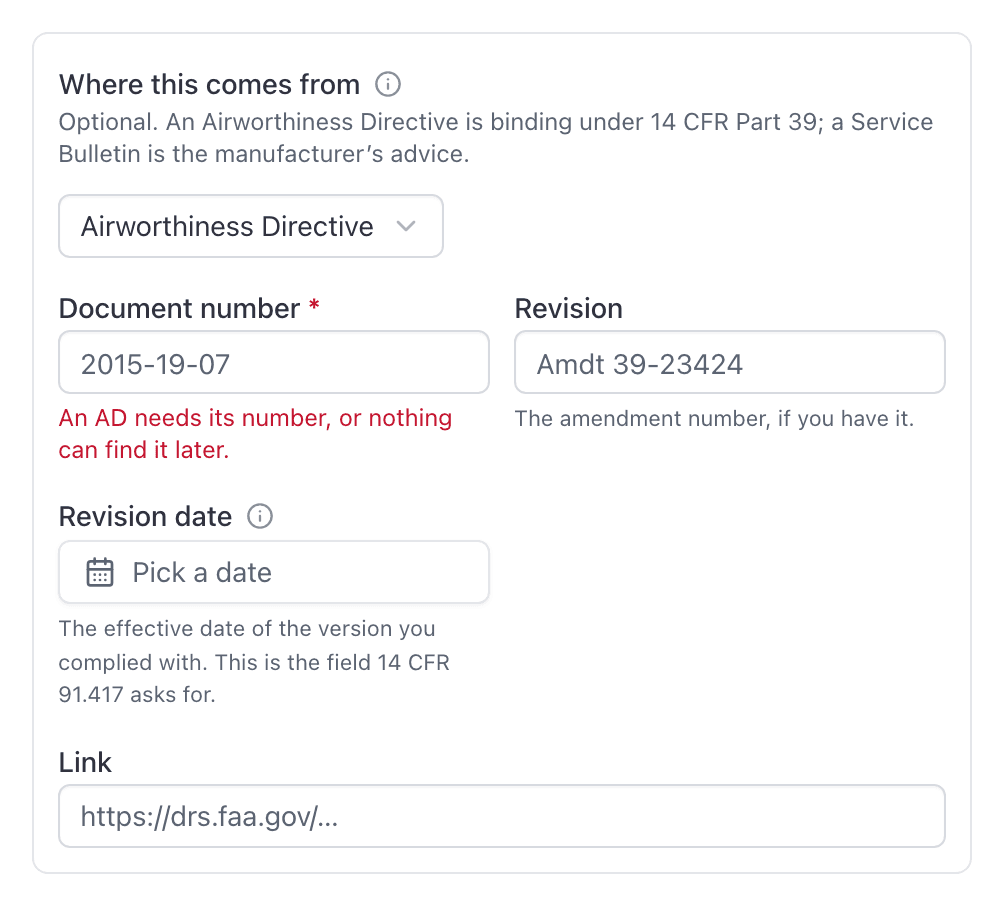
Enter the document number
The AD number as published, for example 2015-19-07. This one is required: an AD
without its number cannot be found, filtered, or listed on the report an inspector
reads.
Add the revision and link if you have them
The revision currently in force, and a link to the issuing authority's copy.
An AD badge now appears on that inspection everywhere it is listed, so a regulation is distinguishable from a shop interval at a glance.
When the AD is superseded#
ADs get revised, and the revision you are tracking has to be the one currently in force. Open Maintenance → Inspection rules, find the inspection, and choose Edit name, notes and source from its … menu. Change the revision, correct a mistyped document number, rename it, or add the link.
An inspection cannot be left as an Airworthiness Directive with no number, whether you are creating it or editing it. Clear the number and the console asks for one back.
Sign it off, and keep the record#
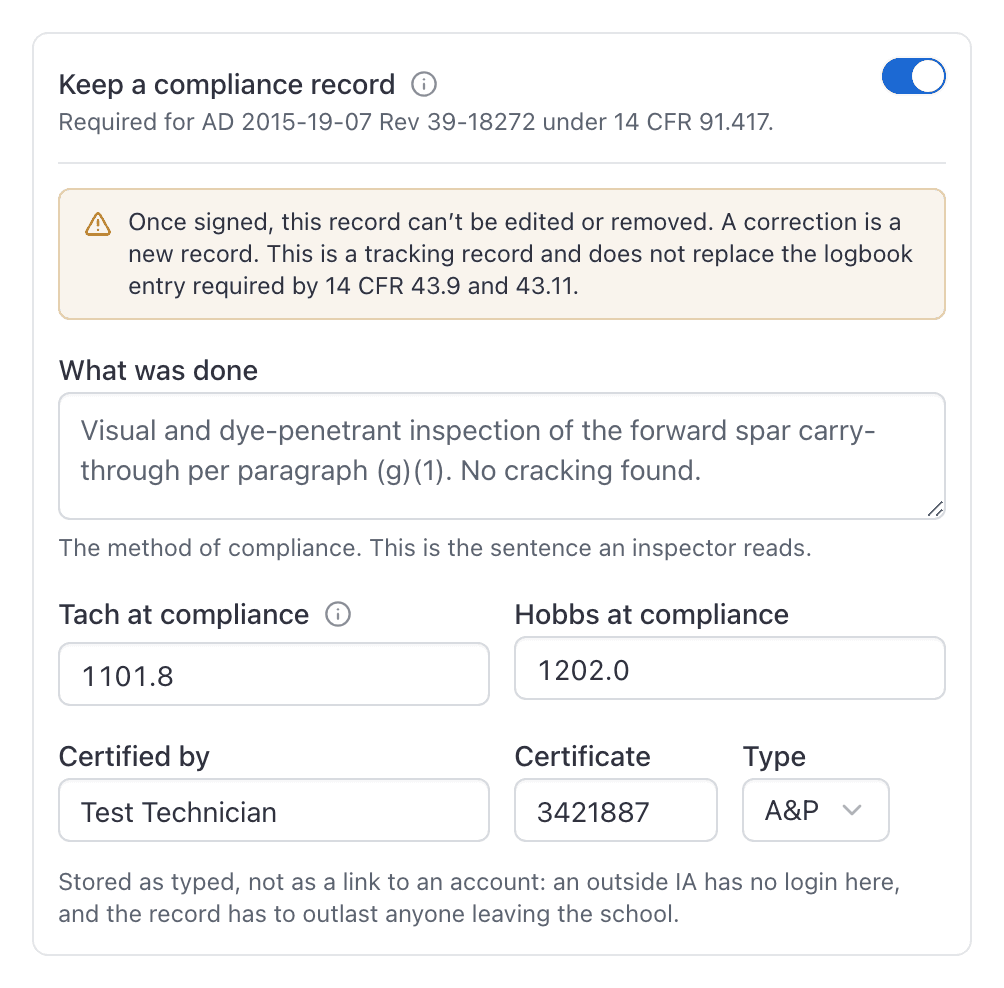
When you sign an AD off, the sign-off form opens with Keep a compliance record already switched on.
Fill in what was done
The method of compliance. This is the sentence an inspector actually reads, so write it the way you would write it in the logbook: "Visual and dye-penetrant inspection of the forward spar carry-through per paragraph (g)(1). No cracking found."
Check both meters
Tach and Hobbs are both captured, whatever the inspection was counting, so the record still reads correctly years later to somebody working off the other clock. They are filled in from the aircraft, so usually you are confirming rather than typing.
Neither is time in service as 14 CFR 1.1 defines it, which is wheels-off to touchdown. Record the airframe total time in your logbook entry as usual.
Confirm who certified it
Your name and certificate fill in from your profile. Change them if somebody else signed: an outside IA has no account here, and the record has to say who actually certified the work.
Signing off is a single action, kept whole. An inspection already signed off answers "That inspection has already been signed off" rather than recording the work twice, so a double-tap on a phone, a retried request on a bad connection, or two people in the hangar signing the same inspection at the same moment all leave exactly one record. And if anything at all fails partway, nothing is written: you never end up with a permanent record attached to an inspection still showing as due.
Set your certificate once#
WebProfile → Mechanic certificate holds your FAA certificate number and type. Enter it once and it fills in every time you sign something off.
This is worth two minutes. Six to eight exact characters, typed at every signature, is how a compliance log ends up full of blanks and typos, and a record with the wrong certificate number on it is no better than no record.
The number on a record is a copy taken at signature, not a link to your account. Changing your profile later does not alter anything already signed, and it should not.
That is also why Certified by, Certificate and Type on the sign-off form are all editable. An outside IA who signed your annual has no account here; type their name, their number and their rating, and the record says who actually certified the work rather than who typed it in.
Read the history#
WebMaintenance → Compliance log lists every inspection this school has signed off, newest first, with the aircraft, the rule, both meter readings and who certified it. Search it by AD number, aircraft, mechanic, or anything in the method text.
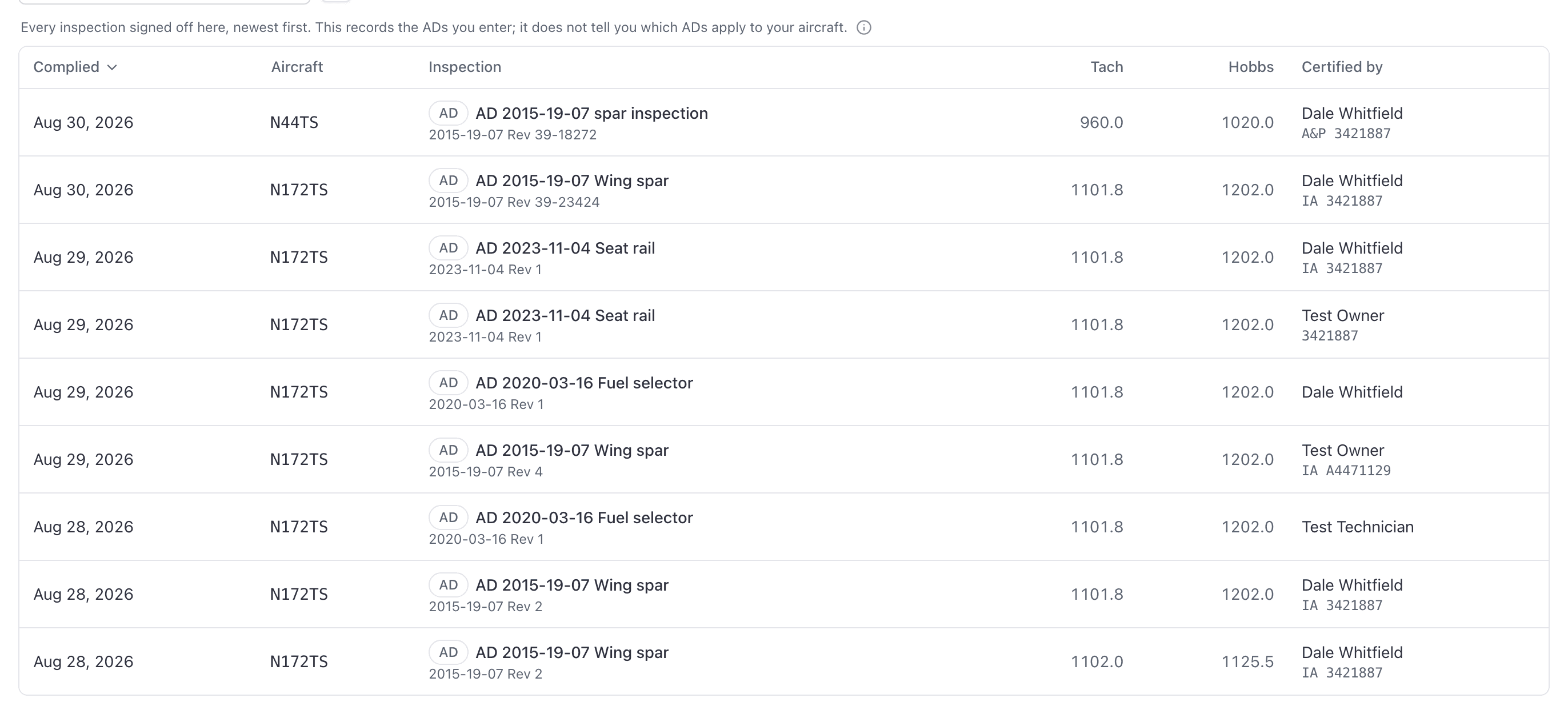
Click any row for the full write-up.
Hand it to an inspector#
WebReports → Airworthiness compliance is the same information as a report: filter it to one aircraft, group it, add the method-of-compliance column, and export.
Make and model and Serial are both columns on it, both on by default. An AD names the aircraft it applies to by make, model and usually a serial number range, so those three together are what let a reader check a directive against the aircraft in front of them rather than walking out to read a data plate. Half an applicability statement does not answer the question: two 172s parked side by side are frequently not both affected.
Both sit at the left-hand end of the row on purpose. A printed page that runs out of width turns the paper sideways first, and if it still will not fit it drops columns from the right and says at the top which ones went. Identity parked out there would be the first thing missing from the copy you sign and file, so it is not parked out there.
An aeroplane whose serial nobody has recorded prints Not recorded, which is worth fixing before you print rather than after. The report's own footnote says on the page that those words mean the number is missing from your records rather than from the aeroplane, so a reader who was handed the page and not the explanation still gets it. A blank Serial cell is a different thing: that row is a simulator or a classroom, which has no data plate to read a serial off. See what a serial number buys you.
Technicians can open this report. It is filed under fleet reports rather than compliance reports for exactly that reason.
What this does not do#
Worth knowing before you rely on it:
- It does not tell you which ADs apply to your aircraft. You add the ones that apply; there is no catalogue that proposes them from your make, model and serial. This is the difference between what AerScheduler does and what a dedicated AD subscription does, and it is why the report below is a history of sign-offs rather than an AD status.
- The report covers what you have signed off here. Anything complied with before you started using AerScheduler, and anything you have not entered, is not in it.
- Component ADs stay with the airframe. An engine AD is tracked against the aircraft, so it does not follow the engine through an overhaul swap.
- "Due at the next annual" cannot be expressed. Use the interval the AD gives in hours or months.
- A one-off AD takes a date, not an hours deadline. For "comply within the next 50 hours", track it as a recurring hour interval and stop tracking it once done.
Related#
- Sign off a completed inspection
- Add the standard airworthiness inspections
- How maintenance tracking works
Still stuck on this?
Email support@aerscheduler.com and tell us what you were trying to do. We answer.