
Add an aircraft
Tail, make, model, year, category and class, meters, rates and a home base. Get the rates and meters right now, because billing and maintenance both read them.
For owners and admins
WebAircraft → Add aircraft. Tail number, make and model, year, category and class, current Hobbs and tach, fuel capacity, the hourly rate and its basis, and a home base. Save, and the tail is on the schedule and billable.
Before you start#
At least one location has to exist. Without one the Home base picker is disabled and the form will not save.
If you meet "Add a home base location first, every aircraft needs one before it can be scheduled"press Add a location beside it. That opens WebFacilities → Locations with the create form already up. Save the location, come back, and the picker works. You only do this once per airport.
Add the tail#
Open Aircraft and press Add aircraft
Admins and owners only. Everybody else can view the fleet but not change it.
Enter or search the tail number
This is what appears on the dispatch board, on invoices and in every report.
On the web, start typing in the tail field. On iPhone, tap Tail number. Matches from the public US aircraft registry appear as you search. Pick yours and the make, model, year, category, class, engine and seats fill themselves in, and the serial number too when our copy of the registry has one for that tail. Everything it fills stays editable.
Nothing appears for a registration outside the US, or for a very new one. That is normal and not an error: use the tail you typed and fill the rest yourself.
Check the category and class
Category is what the aircraft is, airplane, rotorcraft, glider and so on. Class narrows to the ones that belong to that category. See Categories, classes and meters.
Fill in anything the lookup could not
Make and model are required. Year, engine, fuel, gear and seats are optional and can wait.
So is the Serial number, near the bottom of the form, above Flying day and Home base. Choose a US tail number from the lookup and it arrives already filled: every row in the federal file carries a serial. What the file does not carry is a non-US registration, so a G-, D- or LV- aeroplane is typed off the data plate like everything else about it. It is the number an Airworthiness Directive names its affected aircraft by, and it prints on the Airworthiness compliance report. See Choose how much AerScheduler does about ADs.
Enter the current Hobbs and the current tach
Type the readings exactly as they show on the meters, for example 1234.5. These are the starting point for billing and for every hour-based maintenance inspection, so get them off the actual aircraft rather than off a spreadsheet.
Enter fuel capacity and its unit
Optional. Gallons or liters.
Set the hourly rate and the rate basis
Wet means the rate includes fuel. Dry means it does not.
Decide Bill by Hobbs time
On bills from Hobbs time. Off bills from tach time.
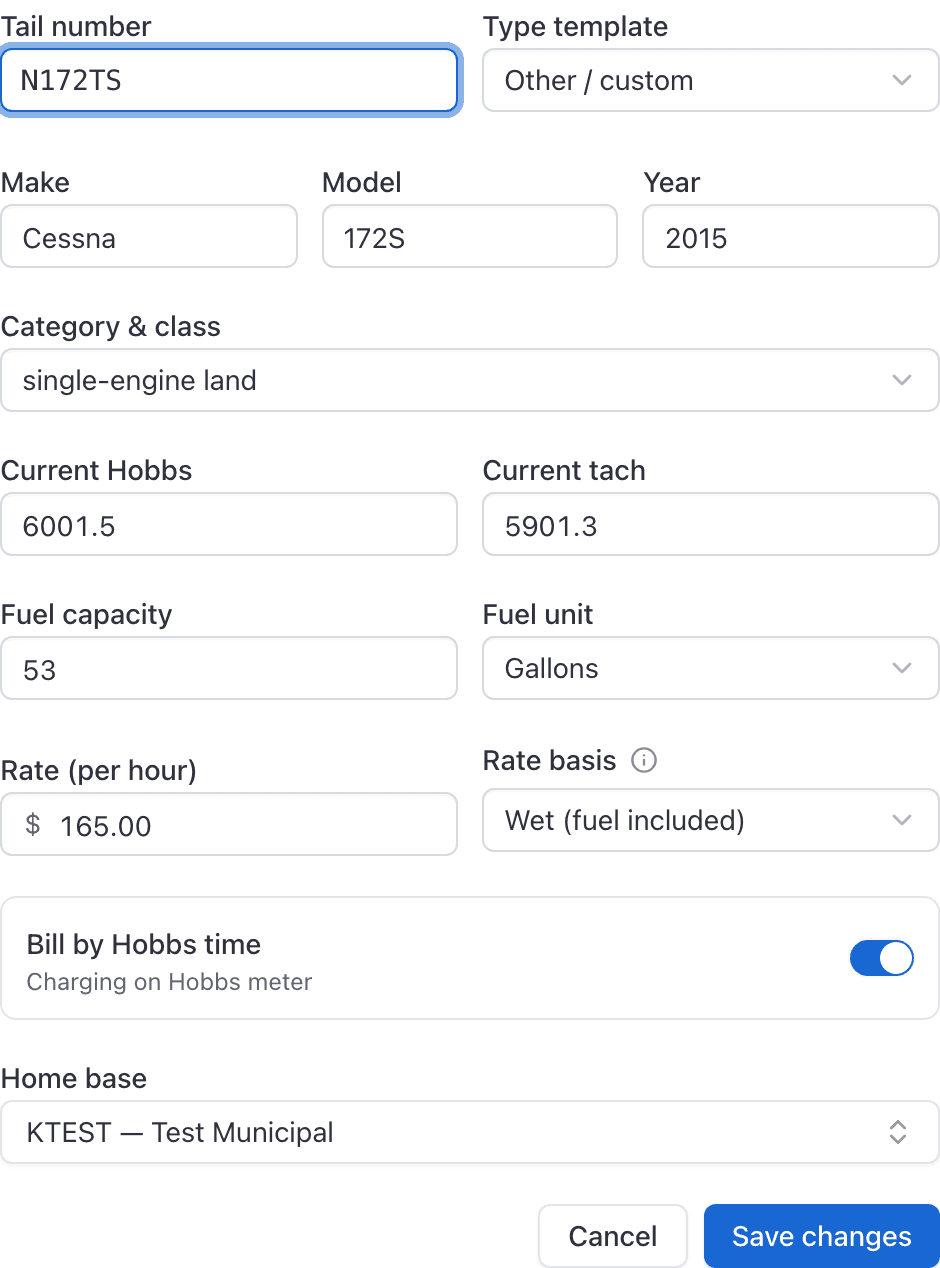
Choose the Home base and press Add aircraft
The home base is the airport the aircraft lives at, and it is what the schedule's time zone resolves against.
Rate basis and Bill by Hobbs are two different questions#
They sit next to each other and both sound like "how is this billed", which is why they get confused.
| Control | The question it answers |
|---|---|
| Rate basis (wet or dry) | Does the hourly rate include fuel? |
| Bill by Hobbs time | Which meter do the billed hours come from, Hobbs or tach? |
A wet rate billed on tach time is a perfectly normal combination, and so is a dry rate billed on Hobbs. Pick each one on its own merits.
More on what happens to those numbers at close-out in How billing works.
What adding a tail changes#
- It appears as a lane on the dispatch board and in every booking form.
- It becomes billable at the rate you set.
- It counts toward your subscription, which is $20 per month per aircraft. Simulators and ground-school rooms are free.
Editing an aircraft later#
Open the tail and press Edit. It is the same form, filled in with what is already on record. The tail-number lookup still works if you need it, but nothing is overwritten unless you pick a match yourself.
After the tail is in#
Annual, ELT, transponder, pitot-static, VOR, altimeter, 100-hour.
Record who is approved to fly this tail.
Aircraft rates, instruction rates and what a lesson costs.
Take a tail off the line, by hand or automatically.
Still stuck on this?
Email support@aerscheduler.com and tell us what you were trying to do. We answer.