
Track medicals, certificates and other documents
Set the document types your school requires, upload on somebody's behalf, and get told before one expires.
For owners, admins, instructors, students and renters
An admin sets up the categories on WebSettings → School → Document types. Members file their own from WebYou → Documents. Admins file one on somebody's behalf from that person's record, under Compliance.
Set up your document types first#
Nothing can be uploaded until at least one type exists. A type is the category a document is filed under: Medical Certificate, Photo ID, Renter Agreement, and whatever else your school insists on.
Each type carries four settings:
| Setting | What it does |
|---|---|
| Admin upload only | Members do not see this type in their own upload picker. An admin files it for them |
| Has an expiry date | Makes the expiry field appear when the document is uploaded |
| Warn this many days ahead | How much notice you want before it expires. The form starts at 30 days |
| Active | Turn a type off to retire it without deleting anything |
Upload your own document#
Open Documents under You in the left rail
Or go to your own record and look under Compliance.
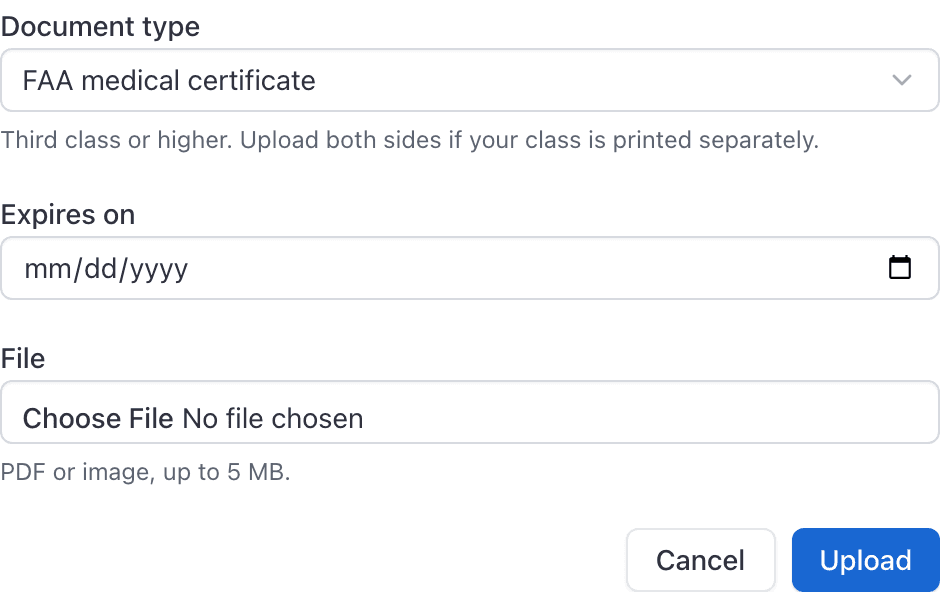
Press Upload and choose the type
The picker shows only the types your school has marked active and has not restricted to admins.
Add the expiry date if you are asked for one
Only types set to expire ask.
Upload on somebody's behalf#
Open the person from WebPeople, go to the Compliance section of their record, and upload there. Admins can file any type, including the ones marked admin upload only.
Who can see whose documents#
| Role | Whose documents they can read |
|---|---|
| Owner, Admin | Anybody's |
| Dispatcher | Anybody's |
| Instructor | Their own |
| Student, Renter, Technician | Their own |
An instructor being unable to see a student's medical surprises people, since instructors can see that student's training record and endorsements. The two are scoped differently on purpose.
Expiry warnings#
A type with an expiry date and a warning period generates a Document expirations notification the set number of days ahead, by email and by push. Members can turn that category off for themselves under notification settings.
If a document lapses anyway, Missing or expired documents and Medical certificate expired are both standard grounding reasons. See Ground, archive or remove a member.
Two things that catch people out when editing a type#
Documents are per school#
Documents belong to your membership of one organization, the same as your roles. If you fly at two schools you file your medical at each of them.
Still stuck on this?
Email support@aerscheduler.com and tell us what you were trying to do. We answer.