
Post an announcement
Owners and admins post a school notice from Operations → Announcements. Members see it on Home until they tap Got it, then find it again on the announcements page.
For owners, admins, instructors, students and renters
WebOperations → Announcements → New announcement. Enter a title and a message, optionally set an expiry, and post. Members see it on Home until they tap Got it. After that it stays on the announcements page. Those with the iOS or Android app can get a push.
Use this for anything the whole school needs to know: a runway closure, a schedule change, a new checklist, or a reminder about paperwork.
Post one#
Open Operations → Announcements
Owners and admins see a New announcement button. Everybody else can still read the board.
Enter a title and a message
Title is required and capped at 60 characters. Message is optional, up to 600 characters.
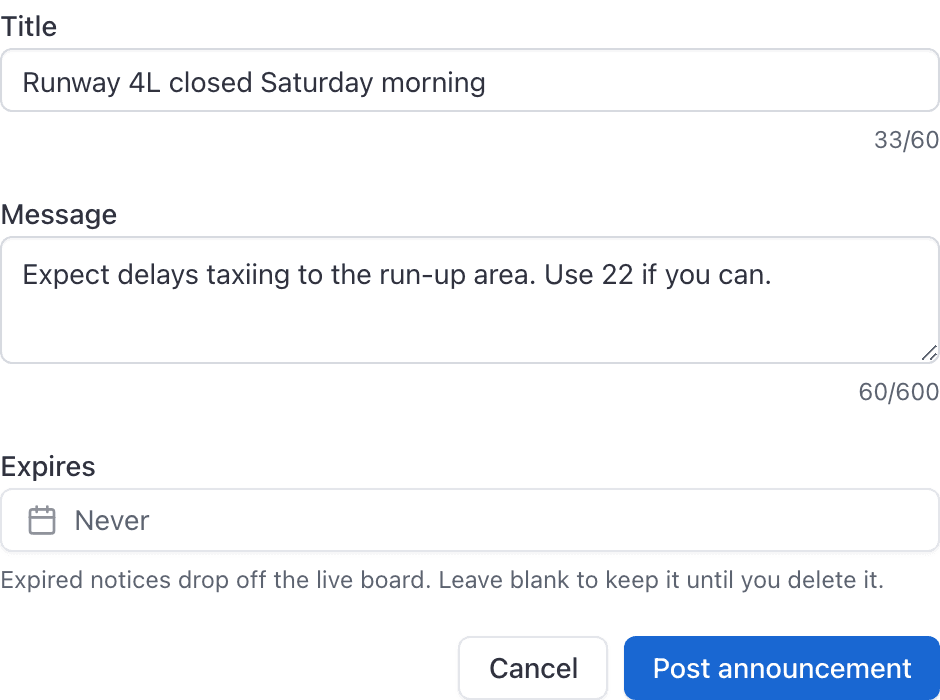
Set an expiry if you want one
Leave Expires as Never to keep the notice until you delete it. Expired notices leave the live board.
Click Post announcement
The notice appears on the board immediately. Members with push enabled and the iOS or Android app installed get an alert.
Hide it from Home#
Members tap Got it on a notice on Home, in the console or the mobile app. That hides it from Home for them only. It stays on Operations → Announcements (and under Announcements in the app) until an admin deletes it or it expires.
Edit or delete#
Open the menu on a notice and choose Edit or Delete. Deleting removes it for everyone.
Related#
Turn announcement alerts on or off per channel.
What the phone is for, now that the console posts notices too.
Common questions
- How do I hide an announcement from Home?
- Tap Got it on the notice. It leaves Home for you only. The school still has it on Operations → Announcements, and in the app under Announcements, until an admin deletes it or it expires.
- Does Got it delete the announcement for everyone?
- No. Got it is only for you. Other members still see it on Home until they mark it themselves. Deleting from the board removes it for the whole school.
Still stuck on this?
Email support@aerscheduler.com and tell us what you were trying to do. We answer.