
Report numbers that look wrong
The usual reasons two AerScheduler numbers disagree, in the order people hit them. Nearly all of them come down to which date the window applies to, or a flight that was never closed out.
For owners, admins, dispatchers and technicians
Nearly every "these numbers are wrong" question comes down to one of three things: which date the window applies to, a flight that was never closed out, or a column that is measured to today rather than to the end of your window. Work down this list in order.
Revenue and Payments received do not agree#
They are not supposed to.
Revenue is windowed on the date an invoice was raised. Payments received is windowed on the date it was paid. An invoice raised in June and paid in August is June's revenue and August's cash, so at any school where somebody pays late the two reports will differ over the same window and both are correct.
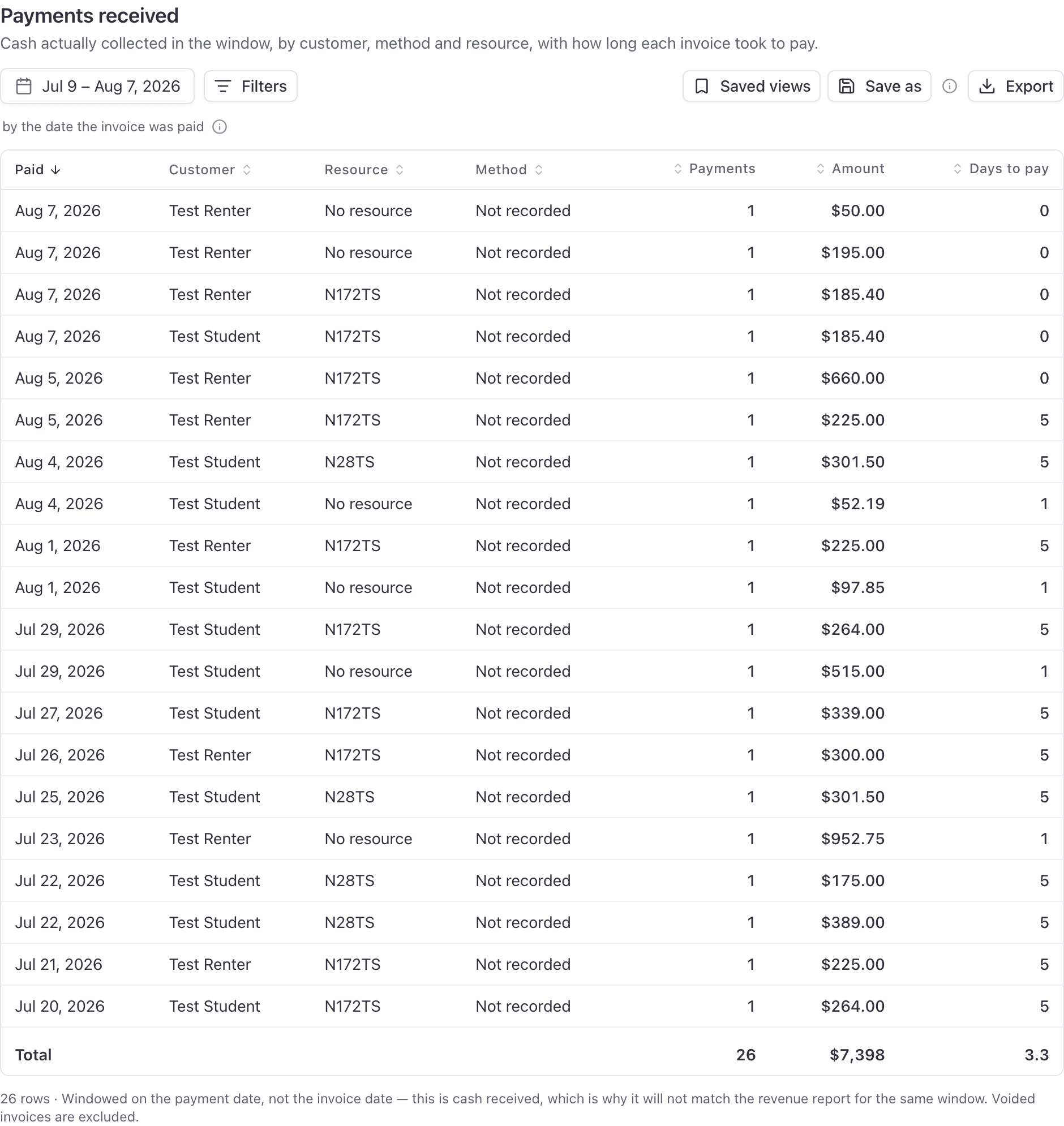
Check the caption under each report's date picker before reconciling anything against anything else. See Date ranges, date basis, and your school's time zone.
There is a second difference once your school charges sales tax: Revenue, and the Revenue card on Billing, are before sales tax, because tax is money you collect for the state. Payments received, Accounts receivable and the Outstanding card on Billing include it, because it is money the customer paid or owes. See Charge sales tax on an invoice.
A dash is not a zero#
A dash means no value was recorded. Zero means it really was zero.
An aircraft booked for 13 hours whose flights were never closed out shows a blank Flown and a blank Efficiency, not "0.0 h" and "0%". Printing zero would claim the aircraft sat idle, which is a different and wrong finding.
The usual cause is a flight nobody closed out. See Ramp out and ramp in.
The Totals row has blank cells#
Same rule, one level up. If a whole column is dashes, its total is blank too.
A total is also blank where there is no honest way to add the column up. You cannot sum a tail number or a status.
Efficiency looks terrible on a fleet that is busy#
Efficiency on Utilization is flown divided by booked. An overnight trip holds the aircraft for the whole trip, so its booked hours are enormous next to its flown hours. The aircraft was away earning, not sitting idle.
Utilization is missing bookings you know happened#
Cancelled bookings are excluded from Utilization and Flight log entirely. They held the aircraft, so people expect them in the booked figure, and they are not there.
They have their own report: Cancellations & no-shows.
Maintenance due looks almost empty#
On Maintenance due, the date range is when the reminder was raised, not when it comes due. A 30 day window therefore hides most of what is outstanding.
Widen the range, or filter Status to Overdue, to see everything.
A voided invoice changed the totals#
Voided invoices are excluded from every financial report: Revenue, Payments received, Items sold and Tax collected.
So a school that voids and reissues sees one figure, not two, which is right but will not match a manual tally that counted both. And an invoice voided without a replacement takes its money out of the reports entirely. See Mark an invoice paid, void it, or refund it.
A saved view stopped matching anything#
Check its date range first. It is almost always a fixed window that has aged out.
A saved view stores the exact dates that were on screen when you saved it, presets included. "Last 30 days" is resolved to real dates at the moment you save.
Fix it by resetting the range and saving the view again. See Save a report as a view.
A filter dropdown is missing somebody#
Aircraft and people filters match on the label, meaning the tail number or the person's display name, not on an internal record id. Two consequences:
- A member with no name set does not appear in the dropdown at all.
- Two members with identical display names cannot be told apart by a filter.
If you need to isolate one of two identically named people, filter on something else they do not share, or group the report by a different dimension.
Two people see different Last 30 days totals#
That happens when nobody has set the school's time zone. With no organization zone, each reader's window falls back to their own browser's zone, so a colleague two time zones away genuinely sees a slightly different thirty days.
Fix it in WebSettings → Organization. See Date ranges, date basis, and your school's time zone.
Hours look ten times too big#
On screen and in a CSV export, hours are always real hours. Internally AerScheduler stores every hour figure in tenths, and both the screen and the export convert before you ever see them.
So a figure that is exactly ten times too large means you are reading a raw value from outside the console. If you are seeing it inside the console, that is a fault and worth telling us about.
Two exports of the same thing came out different#
Two ordinary reasons.
- Columns measured to today. "Days since last flight", "Days open" and "Days left" are counted to today, not to the end of the window you picked, so they move overnight even on a historic report.
- New data landed. A report is recomputed every time it runs. A flight closed out between your two exports changes both exports and both were right when they were taken.
A dashboard tile and its report disagree#
Check the tile's own date range. A tile defaults to inheriting the dashboard's window, but it can be given its own, and an overridden tile is labelled "· pinned" under its title. That is how "Revenue this week" and "Revenue this month" can sit side by side.
Then check the comparison select, which changes only the percentage, not the figure.
Nine counts sit outside this altogether: the Needs attention items each carry their own window and ignore the dashboard's date range entirely. See Work the Needs attention list.
The Dashboard page does not agree with Reports#
WebDashboard is the console home page, and its stat cards are not built by the report engine.
"Outstanding" there is the sum of every unpaid invoice with no date window at all. "Outstanding" on the Reports Overview is the report engine's figure over the window you picked. They answer different questions and will differ. Use Reports when you want a number you can defend.
A tile disappeared from your dashboard#
A tile is dropped, with a warning toast naming it, when it points at a report you no longer have access to or at a metric or dimension the report no longer offers. The rest of the board still renders, so the board is simply one card shorter.
Rebuild it, or ask an admin about the role change. See Who can see which reports.
A student's progress looks stuck after a lesson#
Two things to check on Student progress.
- Only lessons the student passed count toward "% complete". A lesson graded unsatisfactory counts as signed but not done.
- Lessons done and hours accumulated move independently, because one flight can credit several requirements at once. Neither number predicts the other.
Requirements short reads zero when your syllabus says otherwise#
"Requirements short" counts FAA-sourced requirements only.
If your school sets a stricter bar than the regulation does, a student who is short of your bar but clear of the reg is not reported here as a deficiency. That is deliberate: the column answers "can this student be recommended", not "has this student met our house minimums".
An endorsement disappeared but an old document did not#
The two compliance reports deliberately behave differently.
| Report | What happens when the record is superseded |
|---|---|
| Endorsement expirations | The old endorsement is excluded and disappears from the report |
| Document expirations | The archived document is kept, hidden behind the status filter |
So "show me what I replaced" is one click away for documents and not available for endorsements. See Endorsements about to expire.
Somebody with no expiry date is missing from the expirations report#
Documents, currencies and endorsements with no expiry date never appear on their reports at all. Those reports window on the expiry date, so a blank expiry cannot match any window, and the row is missing rather than listed with an empty cell.
Still not right#
Before you contact us, note down four things. They answer most of what we would ask anyway.
The report name and the exact date range on screen
The date basis caption under the picker
The line reading "by" and then a date.
Which filters are applied
The chips under the toolbar, and whether the Filters button carries a number.
The number you expected, and where you got it from
"Our spreadsheet" and "the Dashboard page" lead to very different answers.
Then contact us with the school's name and those four details.
Still stuck on this?
Email support@aerscheduler.com and tell us what you were trying to do. We answer.