
See one student's hours or one aircraft's utilization
You do not need a report for a single person or a single tail. Open the member and choose Activity, or open the aircraft and choose Utilization. Each has its own date range.
For owners, admins, dispatchers, instructors, students, renters and technicians
You do not need a report for one person or one tail. Open the member and choose the Activity tab, or open the aircraft and choose the Utilization tab. Each has its own date range picker, defaulting to the last 90 days.
A member's Activity tab#
Open the person from WebPeople, then the Activity tab.
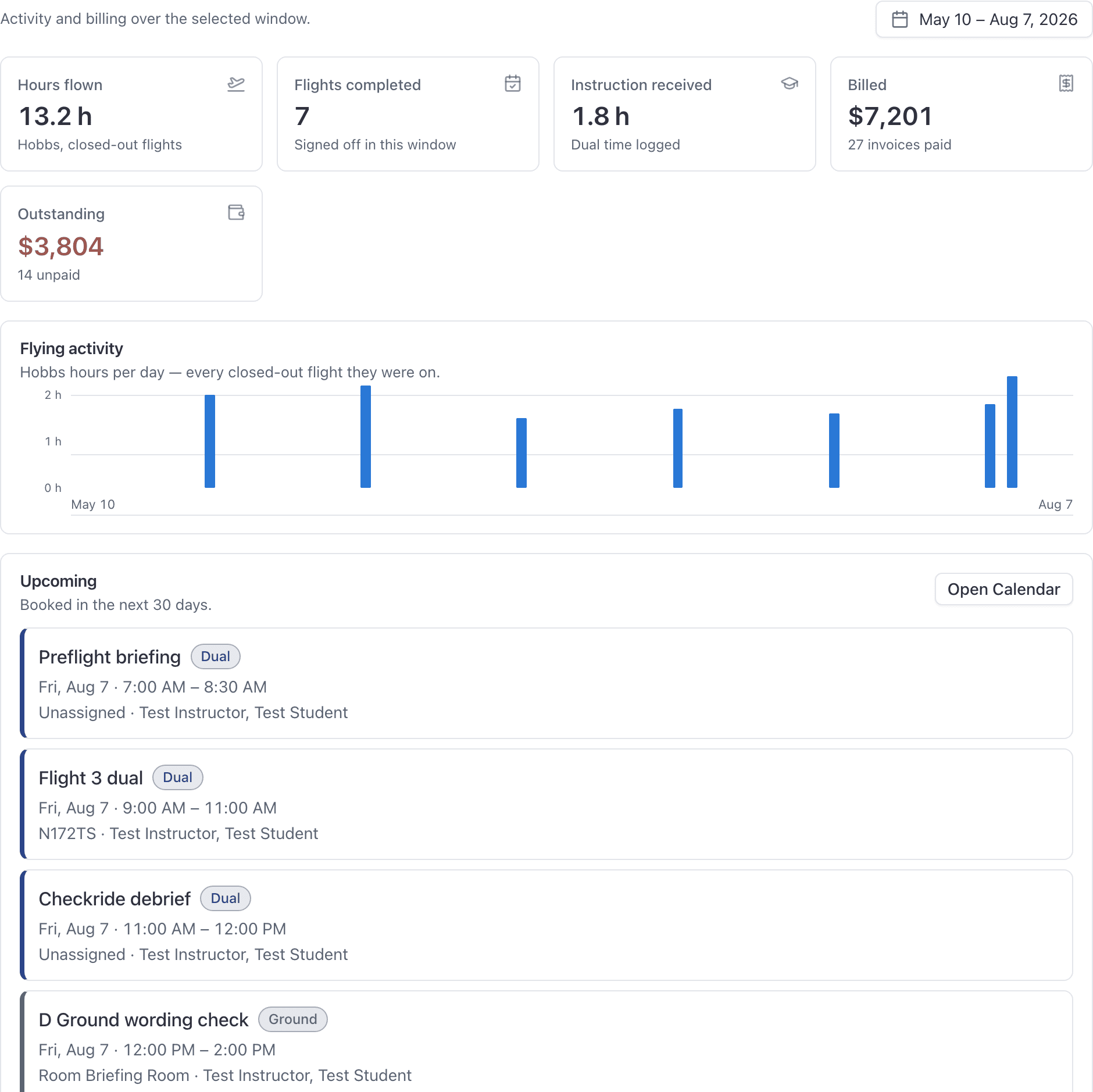
A date range picker sits above the tiles and defaults to the last 90 days. Under the tiles is a "Flying activity" bar chart of Hobbs hours per day, which switches to per week over a long window.
Which tiles a member's page shows#
The tiles depend on what that person does at the school, so two members' pages legitimately look different.
| Tile | Who gets it | What it counts |
|---|---|---|
| Hours flown | Everyone | Hobbs hours on closed-out flights in the window |
| Flights completed | Everyone | Flights signed off in the window |
| Instruction given | Instructors | Instruction they gave |
| Instruction received | Students | Instruction they received |
| Billed | Admins, and the member themselves | Billed in the window |
| Outstanding | Admins, and the member themselves | Billed and not yet paid |
Where the money figures live#
Billed and Outstanding appear on the Activity tab only for an admin, or for the member looking at their own record.
For the invoices themselves, use the Billing tab on the same record. It carries its own date range picker, the member's membership plan and dues, and their invoices over the window. A member can see their own invoices there; the membership card is admin only and is never shown to the member.
An aircraft's Utilization tab#
Open the tail from WebAircraft, then the Utilization tab.
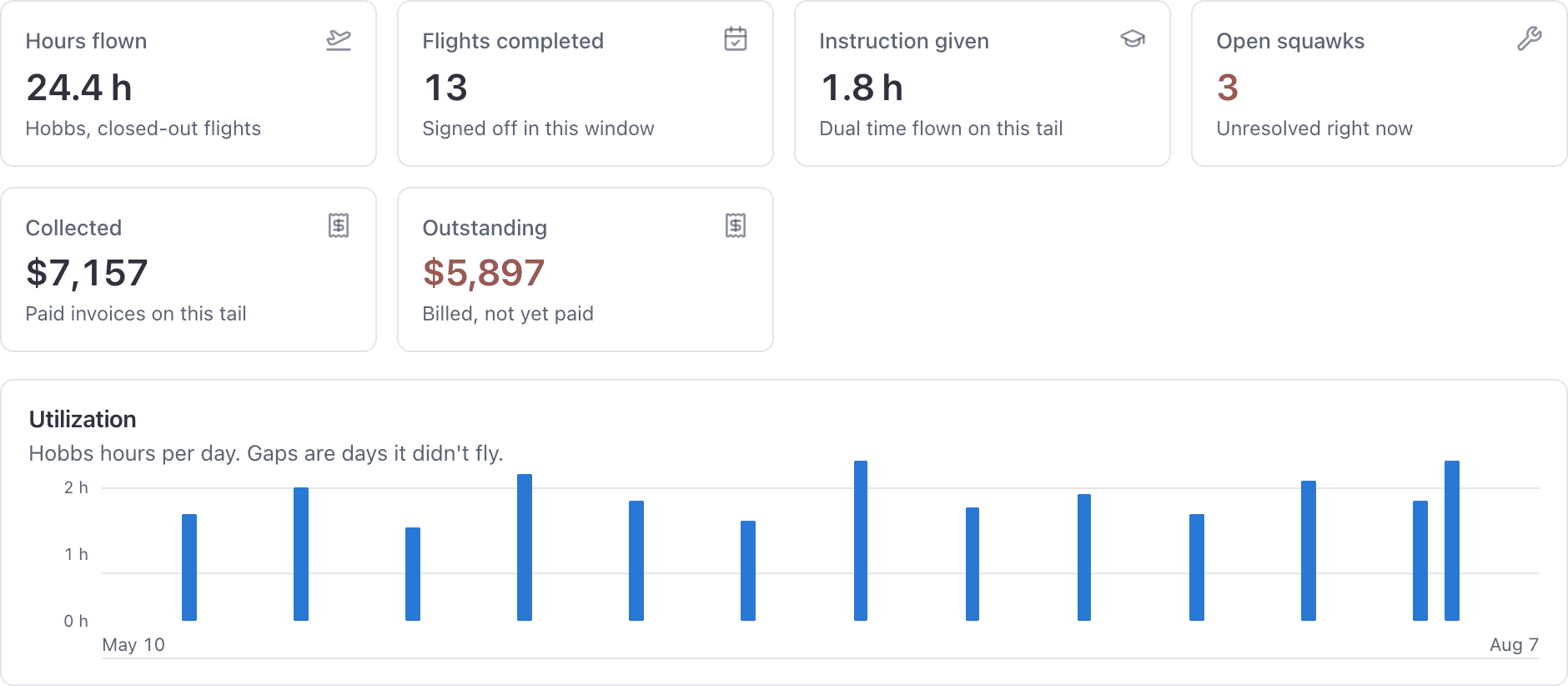
Same shape: a date range picker defaulting to the last 90 days, metric tiles, then a "Utilization" bar chart of Hobbs hours per day. The chart's caption points out that gaps are days it did not fly.
| Tile | Who gets it | What it counts |
|---|---|---|
| Hours flown | Staff and technicians | Hobbs hours on closed-out flights in the window |
| Flights completed | Staff and technicians | Flights completed in the window |
| Instruction given | Staff and technicians | Dual time flown on this tail |
| Open squawks | Staff and technicians | Squawks open right now |
| Collected | Admins only | Paid invoices on this tail |
| Outstanding | Admins only | Billed on this tail and not yet paid |
Open squawks is a live count, not a window figure#
Every other tile on the aircraft page is scoped to the date range you picked. Open squawks is not: it counts what is open right now.
Hours come from closed-out flights only#
Both pages measure hours from Hobbs readings on flights that were closed out.
A booking that flew but was never closed out contributes nothing. It is not counted as zero hours, it is simply not there, which is the same rule the reports follow. If a student's hours look low, the first thing to check is whether their flights were closed out. See Ramp out and ramp in.
What each role can see here#
| Role | A member's page | An aircraft's page |
|---|---|---|
| Owner, admin | Everything, including Billed and Outstanding | Everything, including Collected and Outstanding |
| Dispatcher | The flight list and compliance sections, no billing figures | Utilization and open squawks, no revenue tiles |
| Instructor | A student's flight list, training and instruction sections | Not applicable |
| Technician | Not applicable | Utilization, the activity chart and open squawks, no revenue tiles |
| Student, renter | Their own record only: metrics, invoices, flights, currencies and documents | Not applicable |
Everyone can read their own record in full, including their own spend. Nobody but an admin can read somebody else's money figures.
Why an aircraft is visible to more people than a member#
An aircraft's utilization is operational information the front desk and the shop both need, so staff and technicians can read it. A member's hours and spend are personal, so the tiles need admin rights or the member themselves.
That is why a dispatcher can tell you how hard N12345 has been worked this month but cannot tell you what a student has spent.
When to use a report instead#
Use these tabs for one person or one tail. Use WebReports when you want to compare, rank, or export.
Rank every aircraft or every instructor in one table.
Utilization, Flight log, Customer activity and the rest.
Still stuck on this?
Email support@aerscheduler.com and tell us what you were trying to do. We answer.