
Who can see which reports
Reporting permissions come from one thing: the category a report sits in. Financial is owner and admin only. Dispatchers get everything else except the maintenance shop's reports. Technicians get Fleet and Maintenance shop.
For owners, admins, dispatchers, instructors, students, renters and technicians
Reporting permissions come from one thing: the category a report sits in. Financial is owners and admins only. Dispatchers get everything else except the maintenance shop's reports. Technicians get Fleet and Maintenance shop. Instructors, students and renters do not get the Reports page at all.
Category decides access, nothing else does#
There are six categories: Financial, Operations, Fleet, Maintenance shop, People, Compliance. Every report sits in exactly one of them, and your roles decide which categories you get.
There is no per-report switch, no per-person override, and no setting to change any of this. If somebody needs a report they cannot see, they need a different role.
| Category | Owner | Admin | Dispatcher | Technician | Instructor, student, renter |
|---|---|---|---|---|---|
| Financial | Yes | Yes | No | No | No |
| Operations | Yes | Yes | Yes | No | No |
| Fleet | Yes | Yes | Yes | Yes | No |
| Maintenance shop | Yes | Yes | No | Yes | No |
| People | Yes | Yes | Yes | No | No |
| Compliance | Yes | Yes | Yes | No | No |
Owners and admins#
Every category, every report, and everything built on them.
Owners and admins can also:
- Create schedules, and edit, pause, test-send or delete any schedule at the school.
- Add outside email addresses to a schedule, which nobody else can do.
- Reach WebAudit Logs.
- See the money card and the Recent invoices panel on WebDashboard.
- See a member's spend and invoices, and an aircraft's Collected and Outstanding tiles.
Either of them can also set the school's time zone, which decides what every report window means.
Dispatchers#
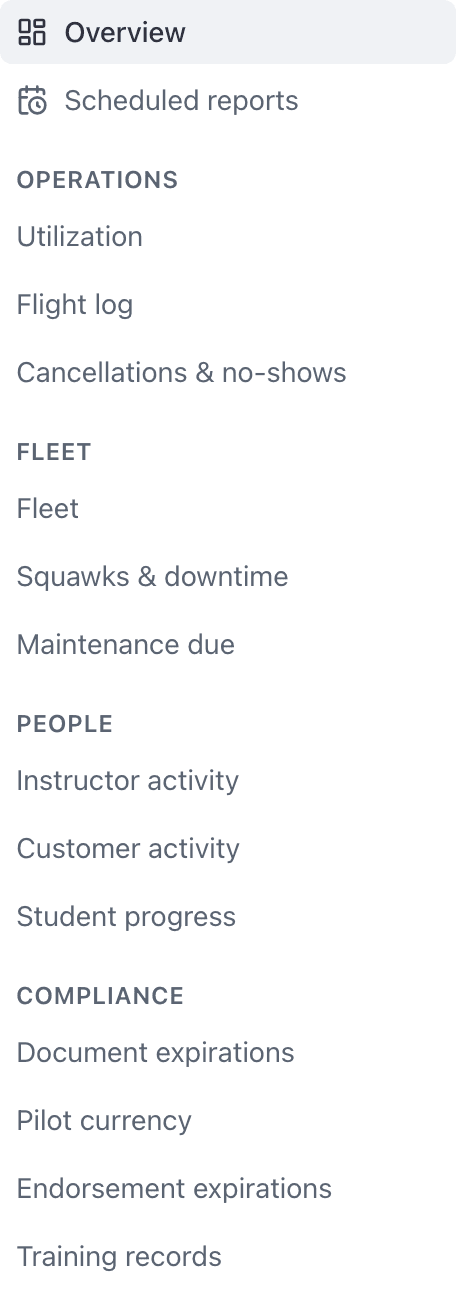
Operations, Fleet, People and Compliance. That is Utilization, Flight log, Cancellations & no-shows, Fleet, Squawks & downtime, Maintenance due, Instructor activity, Customer activity, Student progress, Document expirations, Pilot currency, Endorsement expirations and Training records.
They can save, share, pin and schedule any of those exactly as an admin can.
They cannot see any Financial report. That also removes:
- The Billed, Collected and Outstanding tiles on the Overview, and the "Billed and collected" trend chart.
- The "Overdue invoices" item on the Needs attention card. "Flown not invoiced" stays, because it is built on the Flight log report, which a dispatcher can run.
- Any saved view or schedule built on a financial report, including the knowledge that one exists.
- WebAudit Logs, which is admin only.
- A member's billing figures and an aircraft's revenue tiles.
Technicians#
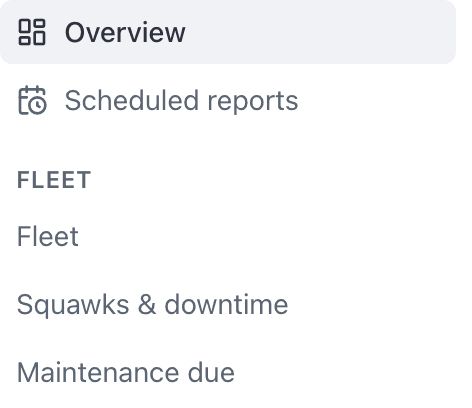
Fleet only: Fleet, Squawks & downtime and Maintenance due. They can export, save, pin and schedule those three.
On the Needs attention tile they get Grounded resources, Open squawks and Maintenance overdue. On an aircraft's record they get the Utilization section, the activity chart and the open-squawk count, but not the revenue tiles.
Technicians reach the board at Reports \u2192 Overview. The Dashboard page itself is for owners, admins and dispatchers.
Instructors, students, and renters#
None of these roles can open WebReports. The route sends them to their own home page instead. They cannot open WebDashboard or WebAudit Logs either.
They are not left without numbers. Everyone can read their own record: their own hours, flights, invoices, currencies, documents and training. An instructor can additionally read a student's flight list, training and instruction sections. See See one student's hours or one aircraft's utilization.
Why the Reports page sent you to your own home page#
Because your roles do not include owner, admin, dispatcher or technician. The Reports route only admits those four, so an instructor or a student following a link to it lands on their own page rather than on an error.
If you hold one of those roles at a different school, check which school you are signed in to. Roles are per school.
Why whole headings are missing from the rail#
Reports you cannot run are absent, not greyed out.
If your roles grant nothing at all, the page reads "No reports available".
Audit Logs is owner and admin only#
WebAudit Logs is hidden from the navigation and refused at the route for anybody below admin. There is no partial view of that feed. The one trail below admin is the Activity list on a booking, which any member who can open the booking can read. See Find out who changed something.
What a shared saved view can and cannot expose#
Turning on "Share with the school" makes a view visible to everyone who can already run that report. It never grants access.
So sharing a Revenue view does not show revenue to a dispatcher: they cannot run Revenue, so the view simply does not appear in their list. And if your own roles change so you can no longer run a report, its views disappear from your list too, shared ones included.
Scheduled reports respect the same rules#
Three things follow from the category model.
- The Scheduled reports page only lists schedules whose underlying report you can run. A dispatcher cannot learn that a revenue report goes out weekly.
- Recipients are re-checked on every send. Someone whose roles change stops receiving that report from the next send onwards, and the schedule's card says so.
- An outside email address keeps receiving a report only while the person who set the schedule up still has access to it.
See Email a report on a schedule and A scheduled report did not arrive.
Still stuck on this?
Email support@aerscheduler.com and tell us what you were trying to do. We answer.